AeroNav 900/880 Series Pilot’s Guide
89000039-010
Rev 1 May 2019 System Overview 1-11
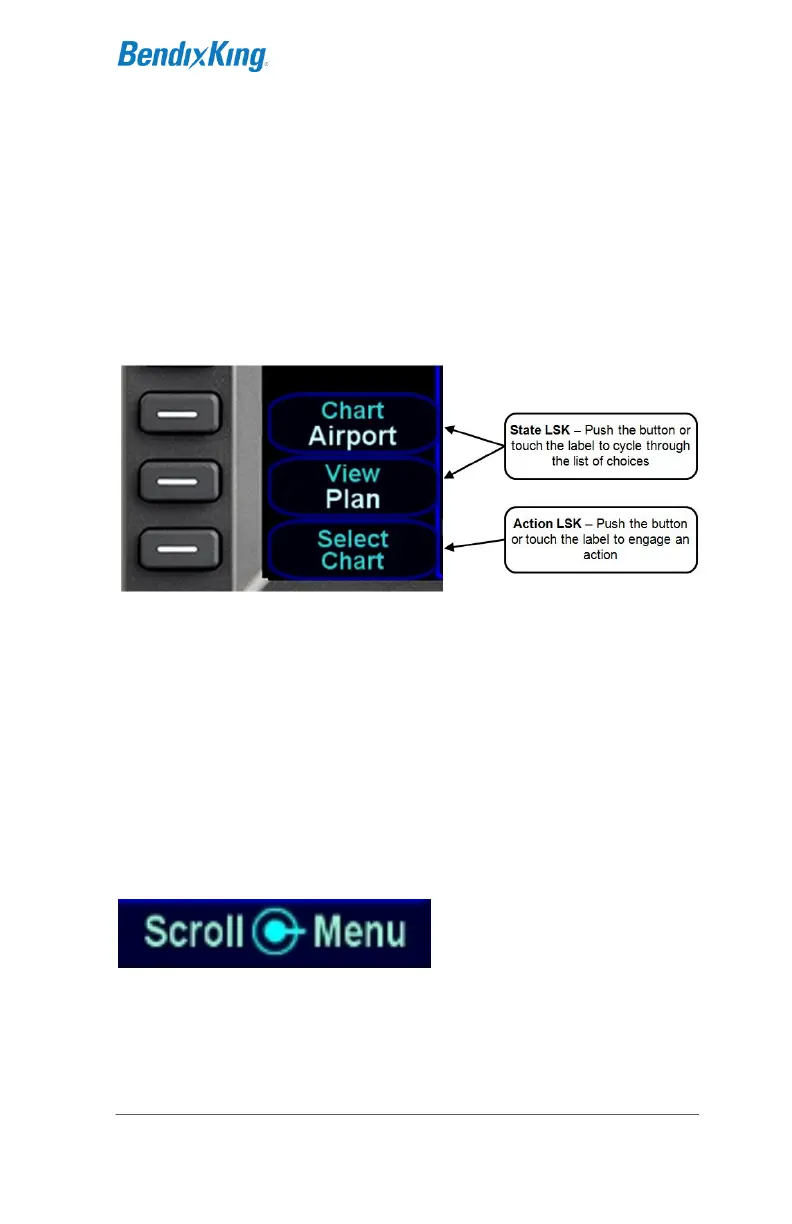
The title reflects the system function or setting to be affected, and
the state shows the current state of that setting. Pressing the
LSK or touching the label will change to the next state.
An Action LSK is identified by a phrase shown in blue-green.
The phrase is usually in verb-subject form, but there are
exceptions when the verb is omitted (e.g. "User Options").
Pressing the LSK or touching the label will cause the system to
perform the specified action.
LSK Types
RIGHT KNOB LABELING
The bottom right AeroNav knob is context-sensitive. Displayed in
the lower right corner of the display, the knob label indicates the
function of the knobs and the knob button on the left and right
side, respectively. As a general rule, the inner and outer rings of
the dual concentric knob perform the same function. Typically,
the inner ring is “fine” control and the outer ring is “coarse” control
for the function. The symbol used to represent the knob button is
a ring with a center dot.
Right Knob Label Scheme
In the example above, the outer ring scrolls through a list in a
coarse manner and the inner ring scrolls through the same list
stopping at each minor field along the way. Pushing the knob
generates a drop-down menu.



 To Next Page