AeroNav 900/880 Series Pilot’s Guide
89000039-010
4-72 Map Subsystem Rev 1 May 2019
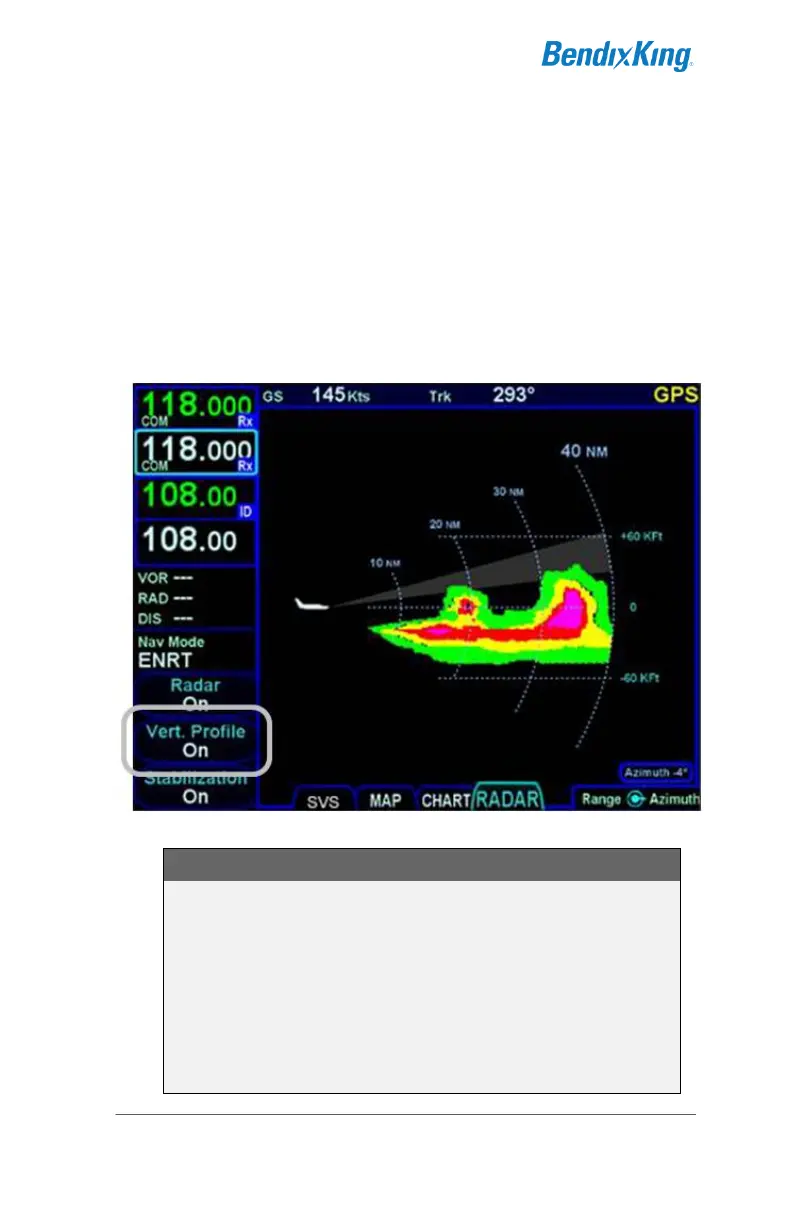
Vertical Profile mode allows you to view approaching weather as a
slice of the vertical plane instead of the conventional horizontal
forward view.
Switching between horizontal forward view and vertical profile view is
accomplished by toggling the “Vert Profile” LSK on/off.
Vertical profile display contains the same functions and modes as
shown on the horizontal forward view. Dual AeroNavs stay synched
in radar view – if one is changed to vertical, the other will follow.
Vertical Profile Radar View
NOTE
Dual AeroNav Range Changes
If radar is an overlay currently displayed on one
AeroNav map and the RADAR tab is displayed on the
second AeroNav, if the map range on the overlay page
is changed, the radar page range will change on the
second AeroNav. Conversely, if the radar range is
changed on the second AeroNav, the map range will
NOT change on the first AeroNav.



 To Next Page