48
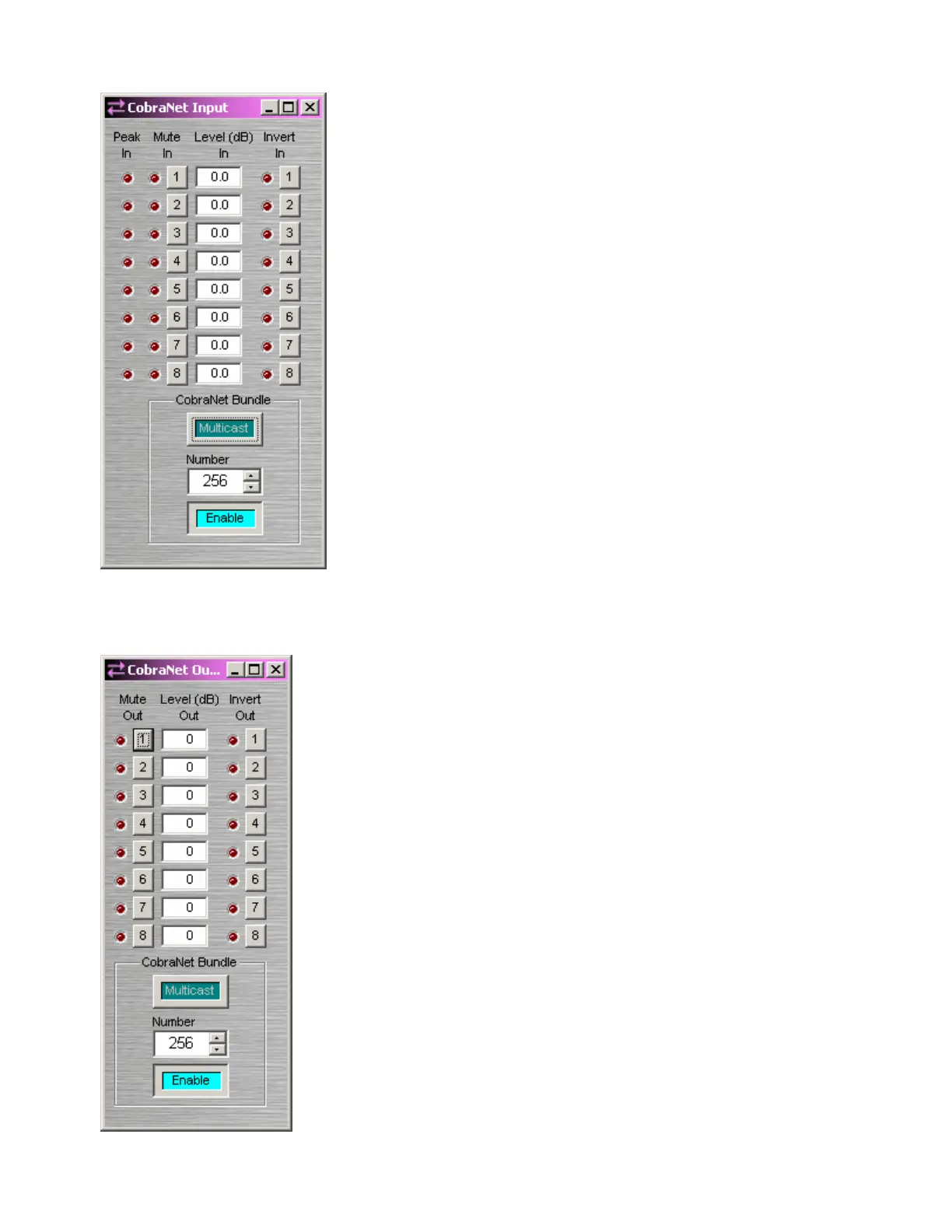
CobraNet Input
Adjust external signal source so Peak In flashes only occasionally
(6dB headroom). Mute In turns the input signal on/off. Level In
adjusts the relative input volume. Invert In reverses the polarity of
the input signal.
CobraNet Bundle assigns digital audio data to a particular bundle
number. CobraNet Bundle Numbers are used to match those of any
external third-party CobraNet A/D converters being used in the
system (see AudiaEXPI). Normally, 'unicast' bundles 256 ~ 61,439
are selectable. These are device specific bundles (for exchange of
digital audio with only one other device). Multicast allows selection
of bundles 1 ~ 255, which are not device specific (for exchange of
digital audio with multiple devices). Enable turns on/off the
exchange of CobraNet digital audio data from this device.
Note: CobraNet Input blocks now include an Internal Propagation
Delay field to assist in delay equalization of audio signals going
through third-party CobraNet output devices. The propagation delay
through the Audia system, the CobraNet transmission delay
(according to the currently selected CobraNet Latency) and the
internal propagation delay in the third-party equipment will be
correctly taken into account.
The "Default" setting for this field only
takes into account the propagation delay through the Audia system
(0.67 ms).
Right-clicking over certain settings will provide a menu of additional
options.
CobraNet Output
Mute Out turns the output signal on/off. Level Out adjusts the relative
output volume. Invert Out reverses the polarity of the output signal.
CobraNet Bundle assigns digital audio data to a particular bundle.
CobraNet Bundle Numbers are used to match those of any external third-
party CobraNet D/A converters being used in the system (see
AudiaEXPO). Normally, 'unicast' bundles 256 ~ 61,439 are selectable.
These are device specific bundles (for exchange of digital audio with only
one other device). Multicast allows selection of bundles 1 ~ 255, which
are not device specific (for exchange of digital audio with multiple
devices). Enable turns on/off the exchange of CobraNet digital audio
data from this device.
Note: CobraNet Output blocks now include an Internal Propagation
Delay field to assist in delay equalization of audio signals going through
third-party CobraNet input devices. The propagation delay through the
Audia system, the CobraNet transmission delay (according to the
currently selected CobraNet Latency) and the internal propagation delay
in the third-party equipment will be correctly taken into account.
The
"Default" setting for this field only takes into account the propagation dela
through the Audia system (0.67 ms).
Right-clicking over certain settings will provide a menu of additional
options.



 To Next Page