88
Logic Box
The Logic Box is an external control device, which provides
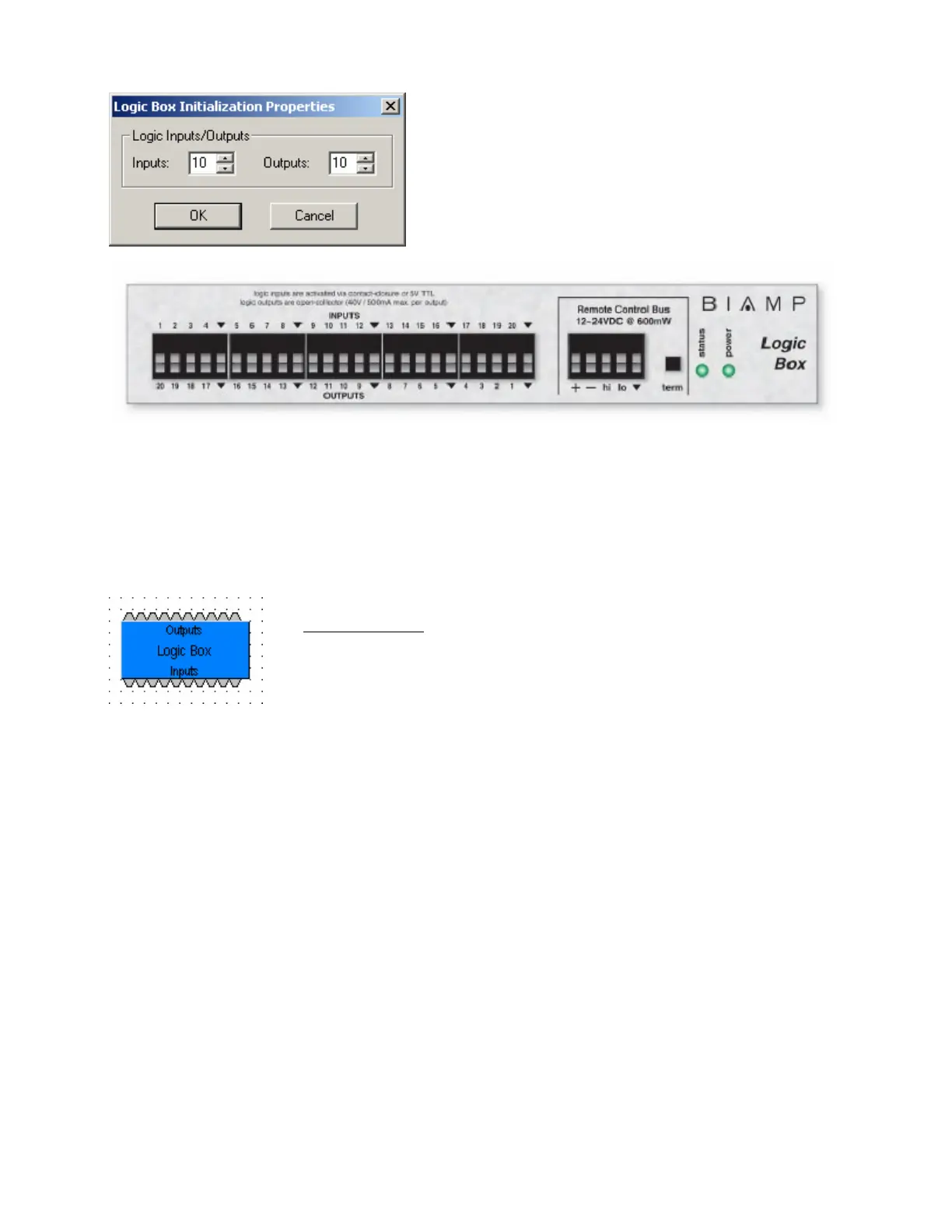
twenty logic input/output connections. When a Logic Box is
placed, an Initialization Properties dialog box appears for
assigning the quantities of logic inputs/outputs (20 total).
Logic inputs allow external switches to initiate Audia actions.
Actions can be individual or grouped functions within Audia.
This includes recalling presets, ducking, combining, etc.
Logic outputs can be used to control additional equipment,
external to Audia.
Logic Box components have no Control Dialog Boxes. They are represented in the layout as a block with a
total of twenty control input/output nodes. Logic Inputs (on the box) are represented as control output nodes
(on the block). These control output nodes may be connected to control input nodes on other components,
such as Remote Preset Buttons, Room Combiners, Duckers, Mute Buttons, and Level Inc/Dec controls.
Logic Outputs (on the box) are represented as control input nodes (on the block). These control input
nodes may be connected to control output nodes on other components, such as Auto Mixers, Duckers, and
Select 8. Unlike other components, Logic Box output nodes may be connected to input nodes on the same
Logic Box block, allowing Logic Inputs (external switches) to control Logic Outputs (external equipment).
Logic Box behavior can be altered using Logic Gates. Please refer to the
'Installation Guide
' (included with controls), or see Control Bus for more
information. External controls must be identified (see Device Maintenance) and
associated with their corresponding component blocks within the layout (see
Equipment Table).
Up to 20 logic inputs are availble on the Logic Box. Logic inputs allow remote control of Audia
®
via external
circuits such as switches, relays, and logic outputs from other devices. When nothing is connected to a
logic input, an internal pull-up resistor keeps it at a ‘high’ state (+5.0 VDC). The logic input is activated
when its input goes ‘low’ (less than +0.8 VDC), and is de-activated when its input goes ‘high’ (greater than
+2.0 VDC). A logic input can be controlled in one of three ways: 1) Using an ‘open-collector’ or ‘open-
drain’ logic output from an external device to short the logic input to ground. 2) Using a switch, relay, or
other contact-closure to short the logic input to ground. 3) Using an active 5V TTL output driver circuit
(such as from a third-party controller) to actively drive the logic input to a ‘high’ or ‘low’ state. Multiple
contact-closures or ‘open-collector’/’open-drain’ logic outputs may be wired in parallel to a single logic input
(see diagram below). Open-collector or open-drain logic outputs and contact-closures should be rated for
at least 5 Volts / 1mA operation. Active output driver circuits should not exceed a signal range of 0~5 Volts
DC, and should have a minimum pulse width of 10 milli-seconds. The logic input impedance is
approximately 10 Kohms.



 To Next Page