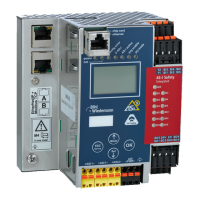
AS-i/PROFIBUS Gateway Operating by Full-graphic Display
Subject to reasonable modifications due to technical advances Copyright Bihl+Wiedemann, Printed in Germany
Bihl+Wiedemann GmbH · D-68199 Mannheim · Phone +49-621-339960 · Fax +49-621-3392239 · Internet http://www.bihl-wiedemann.de
issue date 7.1.2002
36
+- +-
AS-i
+-
config e rror
U AS-i
po w er
PROFI BUS
AS-i active
pr g e na bl e
prj mode
OK
mode /
ESC
set /
3Ø
3Ø
3Ø
3Ø
3Ø
3Ø
3Ø
8Ø
8Ø
8Ø
8Ø
ec-Flags
actual conf ig
LPF
AS-i Master
Diagnosis
actual conf ig
0A | 1 A-C
...
30A-x | 31 A-cf
| 1 B-x
...
30A | 31 B-d
Help:
x O.K.
d detected only
p projected only
c type conf lict
f periph. f ault
ec-Flags: 0 14
0 0001 10 00
1 Config_OK
1 Normal_Op .
0 LDS.0
1 Auto_Addr _Asn
0 Auto_Addr _Avl
0 Config_Ac tiv
0 AS-i_Pwr_ Fail
0 Offline_R eady
1 Periphery _OK
LPF L ist of
Periph. Fau lts
| 1A -x
2A- | 3A -
4A-x | 5A -x
....
30A-x | 31A -
| 1B -x
2B-x | 3B -x
4B-x | 5B -x
...
30B-x | 31B -x
Version
20000919
Feature Str ing
ZefoD1.As.e r
30A - .... -
31A - 7A28 -d
detected o nly
1.12A
Traditioneller Modus
Traditional Mode
grün markierte Werte sind editierbar
green marked data can be edited
Erweiterter Dis
la
Modus
Advanced Di splay Mode
LCS L ist of
corrupted S laves
Reset
Error Count ers
Reset
1A - 0
...
31A - 65535
1B - 34
...
30B - 0
Error Count ers
LCS
advanced Diagnosis
| 1A -x
2A- | 3A -
4A-x | 5A -x
....
30A-x | 31A -
| 1B -x
2B-x | 3B -x
4B-x | 5B -x
...
30B-x | 31B -x
AS-i Safety
Safety Oriented
Slaves
| 1-
2-x | 3-R
....
30- | 31A-
Help:
X o.k.
R released
Safety Monitor
1
...
31
Safety Slaves
Safety Monitor
Safety Monitor
Diagnosis
Addr: 31
Status: O.K.
Ch1: Ready
Ch2: Off
1-32: Green
1-33: F Yellow
...
Fehlersuche/Diagnostics
Grundsätzliche Bedienung
Basic Operation
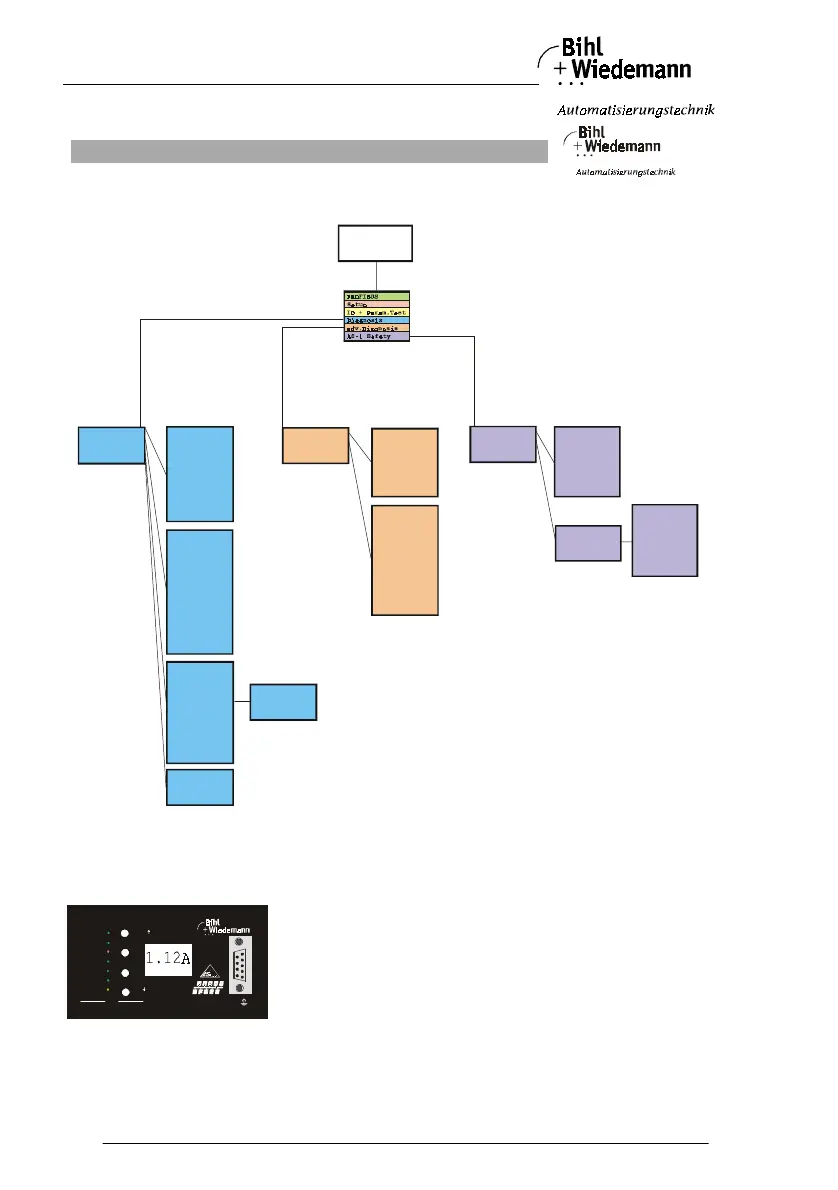
Das Gerät startet im traditionellen Modus. Mit ESC oder OK kann zwischen beiden Modi gewechselt werden.
Im Erweiterten Modus wird ein Cursor mit den beiden Pfeil-Tasten bewegt. OK bringt ins nächsthöhere Menü
(in der Zeichnung weiter nach rechts). ESC bringt zurück ins vorherige Menü.
Wenn Werte editiert werden, werden sie zunächst mit dem Cursor markiert, dann mit OK ausgewählt,
mit den Pfeiltasten verändert und schließlich mit OK übernommen. ESC bricht das Editieren ab.
The device starts in the traditional mode. You can switch between the two modes with ESC or OK.
In the advanced mode the cursor is moved by both arrow buttons. Pushing OK puts you to the superior
menue (in the drawing one step to the right side). ESC puts you back to the previous menue.
To edit data you first mark them with the cursor and then select them with OK, change them with the arrow
buttons



 To Next Page