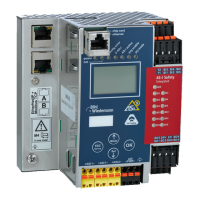
AS-i/PROFIBUS Gateway Operating by Full-graphic Display
Subject to reasonable modifications due to technical advances Copyright Bihl+Wiedemann, Printed in Germany
Bihl+Wiedemann GmbH · D-68199 Mannheim · Phone +49-621-339960 · Fax +49-621-3392239 · Internet http://www.bihl-wiedemann.de
issue date 7.1.2002
37
In the Full-graphic Mode however the settings are protected, as long as the supe-
rior fieldbus (PROFIBUS) runs.
The device starts in the classical mode, i. e. like the former AS
-
i Masters with two-
digit display (see chapter 5). Press the buttons ESC or OK to switch to the full-
graphic mode. To return to the classical mode just press the ESC-button several
times.
When in full-graphic mode there is a highlighted bar that can be moved up or down
with the arrow-buttons. Press OK to switch to the selected function or menue (in
the drawing one step to the right, page 35). Press ESC to go back to previous
menue.
To edit data values mark them with the selection bar, press OK, then change them
with the arrow-buttons and confirm the data input with OK. The ESC-button can-
cels the editing process.
All possible addresses are displayed one after the other from 1A to 31A and from
1B to 31B. Data for single slaves are displayed at the addresses 1A - 31A.
6.1 PROFIBUS (Fieldbus Interface)
6.1.1 PROFIBUS Address
This function is for setting and changing the PROFIBUS station address.
The number behind "Old Address" shows the actual station address. By selecting
"New Address" you can change this address.
In the classical mode it is possible to change settings while the
device is in operation. That can lead to failure of the plant (e. g.
changing the address of an AS
-
i slave).



 To Next Page