44 MT55 Operation & Maintenance Manual
ATTACHMENTS (CONT’D)
Installing And Removing The Attachment (Common Industry Interface)
The Common Industry Interface (CII) is used for fast
changing of buckets and other attachments. See the
appropriate attachment Operation & Maintenance
Manual for further instructions.
Installing
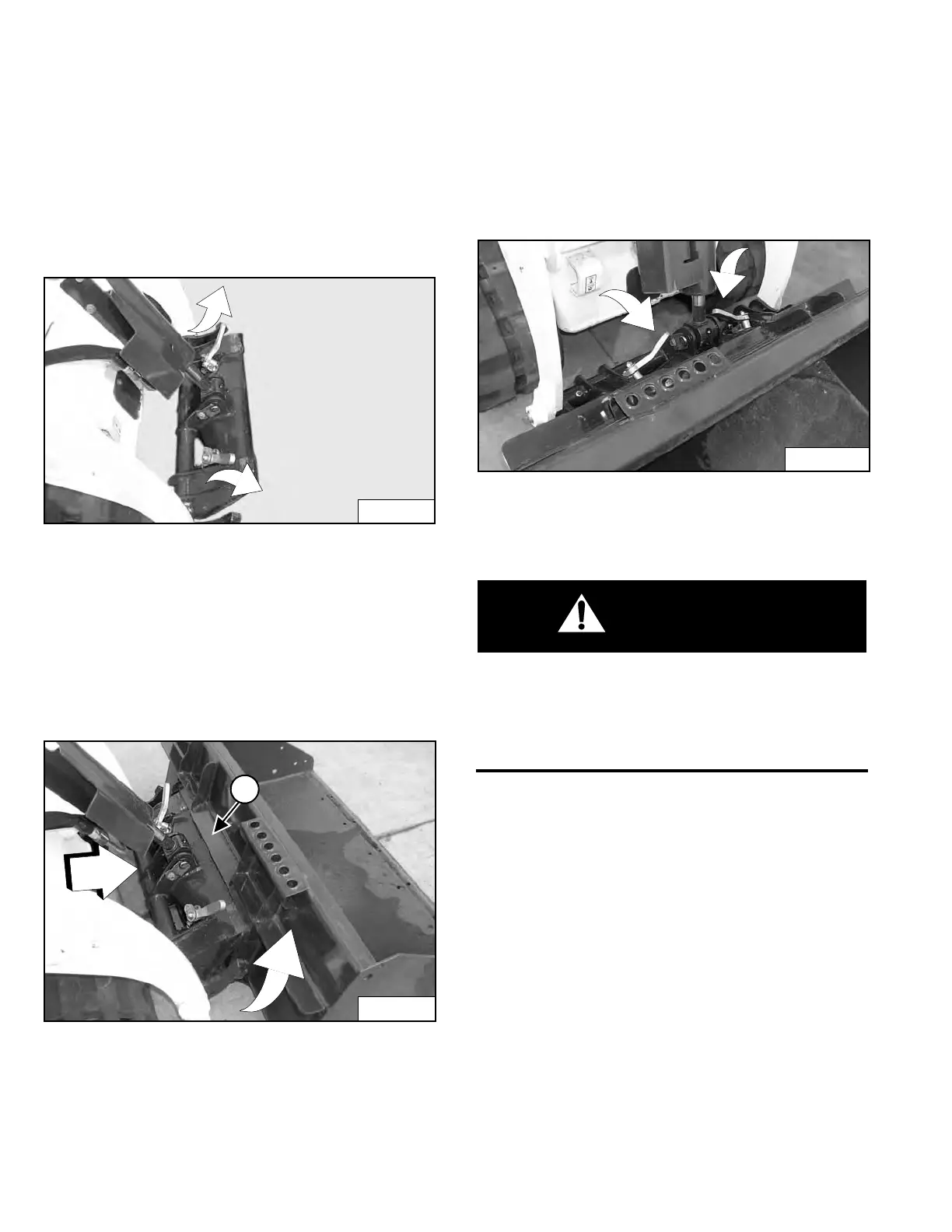
Figure 45
Pull the CII locking pin levers all the way up [Figure 45].
Perform the PRE-STARTING PROCEDURE. (See PRE-
STARTING PROCEDURE on Page 37.)
Start the engine. Release the parking brake.
Lower the lift arms and tilt the CII forward.
Figure 46
Drive forward until the top of the CII is completely under
the top flange of the bucket (Item 1) [Figure 46] (or other
attachment).
Tilt the CII backward until the front of the bucket (or other
attachment) is slightly off the ground.
Stop the engine and engage the parking brake.
Figure 47
Push the CII locking pin levers down until they are fully
engaged in the locked position [Figure 47] (pins fully
extended).
The Common Industry Interface locking pins must
extend through the holes in attachment frame.
Levers must be fully down and locked. Failure to
secure the locking pins can allow attachment to
come off and cause serious injury or death.
W-2996-1015
Dealer Copy -- Not for Resale



 To Next Page