787 Flight Crew Operations Manual
DO NOT USE FOR FLIGHT
Airplane General, Emergency
Equipment, Doors, Windows -
Flight Attendant Rest
Copyright © The Boeing Company. See title page for details.
1.47.4 D615Z003-TBC
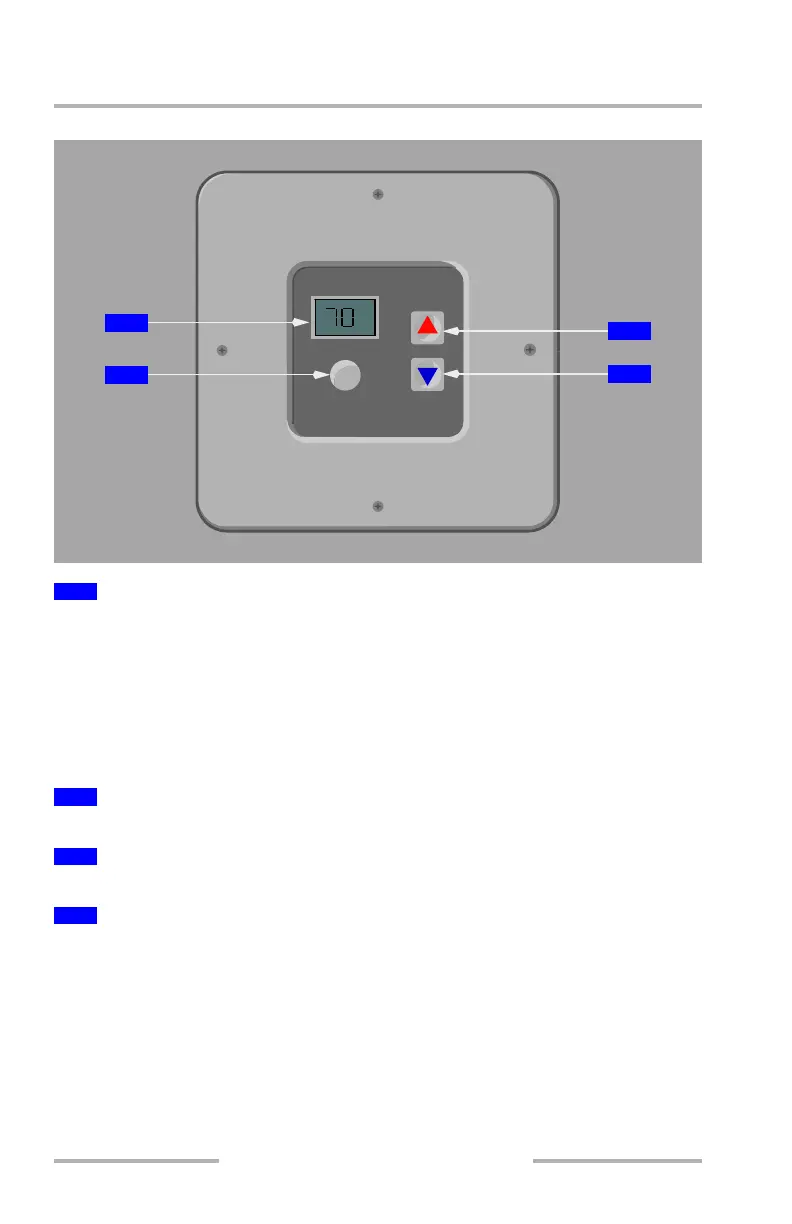
Temperature Control Panel
Displays:
• current selected air temperature in °F or °C
• a momentary flashing selected temperature after warmer or cooler arrows
are pushed
Note: If temperature display is continuously flashing, and not associated with a
recent temperature setting change, the system has failed.
Push – toggles between °F and °C for display and temperature selection.
Push – to increase temperature setting for the overhead flight attendant rest.
Push – to decrease temperature setting for the overhead flight attendant rest.
Temperature Control System
The temperature in the overhead flight attendant rest is controlled by the
temperature controller located on the wall in the entrance enclosure. The
temperature can be set between 59° F (14° C) and 80° F (27° C) by selecting the
warmer or cooler arrows on the panel. Each bunk has an individual air flow outlet
to help control individual temperatures in those areas.
1
Temperature Display
2
Units Selector
3
Warmer Arrow
4
Cooler Arrow
F
o
C/
o
TEMPERATURE SELECTOR
F
o
3
4
1
2
August 14, 2009



 To Next Page