787 Flight Crew Operations Manual
DO NOT USE FOR FLIGHT
Flight Instruments, Displays -
Controls and Indicators
Copyright © The Boeing Company. See title page for details.
10.10.54 D615Z003-TBC
Finger movement on the touch pad moves the cursor on the selected display.
Lifting the finger off the pad and putting it back down in a different location
(except the corner areas) does not move the cursor. The cursor only moves when
the finger is moved on the touch pad surface.
Corner areas – tapping with a finger in one of the four corners puts the cursor in
that respective corner of the screen. Moving the cursor into a corner region
without lifting the finger from the pad does not have this effect.
Push – activates the area of the screen that the cursor is currently in, such as a
menu item or command button. The area is highlighted by a magenta border to
indicate it can be selected.
The switch is used to select menus, checklists, checklist steps, and other functions.
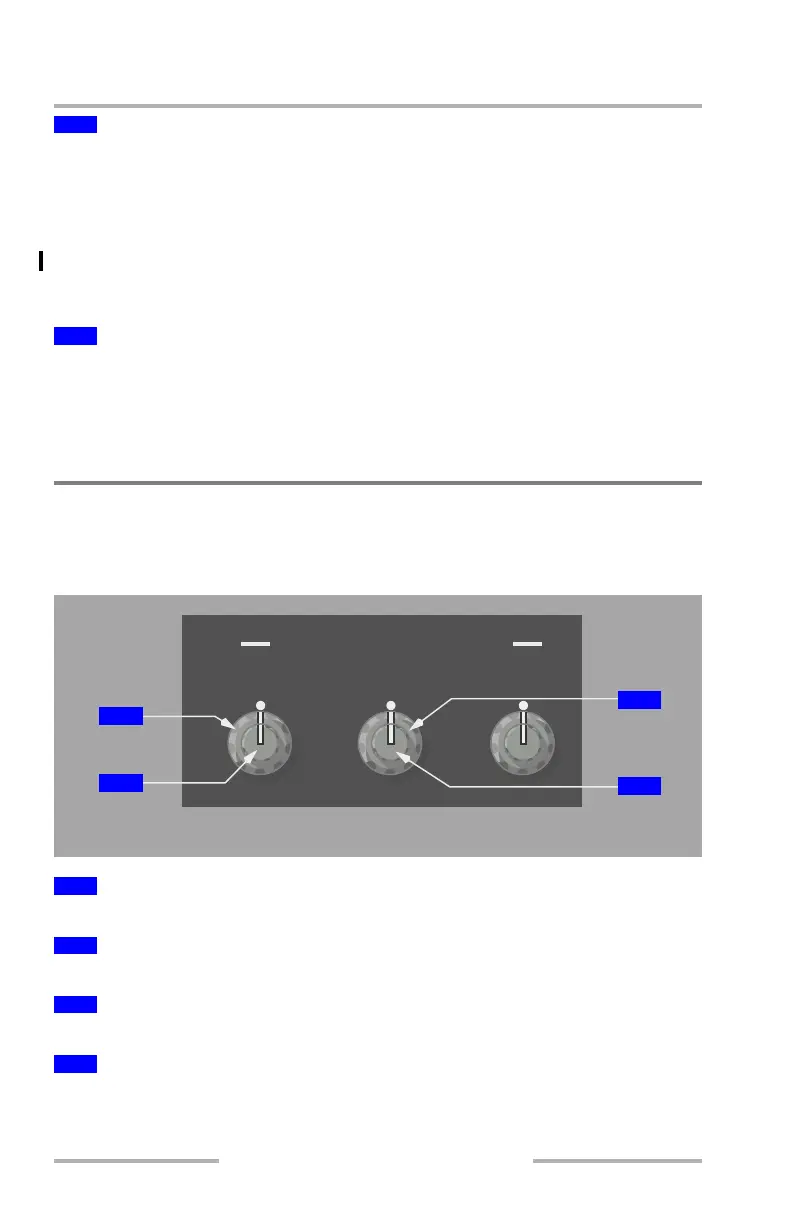
Display Brightness Controls
Forward Panel Brightness Controls
The left panel is shown.
Rotate – adjusts the brightness of the outboard display unit.
Rotate – adjusts weather radar/terrain brightness on outboard display.
Rotate – adjusts the brightness of the inboard display unit.
Rotate – adjusts weather radar/terrain brightness on inboard unit.
3
Touch Pa d
4
Cursor Select Switch
1
Outboard Display (OUTBD DSPL) Brightness Control (Outer)
2
Outboard Display (OUTBD DSPL) Brightness Control (Inner)
3
Inboard Display (INBD DSPL) Brightness Control (Outer)
4
Inboard Display (INBD DSPL) Brightness Control (Inner)
FWD PANEL BRIGHTNESS
OUTBD DSPL/
CONTRAST
INBD DSPL/
CONTRAST
PNL/
FLOOD
SIDEWALL PANELS
3
4
1
2
February 15, 2010



 To Next Page