787 Flight Crew Operations Manual
DO NOT USE FOR FLIGHT
Flight Instruments, Displays -
Head-Up Display System -
Displays
Copyright © The Boeing Company. See title page for details.
10.12.16 D615Z003-TBC
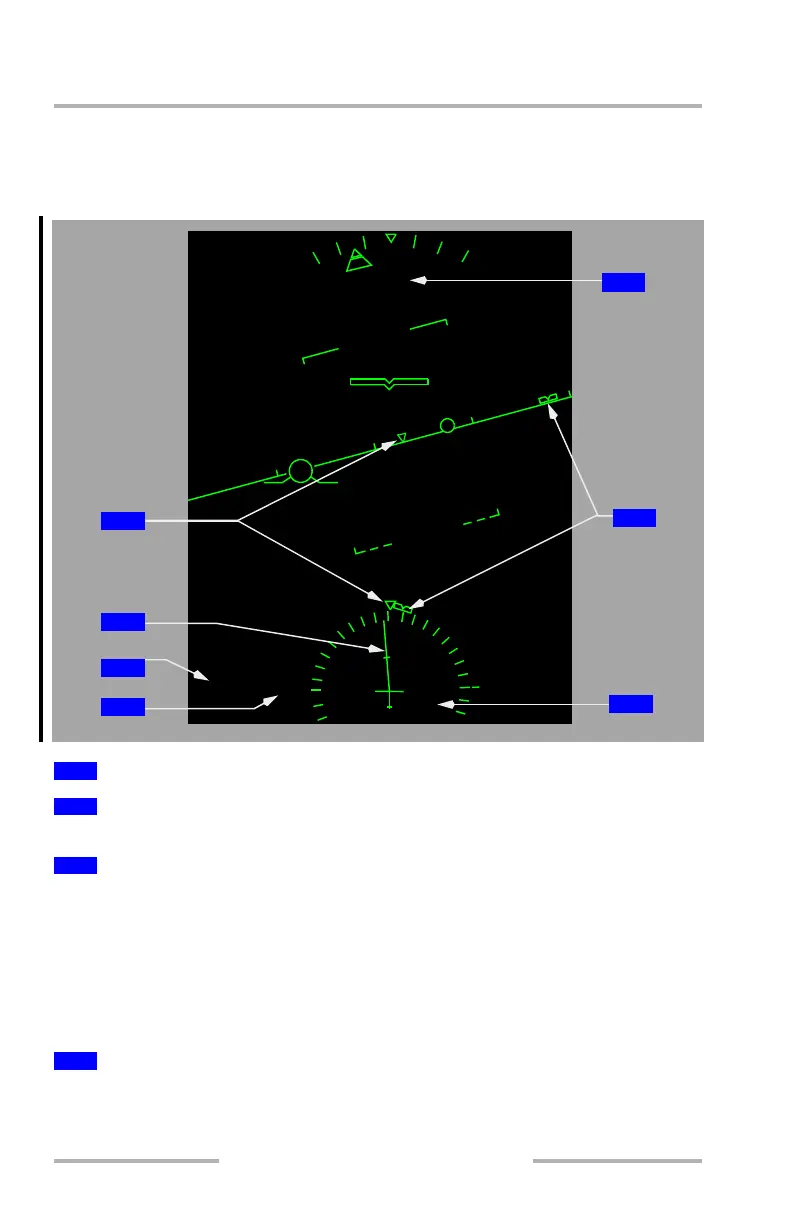
HUD Heading/Track Indications
Note: The selected track bug and selected heading bug are not displayed at the
same time.
Indicates the current track and drift angle.
When HDG (heading) is selected, SEL HDG is displayed.
When TRK (track) is selected, SEL TRK is displayed.
If selected heading/track exceeds display range, the bug parks on the side of the
compass rose and horizon line heading scale, in the direction of the shorter turn to
the heading. The symbol’s outline is depicted with dashed lines, indicating that it
can no longer display the selected heading/track.
Digital display of the selected heading or track bug.
1
Current Heading Pointer
2
Track Line
3
Selected Heading/Track Reference (MCP Selection)
4
Selected Heading/Track (MCP Selection)
0
5
0
-
5
-
5
5
5
H052
SEL HDG 058
M
A
G
1
5
1
2
9
6
3
3
6
3
3
3
0
4
7
6
5
1
2
3
February 15, 2010



 To Next Page