Operation Manual
FT1020G3 Rev 2.4
86
FAULT: Restrt control unit nn, code 00
DD-MM-YYYY HH:MM
FAULT: Restart control unit nn, code 50
DD-MM-YYYY HH:MM
Code 00 / 50 indicates a normal restart of the main board / MMI board after the software
download. Acknowledge the restart faults.
10. LED “Operation” (L5) on the FT1020G3 front should now be turned on and all other
LEDs are normally turned off.
11. New SSD can now be downloaded.
Note: After a new software download, the logon password reverts back to the default
setting i.e. “000000”. The user names and passwords will be changed when the SSD is
downloaded.
Download Software in a TLON Network
All Control Units connected to a TLON network must have the same software version.
Also, in a network system, the system software is downloaded separately to every Control
Panel.
Before upgrading the software in a TLON network, it is recommended to disconnect the
control units from the network. It can be carried out physically (disconnect the TLON cable
from the FDCIE, or via TLON Manager.
Note 1: It is highly recommended to disconnect the TLON network during upgrade in
large networks. Otherwise it will result in large amount of fault messages.
Note 2: The TLON PCBs must remain mounted in the control units, or the control units
will lose their TLON configuration.
To download new software in each Control Unit, follow the procedures below:
1. Disconnect the webserver, RS232 in the FDCIE (if any).
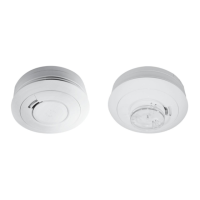
2. Open TLON manager in your PC. Connect the FT1020G3 System to TLON
Manager and set all control units to “Offline”.
3. Follow the procedure 1 to 10 in section 19.2.2.
4. One by one, as the control units start up after download, they will automatically
get “online” in TLON Manager, and the communication will start to run as
normal.
5. Download compatible software in the webserver via TCP/IP (if any).
6. Download SSD to the control units, follow the procedures shown in section
19.2.2. In large systems, it is preferable to download SSD to one control unit at
a time. This, to avoid a large amount of traffic on the TLON network.
7. Re-connect the webserver in the Control Unit (if any).


 To Next Page