6. Service Procedures PreciseFlex 100 Robot
Tensioning the Z-axis Output Belt Part Number: 603988 Rev. A
Tensioning the Z-axis Output Belt
Tools Required
l
Gates Sonic Belt Tension Meter, Model 507C
l
3.0 mm hex driver or hex L wrench
To tension the Z-axis Belt, perform the following procedure:
Step Action
1.
Turn off the robot power and remove the AC power cord.
2.
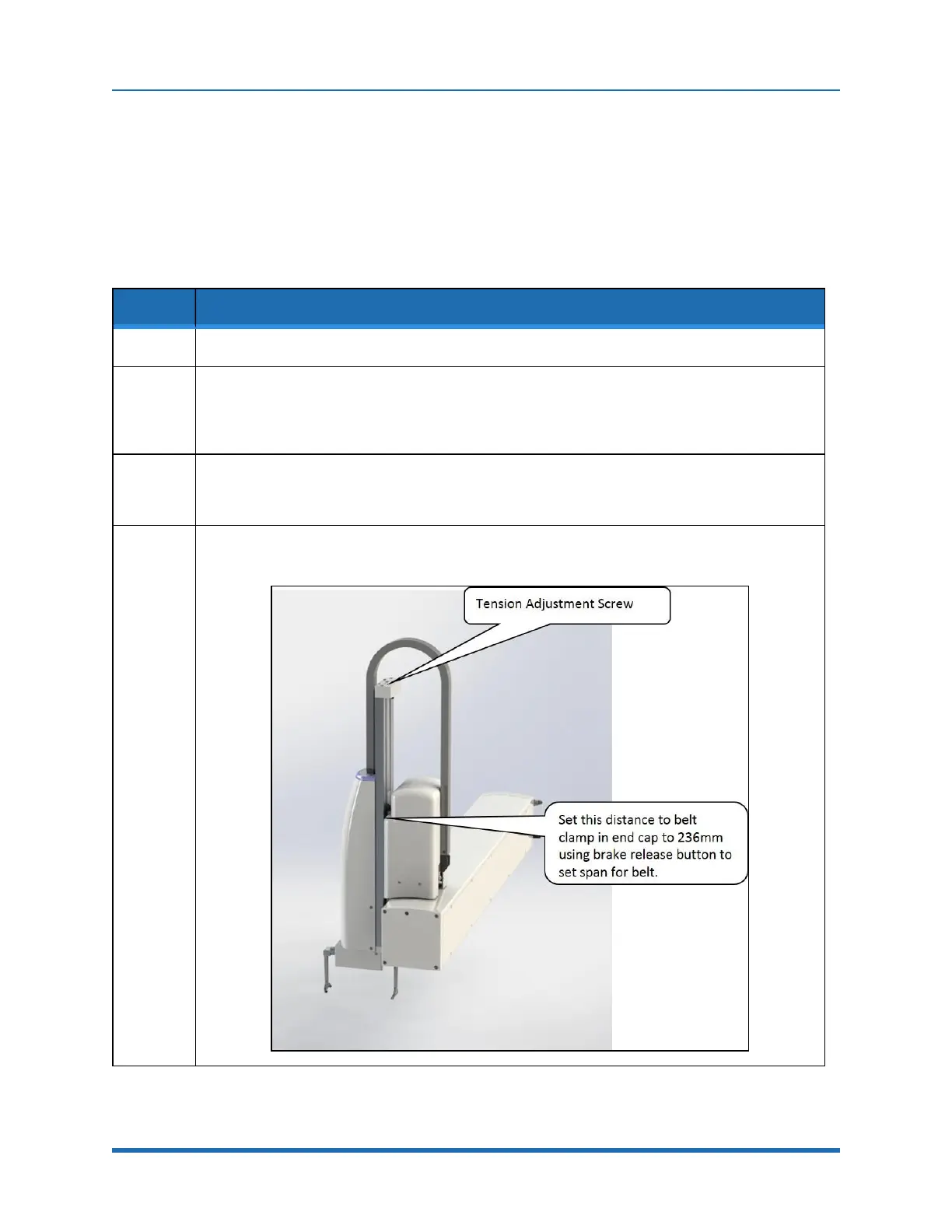
For the 228 mm Z stroke robot, move the Z-axis all the way to the top of the stroke using the brake
release button.
For the 260 mm Z stroke robot move the Z-axis so the distance from the upper belt roller to the top
end of the belt is 236 mm.
3.
Use the belt tension meter with the settings in "Appendix E:Belt Tensions, Gates Tension Meter" on
page 123 to measure and adjust the belt tension. Hold the microphone perpendicular to the belt and
gently pluck the belt using an L key.
4.
Adjust the belt tension by turning the Tension Adjustment Screw. After adjusting the tension, run the
Z-axis up and down a few times using the brake release switch, then check the tension again.
100
Copyright © 2023 Brooks Automation, Inc.



 To Next Page