Brooks Automation 6. Service Procedures
Part Number: 603988 Rev. A
Tensioning or Replacing the Z-
axis Motor and Timing Belt
Tensioning or Replacing the Z-axis Motor and Timing Belt
Tools Required
l
Gates Sonic Belt Tension Meter, Model 507C
l
4.0 mm hex driver or hex L wrench
l
8 mm open end wrench
l
7 mm open end wrench
To tension or replace the Z-axis motor or timing belt, perform the following procedure:
Step Action
1.
Turn off the robot power and remove the AC power cord.
2.
Remove the Z drive plastic cover by removing the (4) M3 X 10 mm Button Head Screws.
3.
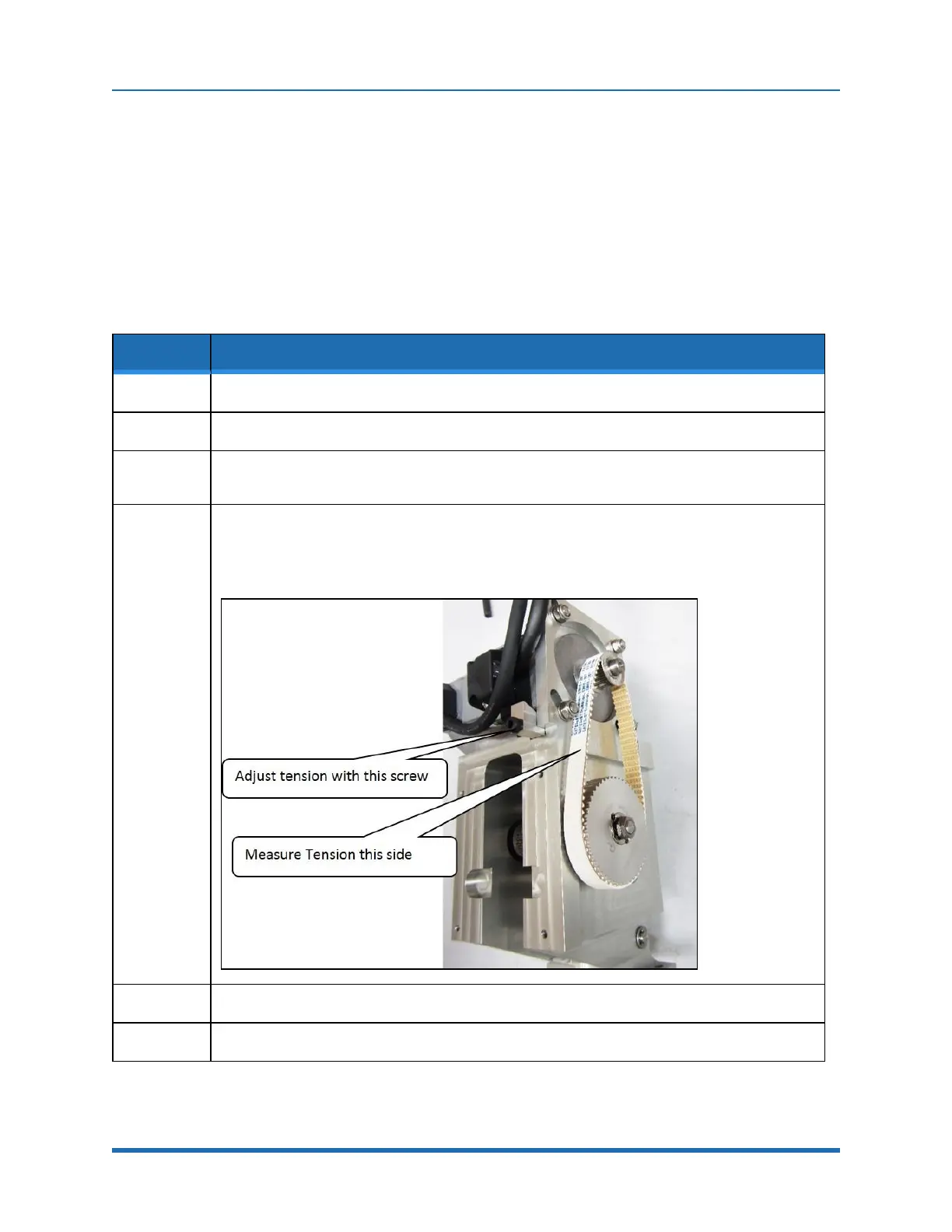
Use the belt tension meter with the settings in Appendix E to measure and adjust the belt tension.
Hold the microphone perpendicular to the belt and gently pluck the belt using an L key.
4.
Adjust the belt tension by first loosening the (4) motor retaining bolts, and then adjusting the
tension screw with a 3 mm hex driver.
After adjusting the tension and tightening the screws, run the Z-axis up and down a few times
using the brake release switch, and then check the tension again.
5.
Replace the Z drive plastic cover.
6.
If the motor or belt has been replaced, the robot must be re-calibrated.
Copyright © 2023 Brooks Automation, Inc.
101



 To Next Page