Appendices PreciseFlex 100 Robot
Appendix E:Belt Tensions, Gates Tension Meter Part Number: 603988 Rev. A
Step Action
4.
Click the Width button.
5.
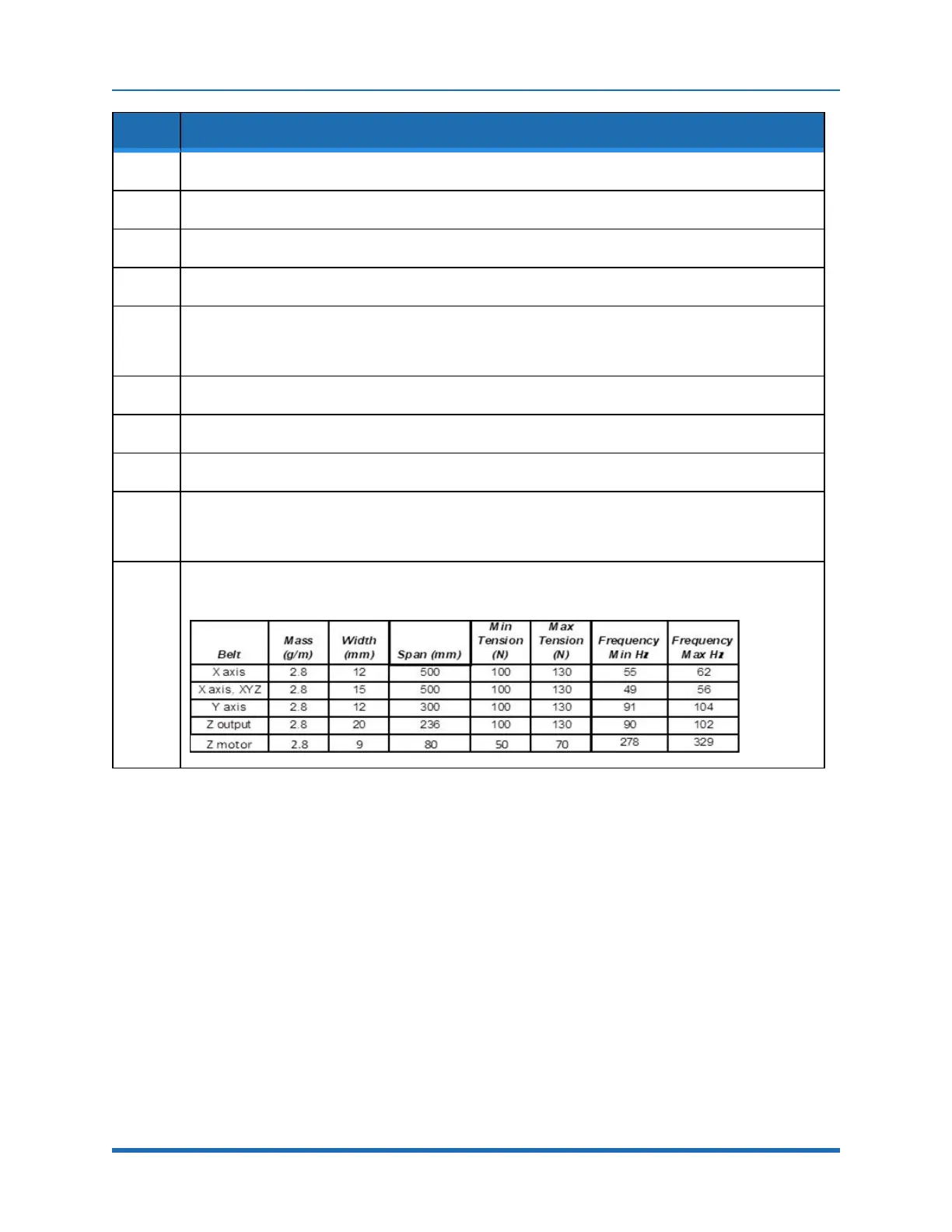
Enter the belt width from the table below.
6.
Click the Span button.
7.
Enter the belt free span from the table below.
8.
Make sure the actual span of the belt in the robot is set to the value entered for “Span.”
For longer belts, move the carriage of the robot so the span does not exceed 500 mm, or the belt
frequency will be so low, it will be difficult to get a reading on the tension meter.
9.
Click Select to record the data.
10.
Click Measure to take a tension reading.
11.
Place the microphone near the belt, typically within 3 mm or so.
12.
Gently pluck the belt so that it vibrates.
The tension meter will calculate the belt tension from the acoustic vibrations and display the tension in
Newtons.
13.
Compare the tension to the table below.
Adjust the belt tension preload screws if necessary.
124
Copyright © 2023 Brooks Automation, Inc.



 To Next Page