3 USING THE OPERATION PANEL AND SWITCHES
BM-2000
3 USING THE OPERATION PANEL AND SWITCHES
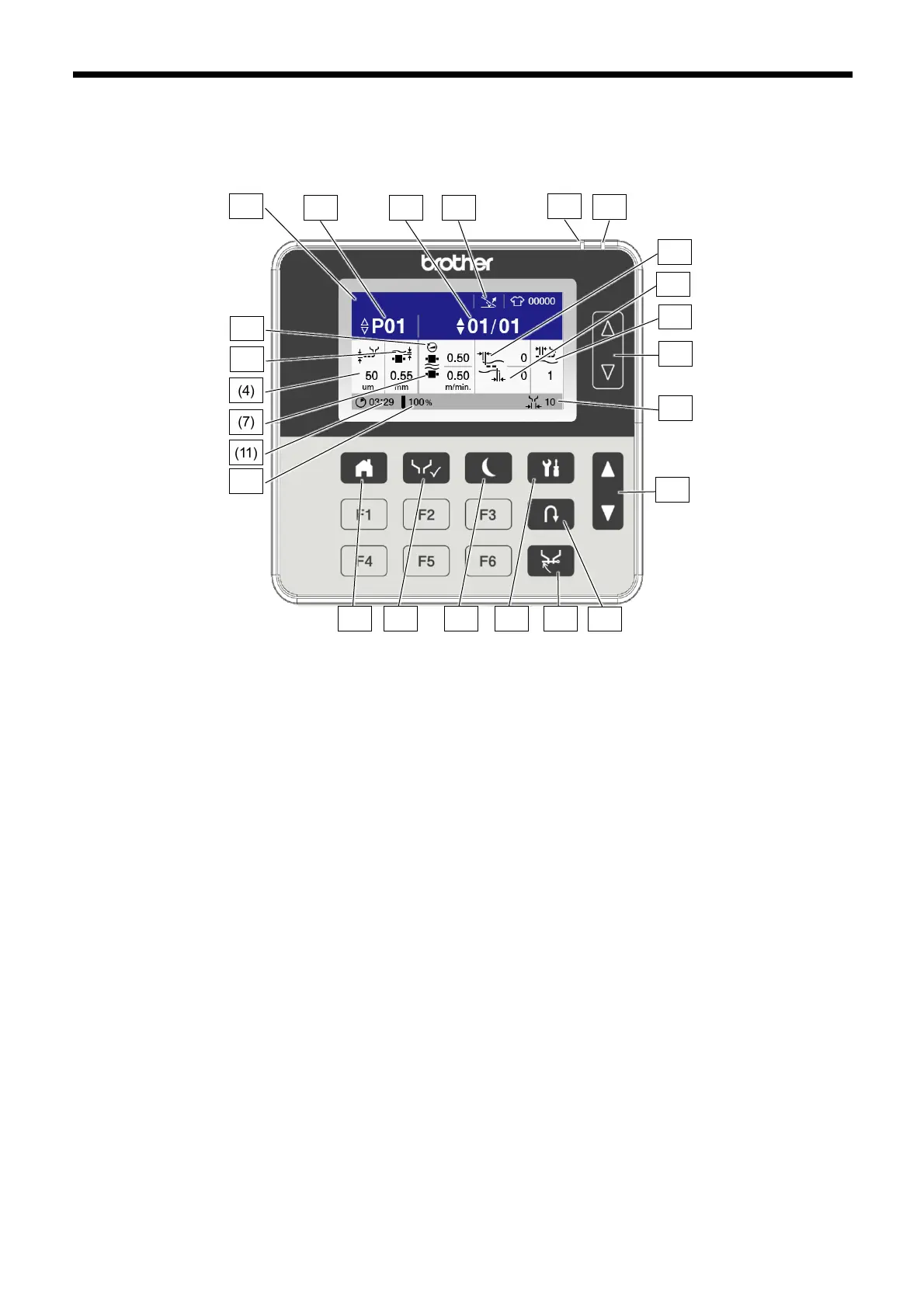
3.1 Name and function of each operation panel item
(1) End detection sensor
Used to switch the end detection sensor between on
and off.
(2) Program number
Used to select programs.
(3) Step No.
Used to select and edit steps.
(4) Glue thickness
Used to set the glue thickness.
(5) Nozzle space
Used to set the nozzle clearance.
(6) Upper roller feed speed
Used to set the feed speed for the upper roller.
(7) Lower roller feed speed
Used to set the feed speed for the lower roller.
(8) Upper cloth glue-free width
Used to set the glue-free width for the upper cloth.
(9) Lower cloth glue-free width
Used to set the glue-free width for the lower cloth.
(10) Anti stop mark
Used to set anti-stop marks.
(11) Glue heating time
Shows the total time required for heating a single glue
cartridge.
(12) Glue level
Shows the amount of glue remaining in the glue
cartridge.
(13) Nozzle glue width
Shows the gluing width for the nozzle which is currently
attached.
(14) Change program No.
Used to increase or decrease the program number.
(15) HOME key
Used to switch to the home screen.
(16) Test key
Used to switch to test mode.
(17) Sleep key
Used to switch manually to sleep mode. In addition, if it
is held down while already in sleep mode, then sleep
mode is canceled.
(18) Menu key
Used to switch to the setting menu screen.
(19) Reverse key
Used to switch to reverse mode.
(20) Nozzle cap key
Used to switch to shutdown proccedure.
(21) Change step No. key
Used to increase or decrease the step number.
(22) Caution indicator
Illuminates when an error or a warning occurs.
(23) Power indicator
Illuminates when the power is turned on.
(24) Comment
Shows program comments. In addition, touch it to set
comments.



 To Next Page