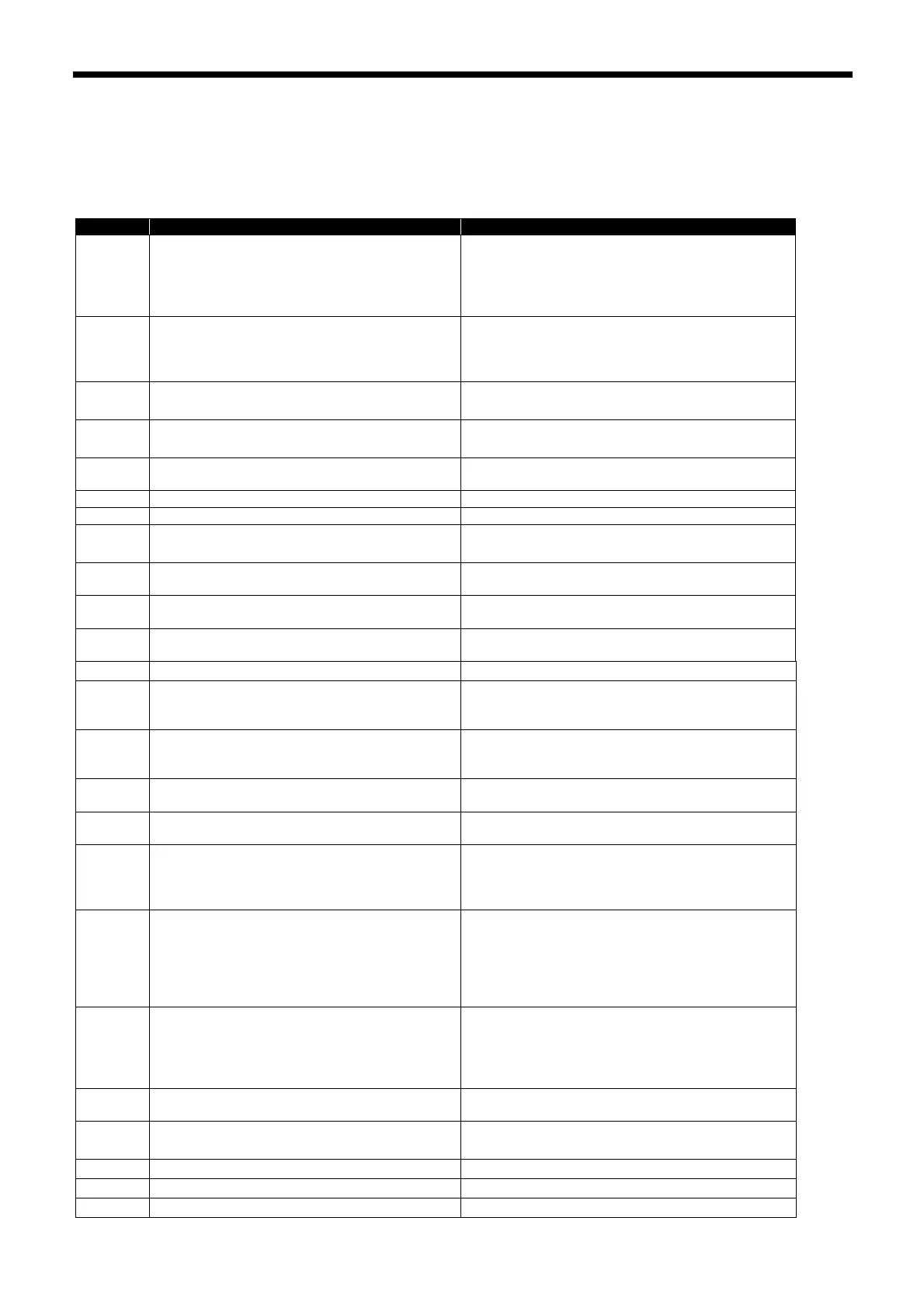
14 TABLE OF ERROR CODES
BM-2000
14 TABLE OF ERROR CODES
If a problem should occur with the bonding machine, the buzzer will sound and an error code and error message will appear
in the operation panel.
Follow the remedy procedure to eliminate the cause of the problem.
The treadle was still being depressed when the
power was turned on.
If the treadle is being depressed, return it to the
neutral position.
If the treadle is not being depressed, turn off the
power and check that the treadle is not being
pressed.
The feed speed adjustment switch is not at the
neutral position when the power was turned on,
or the switch is faulty.
Check that the feed speed adjustment switch is at
the neutral position.
If it is not at the neutral position, return it to the
neutral position.
An operation panel key was still being pressed
when the power was turned on, or key is faulty.
Turn off the power, and then check that none of the
keys on the operation panel are being pressed.
The hand switch was still being pressed when
the power was turned on, or switch is faulty.
Turn off the power, and then check that the hand
switch is not being depressed.
The feed speed adjustment switch is not at the
neutral position when gluing starts.
Move the feed speed adjustment switch to the
neutral position.
Nozzle cap was not attached properly.
Check that the nozzle cap is attached correctly.
Melter cover was not attached properly.
Check that the melter cover is attached correctly.
Treadle connection is faulty.
Turn off the power, and then check that connector
P8 on the main PCB is properly connected.
The adjustment value for the treadle position is
abnormal.
Turn off the power, and then adjust the treadle.
The upper roller motor has gone out of step.
Turn off the power and check that the upper roller
turns smoothly.
The lower roller motor has gone out of step.
Turn off the power and check that the lower roller
turns smoothly.
Pump motor is out of step.
Clean the nozzle discharge holes.
The upper roller pressure is outside the
allowable range.
Adjust the upper roller pressure so that it is within
the range set by memory switches No. 573 and No.
574 (for technicians).
Nozzle clearance adjustment home position
cannot be detected.
Turn off the power and check that the nozzle
clearance adjustment motor is connected to
connector CN20 on the expansion P. C. board.
Nozzle clearance adjustment motor has
stopped due to a problem.
Turn off the power and check that the lower roller
arm moves smoothly.
Displayed when gluing is carried out
continuously for 3 minutes or more.
Turn the power off and then back on again.
Communication error detected between the
main PCB and the panel PCB.
Turn the power off and then back on again.
If this does not solve the problem, turn off the
power, and then check that connector P5 on the
main P.C. board is properly inserted.
Communication error detected between the
main PCB and the temperature control PCB.
Turn the power off and then back on again.
If this does not solve the problem, turn off the
power, and then check that connector CN9 on the
expansion P.C. board and connector CN14 on the
temperature adjustment P. C. board are properly
inserted.
Communication error detected between the
main P.C. board and the expansion P.C. board.
Turn the power off and then back on again.
If this does not solve the problem, turn off the
power, and then check that connector P23 on the
main P.C. board and connector CN25 on the
expansion P. C. board are properly inserted.
No USB media is inserted.
Insert the USB media into the USB port of the
operation panel.
An error occurred while reading from USB
media.
Check the files in the USB media.
Not enough free space in the USB media.
Increase the amount of free space.
An error occurred while writing to USB media.
Use the specified USB media.
Problem with the EEPROM on the main PCB.
Turn the power off and then back on again.



 To Next Page