4-12 Sewing Character/Decorative Stitches
1 —
2 —
3 —
4 —
5 —
6 —
7 —
8 —
?
!
9 —
CONTENTS
Index
1
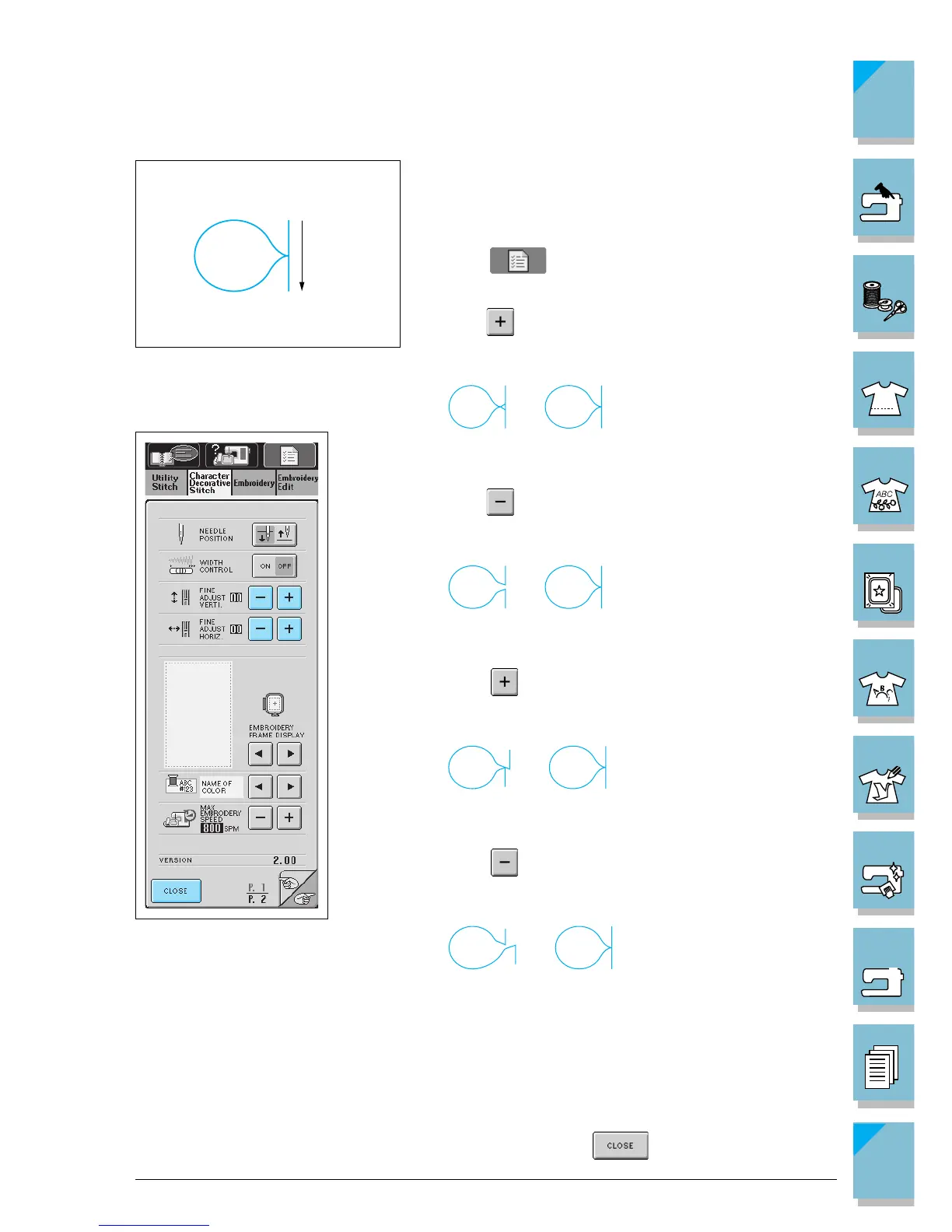
3. Compare the finished pattern to the illustration of the
correct pattern at the left.
1 Sewing direction
4. Press to display the screen at the bottom left.
5. If the pattern is bunched:
Press in the Fine Adjust Verti. display. The displayed
value increases each time the button is pressed and
the pattern will lengthen.
➡
If the pattern has gaps:
Press in the Fine Adjust Verti. display. The displayed
value decreases each time the button is pressed and
the pattern will shorten.
➡
If the pattern is skewed to the left:
Press in the Fine Adjust Horiz. display. The dis-
played value increases each time the button is pressed
and the pattern will slide to the right.
➡
If the pattern is skewed to the right:
Press in the Fine Adjust Horiz. display. The dis-
played value decreases each time the button is pressed
and the pattern will slide to the left.
➡
6. Sew the stitch pattern again.
* You can sew with the screen at left on the display.
7. If the stitch pattern still comes out poorly, make adjust-
ments again. Adjust until the stitch pattern comes out
correctly.
8. When the stitch pattern is sewn correctly, stop making
adjustments. Press to return to the original
screen.
Correct pattern














 To Next Page