Setting Up 1-13
1 —
2 —
3 —
4 —
5 —
6 —
7 —
8 —
?
!
9 —
CONTENTS
Index
5
6
1
2
3
4
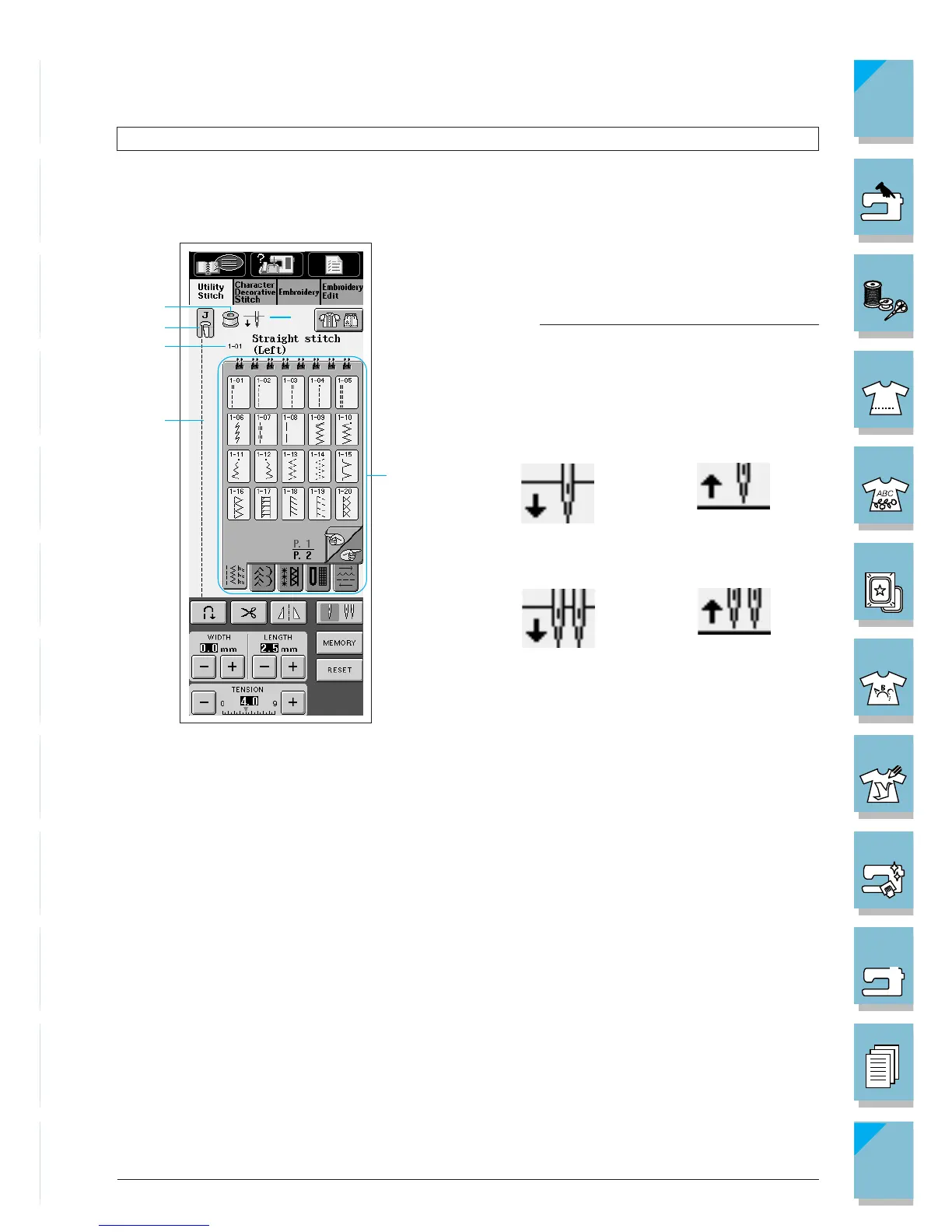
Twin needle/
up position
Single needle/
down position
Single needle/
up position
Twin needle/
down position
Viewing the LCD Display
When switching on machine, the screen will display the name of the machine. Touch the screen
to display the utility stitch. The often used “Straight stitch (left)” (1-01) is automatically selected.
1 Shows the amount of thread remaining in the
bobbin during sewing. If the display is yel-
low, the bobbin is running out of thread.
Note
This bobbin symbol does not show the
amount of bobbin thread remaining when the
machine is not sewing.
2 Shows single or twin needle mode setting, and
the needle stop position.
3 Presser foot code. Attach the presser foot in-
dicated in this display before sewing.
4 Shows the name and code number of the se-
lected stitch.
5 Shows a preview of the selected stitch.
6 To select, press the key of the stitch pattern
you want to sew.














 To Next Page