Setting Up 1-19
1 —
2 —
3 —
4 —
5 —
6 —
7 —
8 —
?
!
9 —
CONTENTS
Index
1
2
3
5
4
1
4
2
3
5
7
6
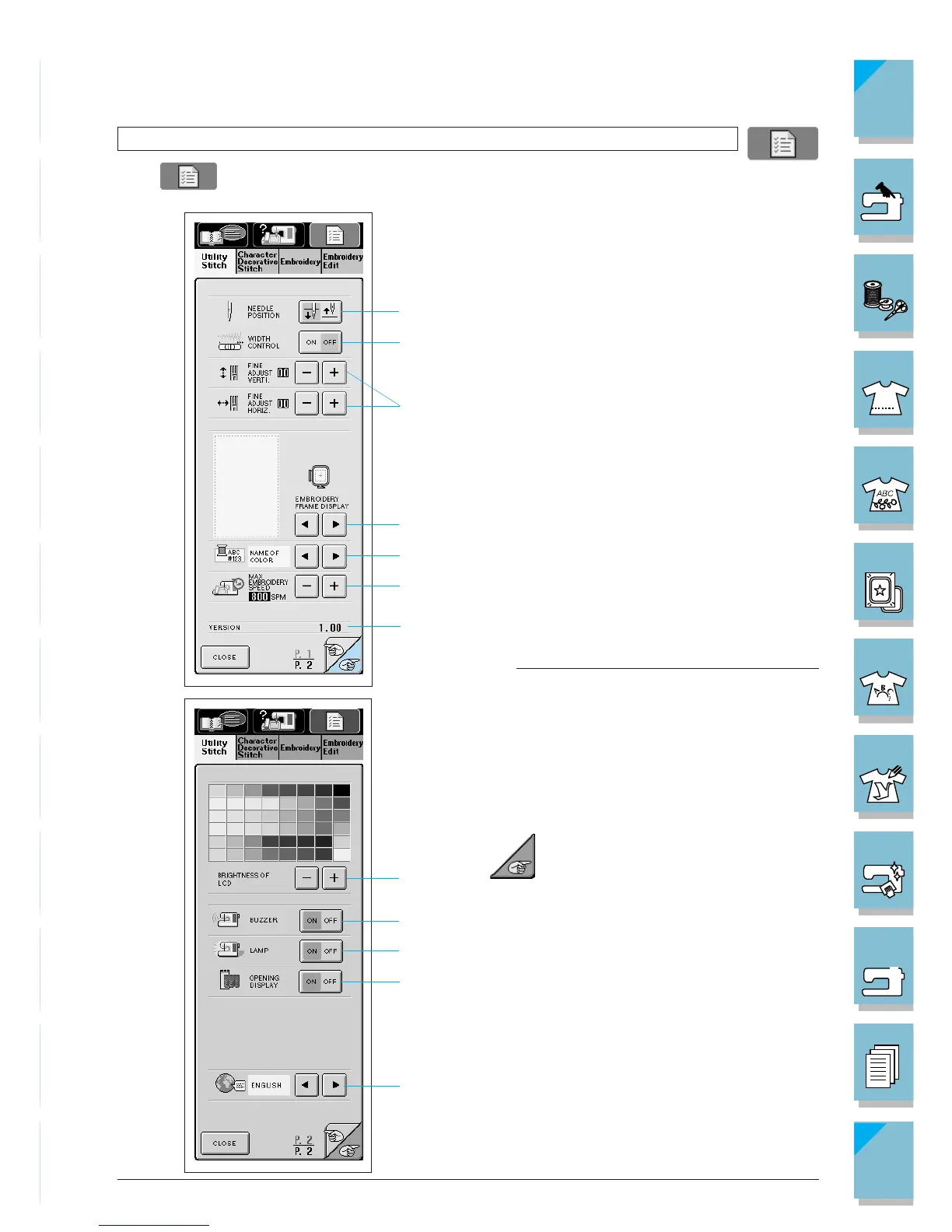
Using the Machine Settings Key
Press to change the default machine settings (needle stop position, embroidery speed,
opening display, etc.)
1 Select the needle stop position (the needle
position when the machine is not operating)
to be up or down.
2 Select whether to use the sewing speed con-
troller to determine the zigzag width (see page
3-34).
3 Make adjustments to character or decorative
stitch patterns (see page 4-12).
4 Select from among 8 displays when using the
Embroidery functions (see page 5-43).
5 Change the thread color display on the em-
broidery screen; display the thread number,
color name or each time to embroider (see
page 5-42).
6 Adjust the maximum embroidery speed set-
ting (see page 5-41).
7 Program version display
Note
Version 1.0, this is the installed software version
for your machine. Check with your local author-
ized Brother dealer or at www.brother.com for
notification of an available updates.
Press to go to the next screen.
1 Change the brightness of the LCD (see page
1-16).
2 Turn the buzzer ON or OFF.
3 Turn the lamp ON or OFF.
4 Turn the opening screen display ON or OFF.
5 Change the display language (see page 1-18).














 To Next Page