Embroidery 5-21
1 —
2 —
3 —
4 —
5 —
6 —
7 —
8 —
?
!
9 —
CONTENTS
Index
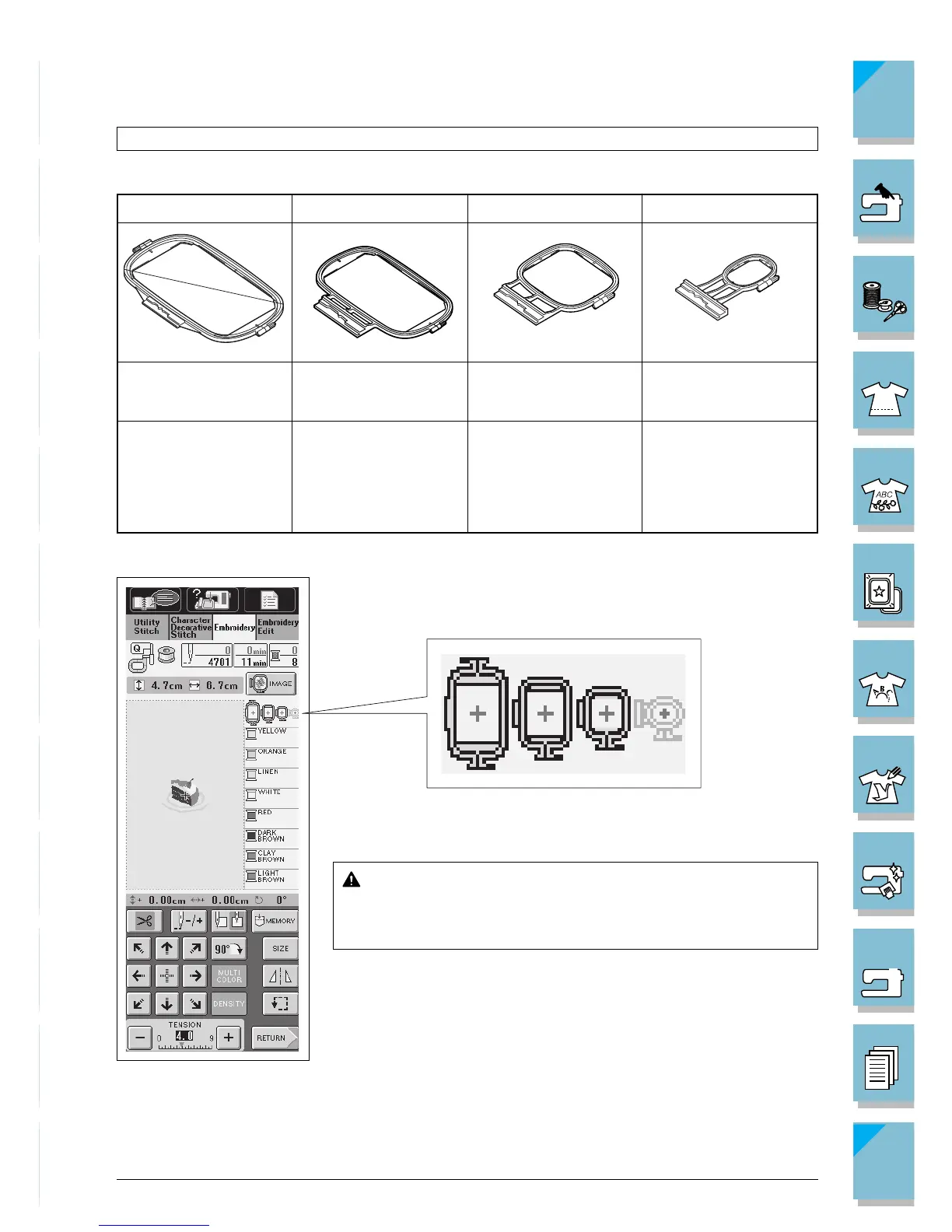
Large Medium Plus Medium Small
Can embroider an area Can embroider an area Can embroider an area Can embroider an area
26 cm × 16 cm 18 cm × 13 cm 10 cm × 10 cm 2 cm × 6 cm
(10-1/4 inch × 6-1/4 inch )
(7 inch × 5 inch)
(4 inch × 4 inch) (1 inch × 2-1/2 inch)
Use when embroidering
connected or combined
characters or patterns, or
when embroidering
large patterns.
Use when embroidering
normal sized patterns.
Use for embroidering
names or very small pat-
terns.
Setting the Fabric in the Embroidery Frame
Types of Embroidery Frames
Select a frame that matches the pattern size. Frame options are dis-
played on the LCD.
Frames that can be used are highlighted.
Frames that can not be used are light gray.
CAUTION
If you use a frame that is too small, the presser foot may
strike the frame during sewing and cause injury.
Use when embroidering
patterns between 10 cm
x 10 cm and 18 cm x 13
cm.














 To Next Page