SMART KTF 2000 – KTF/RW Operation
SMART KTF 2000 3B-29 -
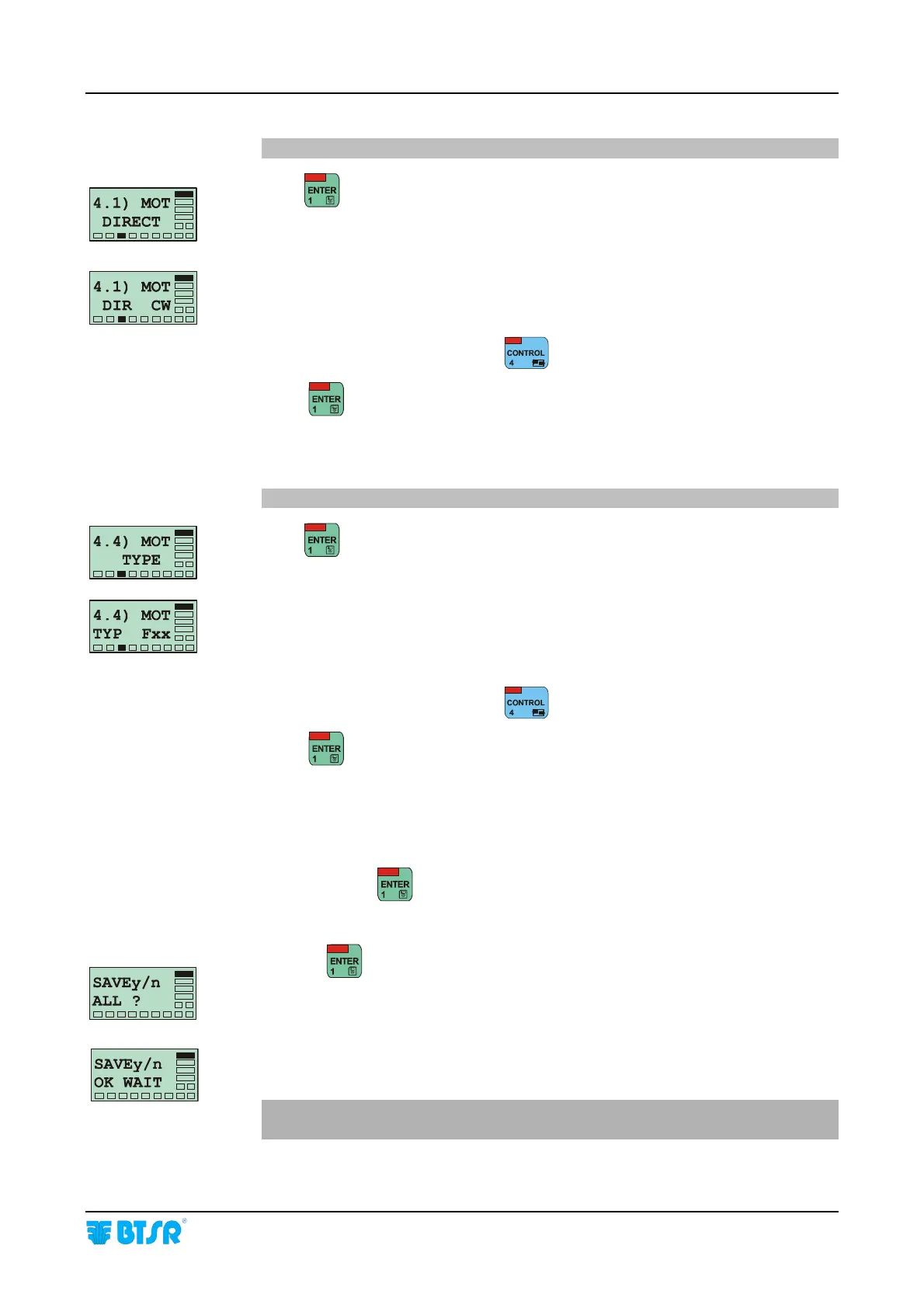
4.1) MOT DIRECT= P4.2
Press
to enable the parameter programming
This function allows you to choose the rotation direction of the yarn feeding motor.
CW = Clockwise direction
CCW= Counter-Clockwise direction
Choose the desired direction using
.
Press
to continue.
4.4) MOT TYPE= P4.4
Press
to enable the parameter programming
This function allows you to choose the type of motor used on KTF/xxx RW yarn
feeding device.
[allowed values F01 – F02 (01 = 25 mN/m; 02 = 100 mN/m)]
Choose the desired direction using
,
Press
to continue.
MOT TYPE is the last programmable parameter of the list concerning the relevant
article. Pressing
you will have the possibility to save the article (with the
values setup).
Pressing
on this screen, completes the creation phase of the new article.
This screen display for a few seconds indent that the parameters are going to be
saved into the database of SMART KTF 2000 terminal.
To load the parameters on SM-DIN-RW devices it will be necessary to use the
WORK (LOAD) function.










 To Next Page