Using your LinkStation
LinkStation User Manual 55
FTP Server
1
2
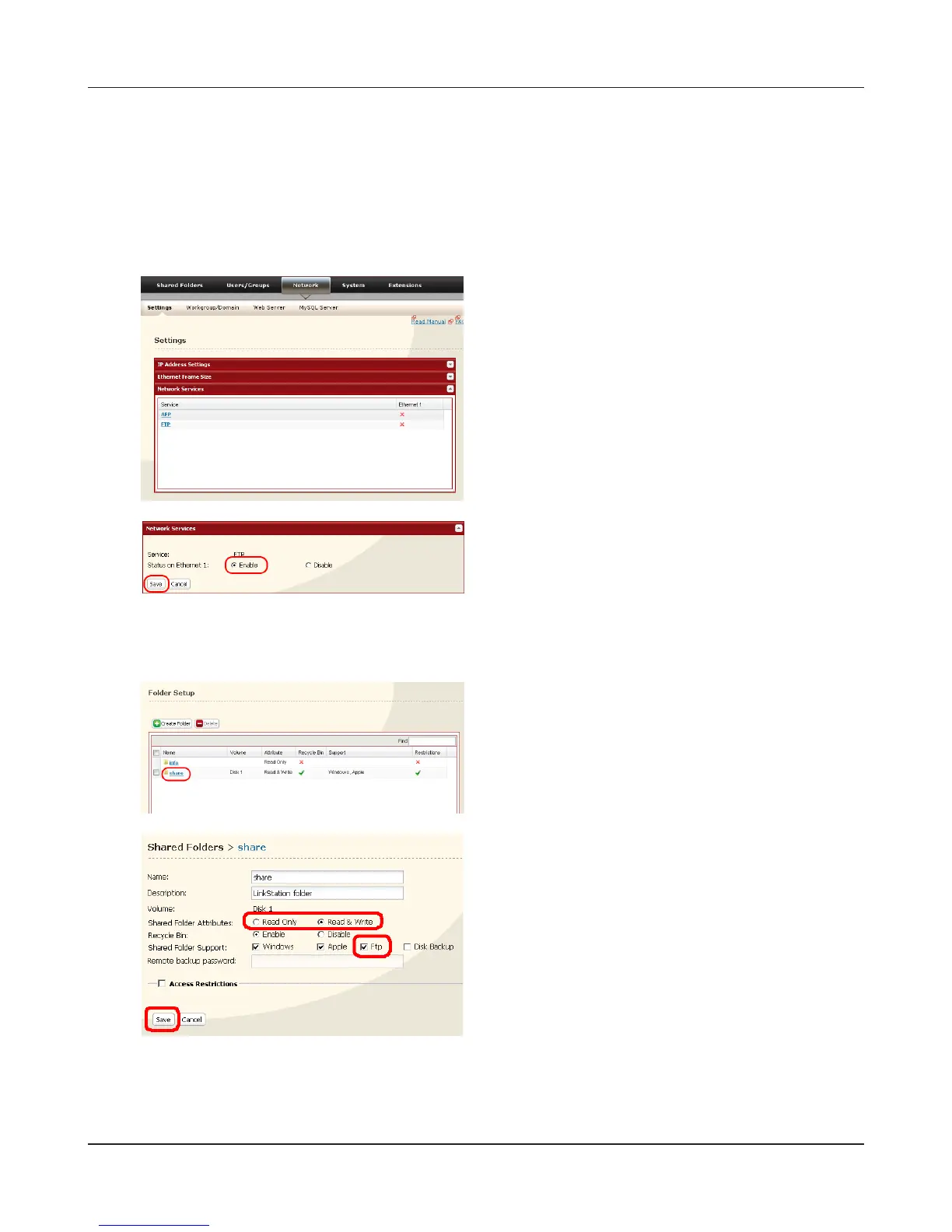
By default, the LinkStation’s shares are only accessible by users connected to the same network
or router as the LinkStation. The optional FTP server allows users to access the LinkStation from
outside of the local network. You may enable it as follows.
In the Web Admin interface, navigate to
[Network] - [Settings] - [Network Services] and
click [FTP].
2 Check [Ftp].
1 Select whether the shared folder is [Read
Only] or [Read & Write].
3 Click [Save].
3
4
5
Click [Shared Folders] - [Folder Setup].
The folder is now congured for FTP access. Do not forget to give read (or write) permissions for
the FTP share to any users that will be accessing the share remotely. Folder permissions can only be
changed from the Web Admin interface. Changing them remotely with FTP client software is not
supported.
Click the folder to enable remote FTP access on.
1 Select [Enable].
2 Click [Save].











 To Next Page