Using your LinkStation
LinkStation User Manual 102
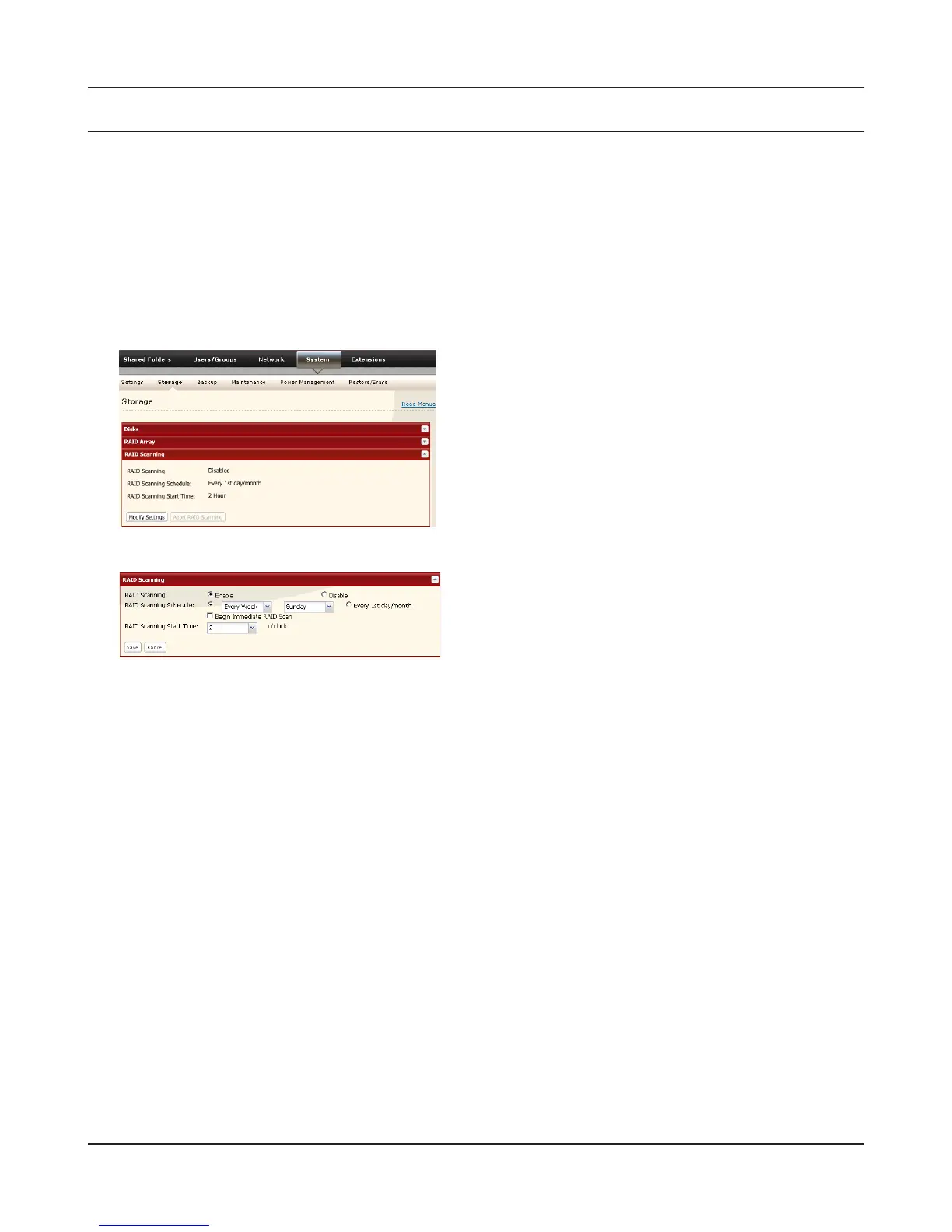
RAID Scanning
LinkStations that are in RAID 1, RAID 5, RAID 10 modes support RAID scanning. A RAID scan tests the
RAID array for read performance. If defective sectors are found, they are repaired automatically. If
your multiple-drive LinkStation is in RAID 1 mode, you should run RAID scans regularly. Congure
regular RAID scans as follows:
Note:
Not all LinkStations support RAID scanning. Check the LinkStation Function List on page 35 to see if
your LinkStation supports RAID scanning.
1
2
Notes:
• Check [Shutdown] to automatically shut down the LinkStation whenever a RAID error occurs.
Check [Begin Immediate RAID Scan] to initiate an immediate RAID scan.
• To stop a RAID scan, click [Abort RAID Scanning].
• Single-drive LinkStations do not support RAID arrays or RAID scanning.
RAID Scanning is now congured.
Choose [Enable], enter your desired schedule,
and click [Save].
Navigate to [System] - [Storage] - [RAID
Scanning] in the Web Admin interface. Under
[RAID Scanning], click [Modify Settings].











 To Next Page