Using your LinkStation
LinkStation User Manual 141
Connecting to a Remote LinkStation
WebAccess Connect enables you to open a shared folder on a remote LinkStation or TeraStation
from Explorer, My Computer, or other le manager.
To use WebAccess Connect, the following conditions must be satised.
• You have LinkStations or TeraStations in two dierent locations, such as at home and at a remote
location.
• WebAccess is enabled for both devices.
1
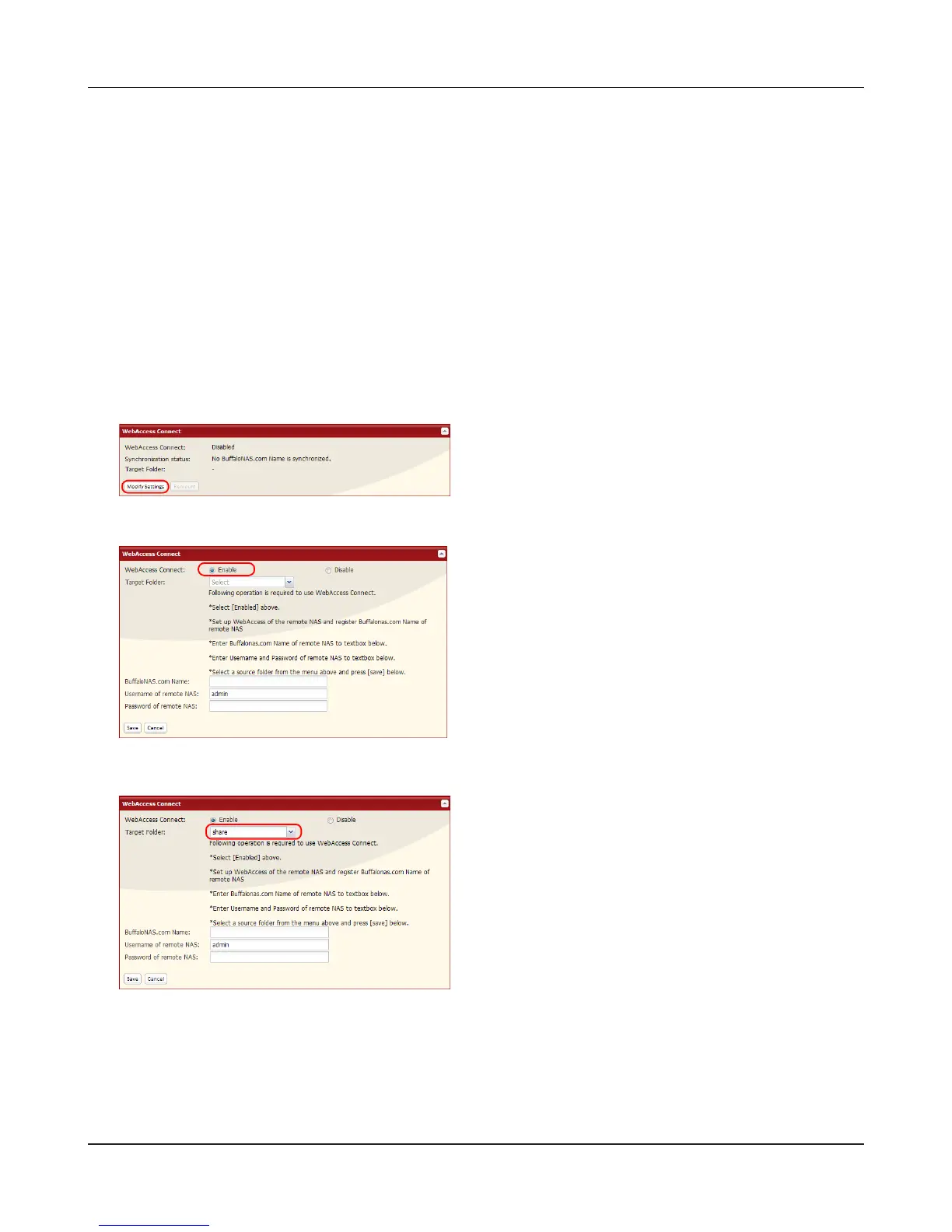
In the LinkStation’s Web Admin interface, click [Extensions] – [Web Service Support].
2
3
4
Enable [WebAccess Connect].
Click [Modify Settings] under [WebAccess
Connect].
From [Target Folder], select the shared folder
that will be connected.
Note:
The selected folder is used internally by
WebAccess Connect. Files are not added to
this folder and the amount of used space does
not increase.











 To Next Page