Using your LinkStation
LinkStation User Manual 74
Adding Storage
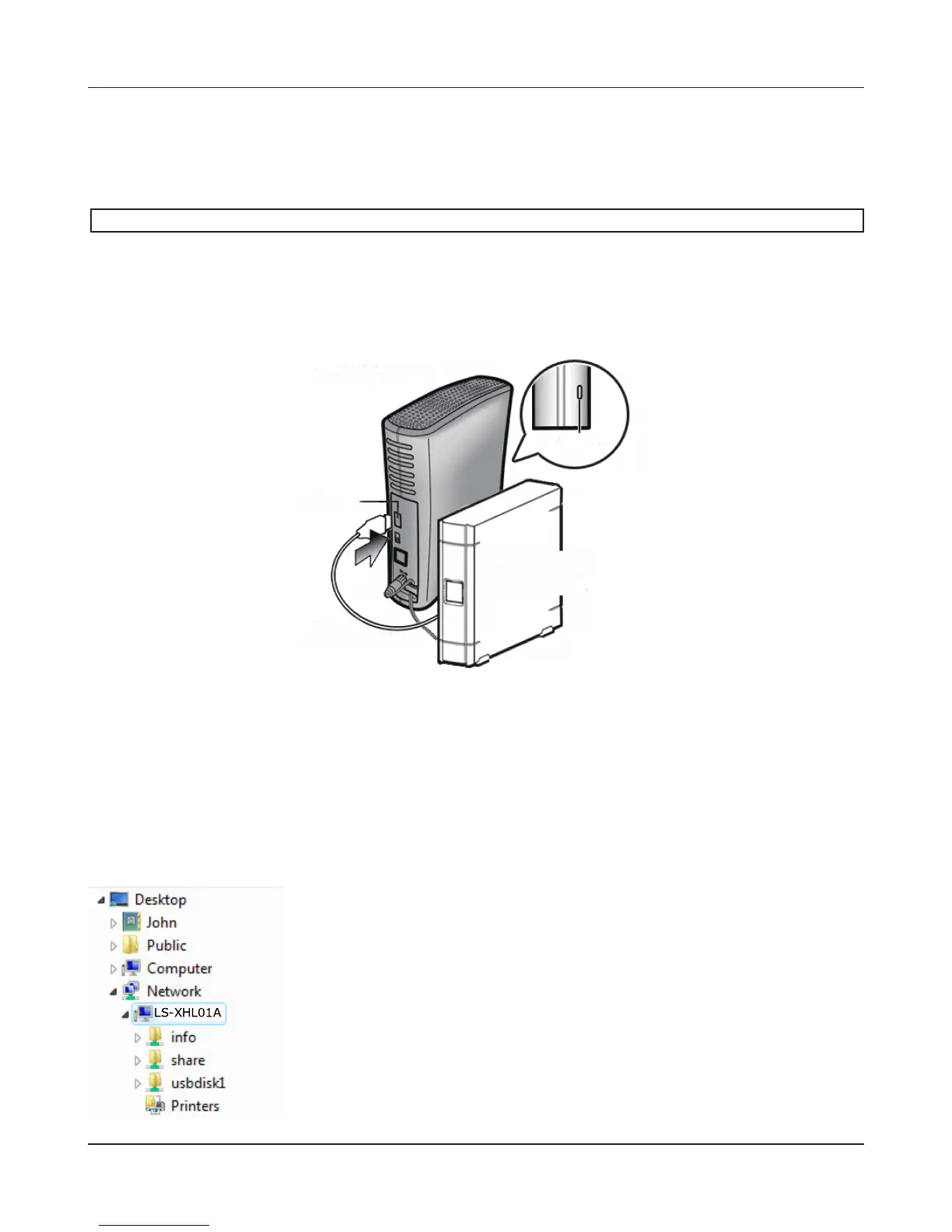
Your LinkStation includes USB ports. You can connect a Bualo external hard drive to it. It will appear as
an additional shared folder on the LinkStation.
USB hard drives cannot be added to LinkStations that do not have a USB port.
Connect the hard drive as shown below. If the hard drive is already formatted, it will be detected
automatically. If the hard disk is not formatted, format it from the Web Admin interface (next page).
To disconnect the external drive from the LinkStation, refer to page 78.
Notes:
• Only one hard drive should be connected to the LinkStation (except the LS-QVL).
• Bus-powered hard drives are not supported. Use a hard drive with an AC adapter or other power
supply.
• For best results, use a Bualo external USB drive. DUB and DUI series drives are not supported.
• Backup data from Mac OS may include characters that cannot be written to FAT16 or FAT32 drives
such as “.DS_Store”. For best results, reformat the drive before using as a backup target.
• If the drive is connected properly, [usbdisk1] will be added to the
shares under the LinkStation in Network.
• If two hard drives are connected to the LS-QVL series, they appear as
[usbdisk1] and [usbdisk2].
Function
Button
USB
Connector
Bualo External
Hard Drive











 To Next Page