Using your LinkStation
LinkStation User Manual 30
Turning O the Power in the LS-XL Series
The LS-XL series LinkStation does not have a power button. It automatically turns on when the AC
adapter is connected. To turn o the power, use the procedure below to perform a shutdown. The
LinkStation may be damaged if the AC adapter is removed without rst shutting down the unit
properly.
Note:
To turn the LinkStation on after a shutdown, unplug the AC adapter and then plug it back in again.
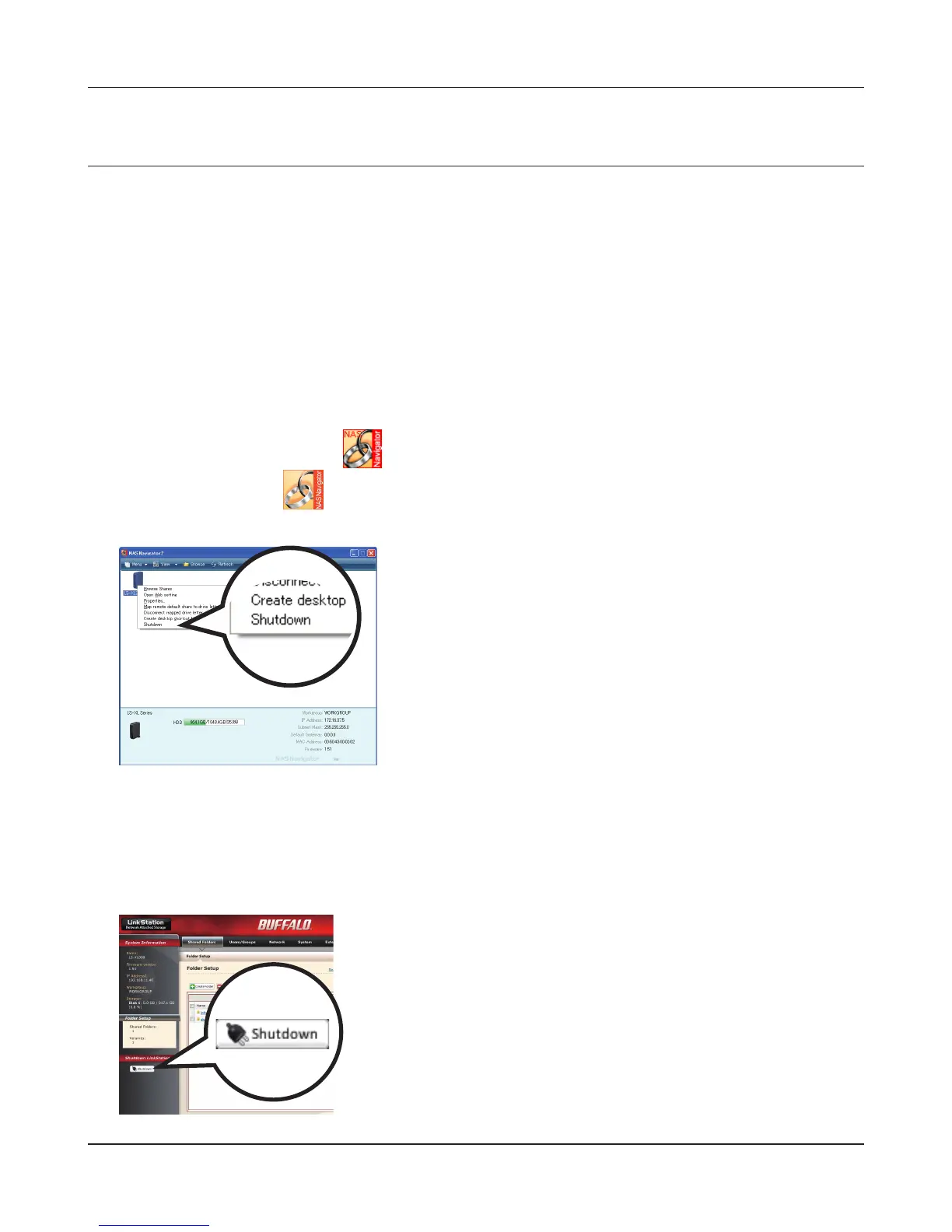
Using NAS Navigator2
1
Launch NAS Navigator2.
• Windows: Double-click the icon on the desktop.
• Mac OS X: Click the icon in the Dock.
2
Using the LinkStation’s Web Admin interface
1
Open the LinkStation's Web Admin interface (page 32).
2
Windows : Right-click on the LinkStation icon and select
[Shutdown].
Mac OS X : Click the LinkStation icon while holding down
the control key and select [Shutdown].
The LinkStation administrator password must be entered to
perform a shutdown. The default password is “password”.
This completes shutdown of your LinkStation.
Click [Shutdown] on the left side of the Web Admin
interface.
This completes shutdown of your LinkStation.











 To Next Page