P
Multiple Exposures
N
216
You can select a
1
image recorded on the card as the first single
exposure. The image data of the selected
1
image will remain intact.
You can only select
1
images.
You cannot select
41
/
61
or
JPEG images.
1
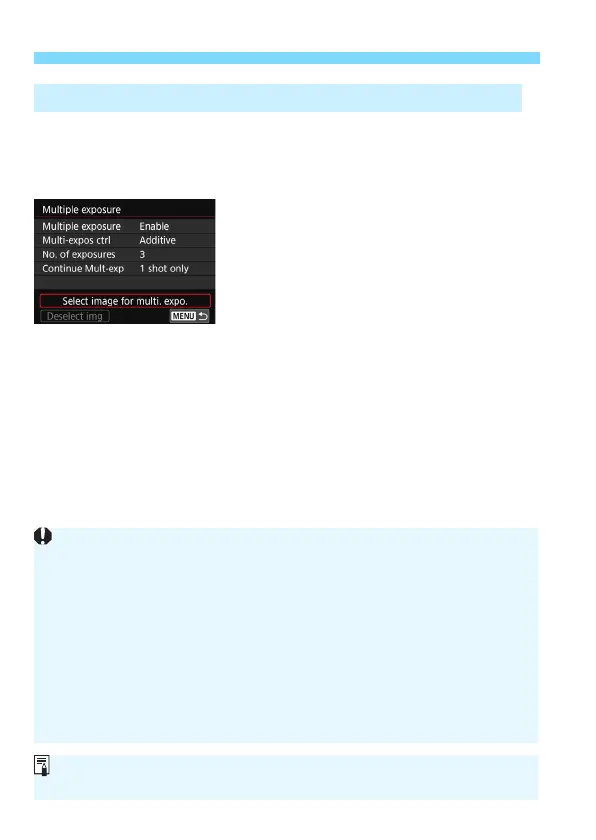
Select [Select image for multi. expo.].
The images on the card will be
displayed.
2
Select the first image.
Turn the <
5
> dial to select the
image to be used as the first single
exposure, then press <
0
>.
Select [
OK
].
The file number of the selected image
will be displayed at the bottom of the
screen.
3
Take the picture.
When you select the first image, the number of remaining
exposures as set with [
No. of exposures
] will decrease by 1.
For example, if [
No. of exposures
] is 3, you can shoot two
exposures.
Merging Multiple Exposures with an Image Recorded on the Card
Images shot with [
z
3: Highlight tone priority
] set to [
Enable
] and
images whose [
z
4: Aspect ratio
] is set to any setting other than [
3:2
]
(p.146) cannot be selected as the first single exposure.
[
Disable
] will be applied for [
z
1: Lens aberration correction
] and
[
z
2: Auto Lighting Optimizer
] regardless of the settings of the
1
image selected as the first single exposure.
The ISO speed, Picture Style, high ISO speed noise reduction, color
space, etc. set for the first
1
image will also be applied for the
subsequent images.
If [
z
3: Picture Style
] is [
Auto
] for the RAW image selected as the first
1
image, [
Standard
] will be applied for shooting.
You cannot select an image taken with another camera.
You can also select a
1
multiple-exposure image as the first single exposure.
If you select [
Deselect img
], the selected image will be canceled.


 To Next Page