4
4
4-38
4-38
Parts Replacement and Cleaning Procedure > Other Parts > Removing the Paper Folding Roller
Parts Replacement and Cleaning Procedure > Other Parts > Removing the Paper Folding Roller
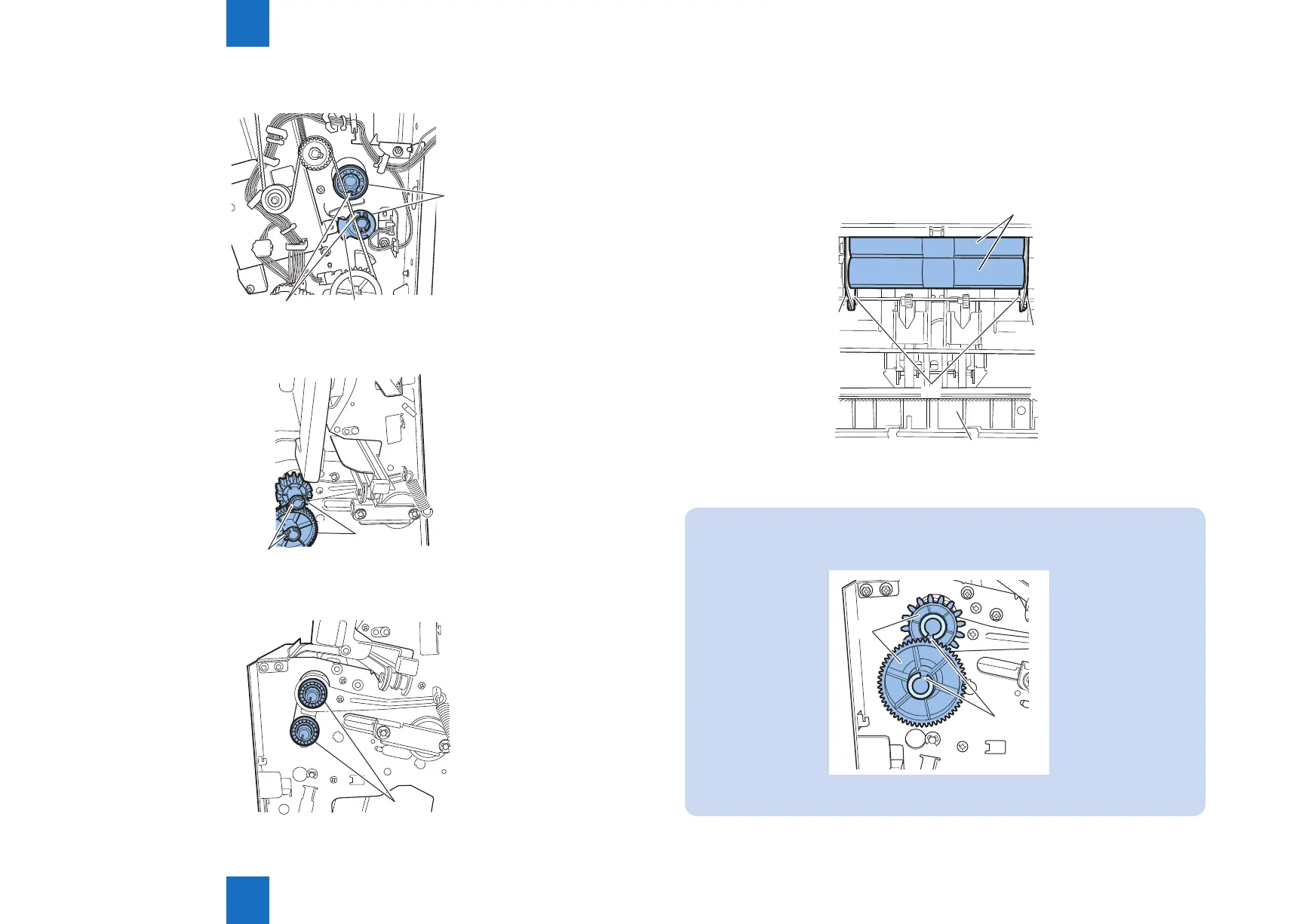
14) Remove the two C-rings [1] at the rear, and remove the sensor ag [2] and two bearings [3].
[3]
[1]
[2]
15) Remove the two C-rings [1] at the front and remove the two gears [2].
[2]
[1]
16) Remove the two bearings [1].
[1]
F-4-79
F-4-80
17) Open the saddle delivery tray [1].
18) Remove two screws [2] and remove the two aligning plates [3].
19) Slide the two paper folding rollers [4] to the front, and then pull it out in the delivery
direction.
[1]
[3]
[2]
[2]
[4]
NOTE:
When installing, attach the gear [2] so that the grooves [1] of the paper folding rollers
face each other and align the phase.
[1]
[2]
F-4-82
F-4-81



 To Next Page