CTR9 Car-O-Liner Group AB
49023, EN - rev. 4, 2020-01 109
8.2 Display information messages
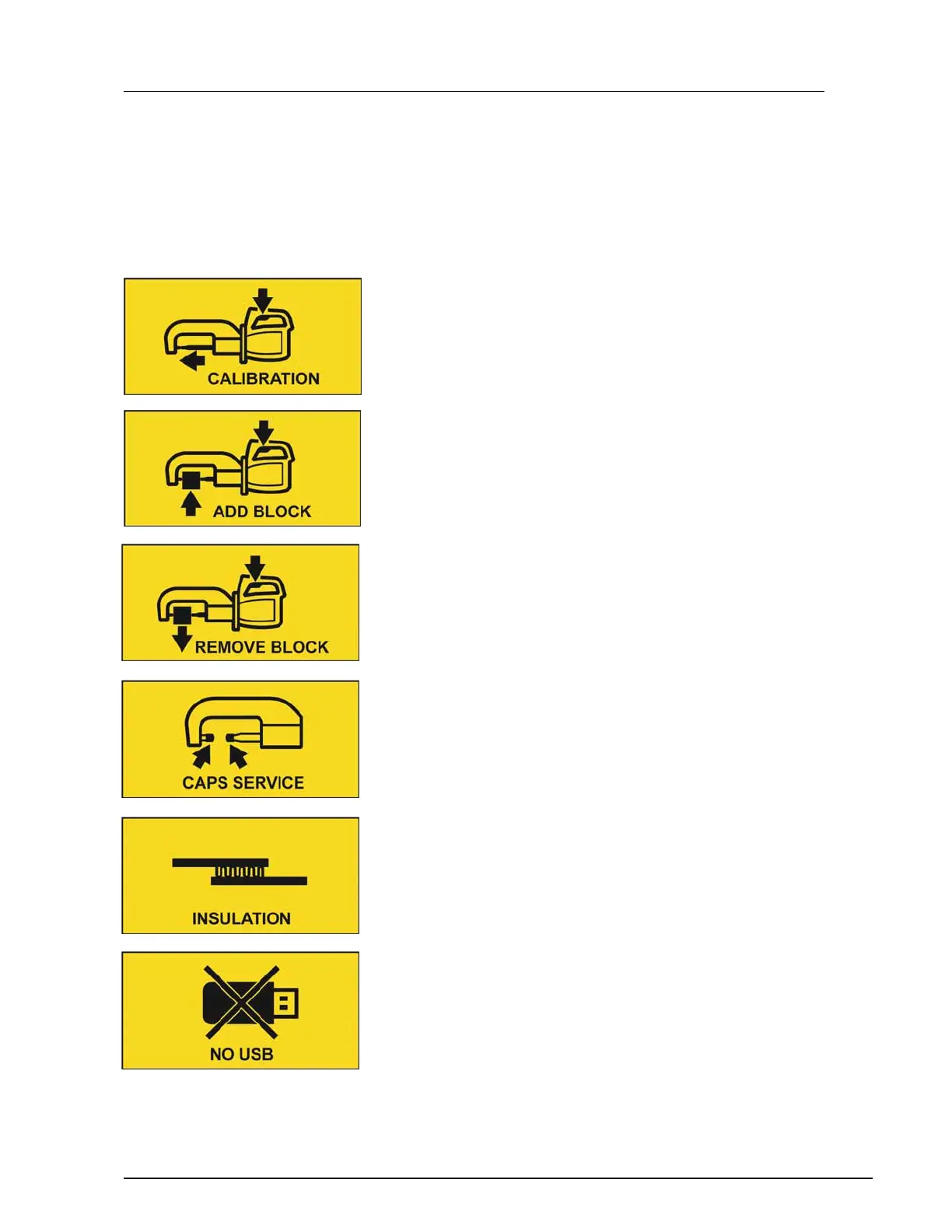
Messages with yellow background gives you important information in cer-
tain situations, for example when installing/removing Multi Function Gun
or when electrode caps service is necessary.
”Calibration” is always shown at Startup and with necessary intervals.
To calibrate welder, push C-Tong trigger button and weld without anything
between the electrodes.
”Add Block” is shown when Multi function gun is selected with the
“Change tool” button on the control panel.
”Remove Block” is shown when C-Tong is selected with the “Change tool”
button on the control panel.
”Caps Service” is shown when cleaning or changing electrode caps is
necessary.
”Insulation” is shown when there is coating, adhesive or other impurities
between metal sheets of welding object that prevents current to transfer
through the metals.
”No USB” is shown when you select “Save to USB” in the “WeldLogger”
(or other functionalities) and no USB is inserted to the welding unit.


 To Next Page