SECTION 88 -- ACCESSORIES -- CHAPTER 1
88-4
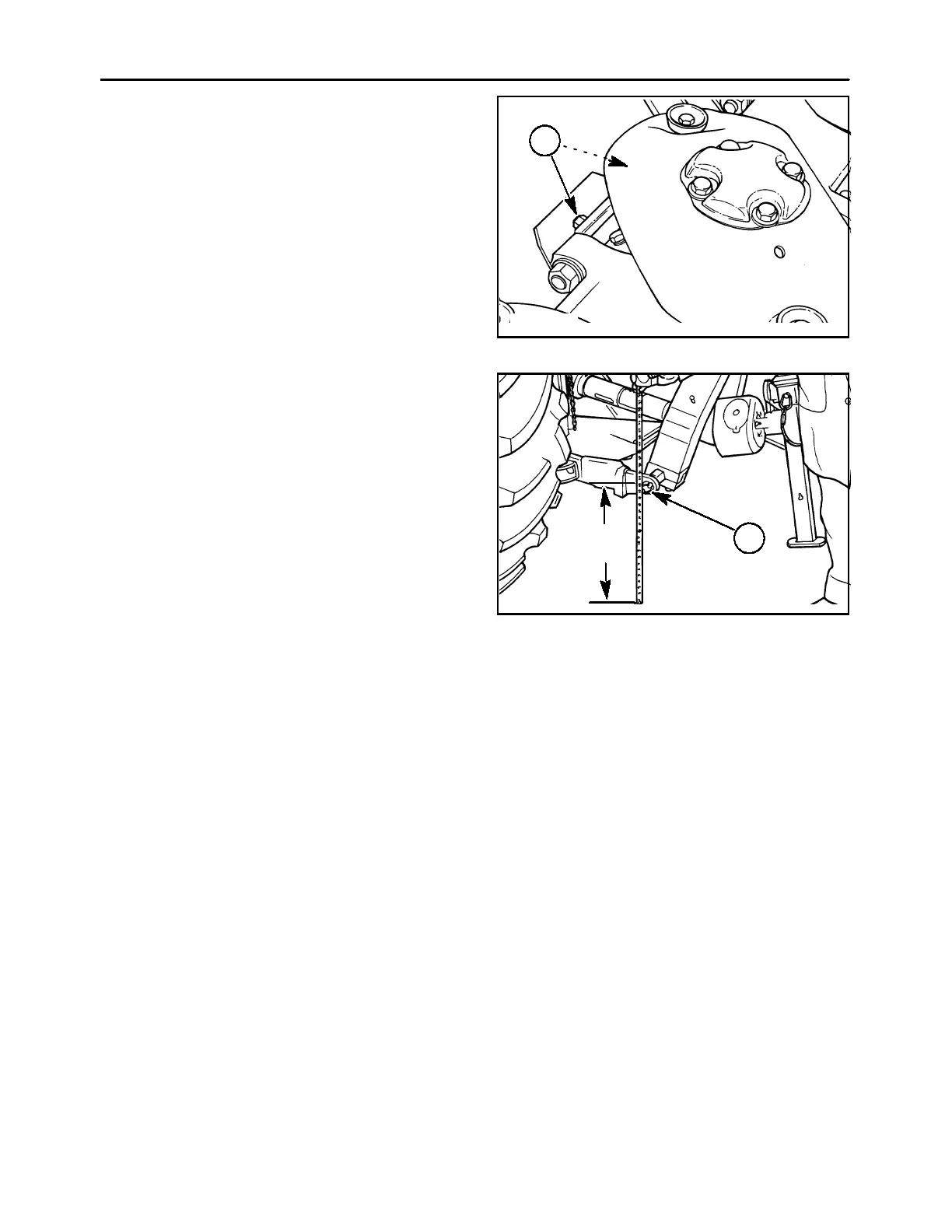
To install the skid shoes, remove the standard skid
shoes by removing the two 1/2″ x1-1/4″ cap screws,
1, and cupped lock washers at the back of each disc
module. Install the high skid shoe by inserting the
front edge into the gap in the rock guard, and lift the
skid shoe up to align the bolt holes. Reinstall the cap
screws and torque to 113 N∙m (83 ft. lbs.).
IMPORTANT: Longer 1/2″ x1-1/2″ cap screws are
used to retain the swathboard mounts and skid
shoes to the inner and outer disc modules. Do not mix
up the cap screws, as use of these longer cap screws
at another disc module may cause module damage.
A3680-30
1
6
After installing the high stubble kit, readjust the cutter
bar flotation to compensate for the increased cutter
bar height. Readjust the check chains so that the
hitch pins, 1, are as close to (but not less than) 508
mm (20″) from the ground on Models MDX81 and
MDX91.
On Model MDX71, readjust the check chains so that
the hitch pins, 1, are as close to (but not less than)
660 mm (26″).
Adjust the flotation spring length to the correct length
as described in “Cutter Bar Flotation” in the Opera-
tion section of this manual.
A3680-12
1
20″
(508 mm)
7



 To Next Page