29
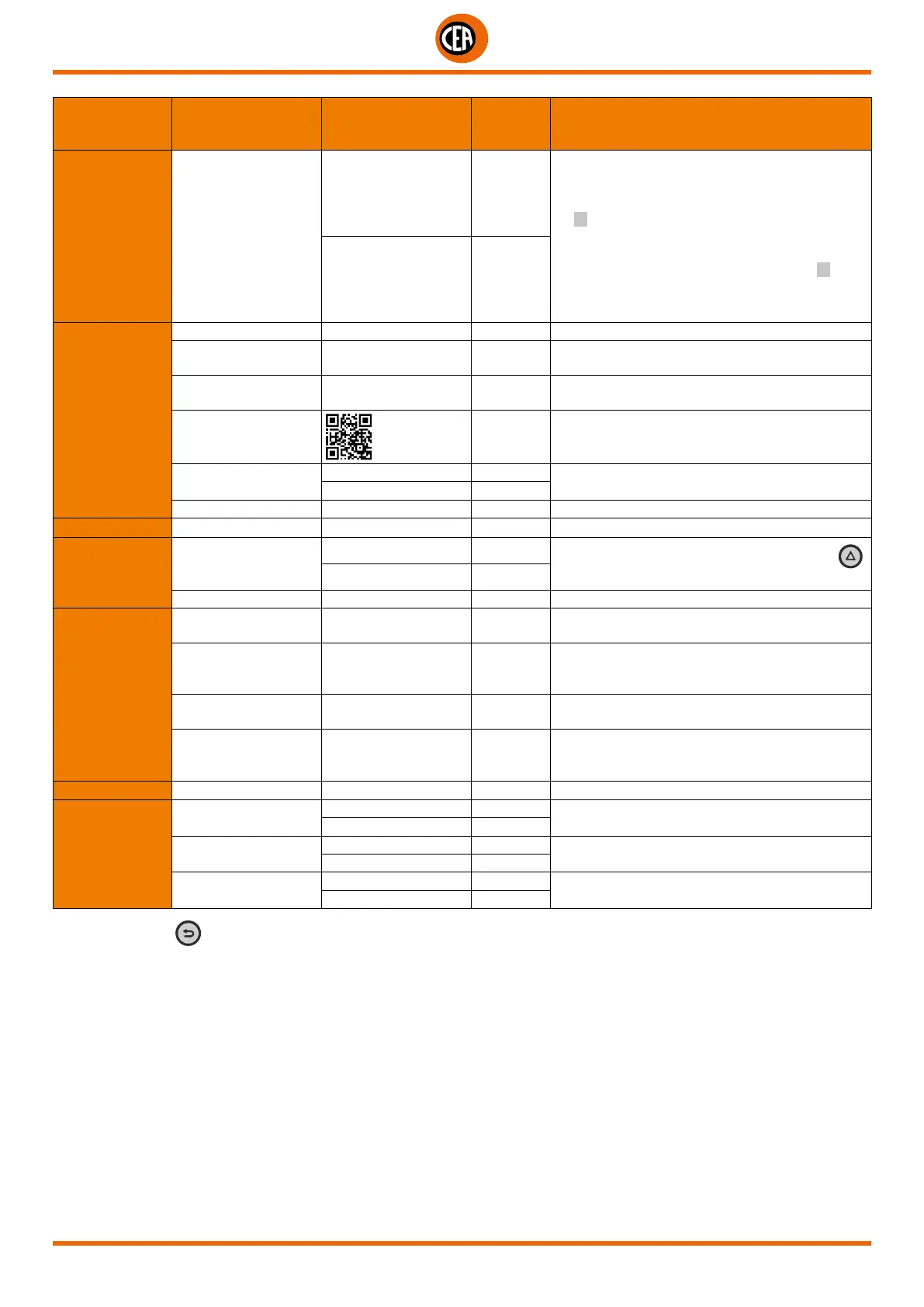
MAIN MENU MAIN SUB-MENU
PARAMETERS /
HIGH - LOW LIMIT
DEFAULT
VALUE
NOTE
WELDING CURRENT SET
ABSOLUTE X
This function can be used to set the “ABSOLUTE”
basic cycle, initial, and final current for pulsation
value in Ampere or as a % of the main current
for I
1 welding or of the peak current when
pulsation is set.
The percentages range from -100% to +900%,
where 0% indicates the same value as the I1
main welding current or as the peak current when
pulsation is set.
PERCENTAGE
INFORMATION
SERIAL NUMBER 00000000 (example) Firmware serial number
FW VERSION
00.04-BETA11
SW0285 (example)
Control board firmware version
DIS FW VERSION
01.03 220404 TIG
(example)
TFT display firmware version
QR CODE
This makes it possible to connect to the factory’s
WEBSITE to download the instruction manual
UPDATE FW
NO X
It activates the guided firmware updating
procedure, using the USB port
YES
USER MANUAL 1020HE61/A (example) Instruction manual number and version
ERROR PAGE Shows current errors
PANEL LOCK
LOCK PANEL
NO X
Locks the panel. To release, hold the SET key
down for 5 seconds
YES
SET UNLOCK CODE Used to set a personal panel release code
USB SAVE
RESTORE DATA
USB SAVE JOBS
Activates the procedure for saving JOBS on a new
“FAT32” USB stick, set aside for this purpose
USB SAVE SETTINGS
Activates the procedure for saving the settings
on a new “FAT32” USB stick, set aside for this
purpose
USB LOAD JOBS
Activates the procedure for uploading JOBS to a
new “FAT32” USB stick, set aside for this purpose
USB LOAD
SETTINGS
Activates the procedure for uploading the settings
to a new “FAT32” USB stick, set aside for this
purpose
DIAGNOSTIC Range of information for the service centre
HW TEST
GAS
OFF X
Service centre test.
Activates / Deactivates the gas solenoid valve
ON
FAN
OFF X
Service centre test.
Activates / Deactivates the fan
ON
COOLING
OFF X
Service centre test.
Activates / Deactivates the cooling system
ON
NOTE: If the BACK
key is held down for 2 seconds, the parameter goes back to its default setting.













 To Next Page