1x 5/16x2-1/8”WaferBolt(5/16”atwasher,5/16”t-nut)
1x 1/4x2-1/2”WaferLag(5/16”atwasher)
1 x #8 x 3” Wood Screw
2 x #8 x 2” Wood Screw
Hardware
Wood Parts
1 x Support Diagonal 5/4 x 4 x 24-1/2”
1 x Diagonal 2 x 3 x 42¼”
092
093
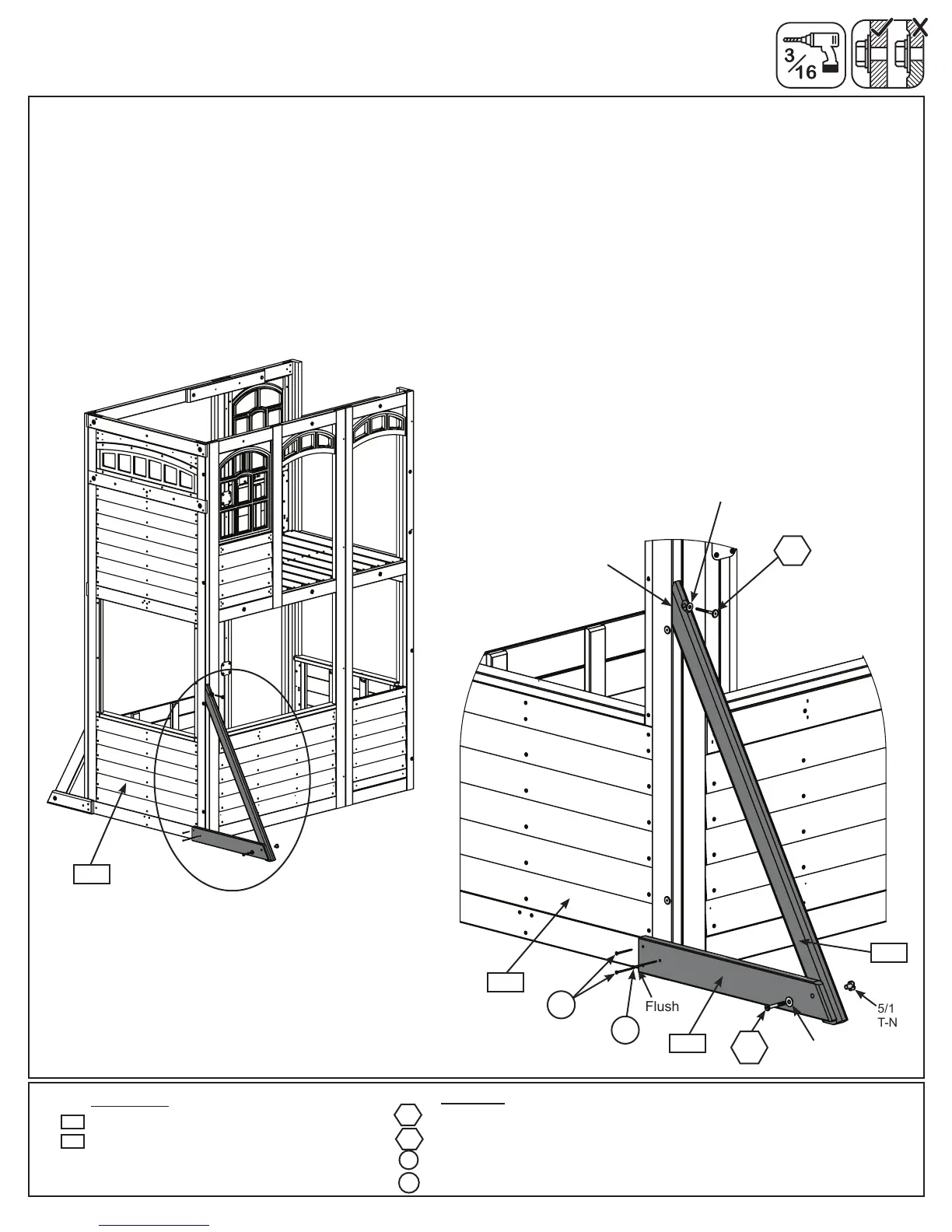
D: Loosely attach (092) Support Diagonal to (093) Diagonal with 1 (WB9) 5/16 x 2-1/8” Wafer Bolt (with at
washer and t-nut) then place (093) Diagonal tight and ush to the back of (050) SW Wall Panel. (092) Support
Diagonal to be ush to the bottom of (050) SW Wall Panel. (g. 9.3 and 9.4)
E: Pre-drill pilot hole with a 3/16” drill bit then attach (093) Diagonal to (050) SW Wall Panel with 1 (WL5) 1/4 x
2-1/2” Wafer Lag (with at washer), checking that it remains ush to outside edge. (g. 9.3 and 9.4)
F: Making sure bottom of (092) Support Diagonal is ush to bottom of (050) SW Wall Panel then attach with 2
(S11) #8 x 2” Wood Screws and 1 (S4) #8 x 3” Wood Screw then tighten the bolt. (g. 9.3 and 9.4)
Fig. 9.3
Fig. 9.4
WL5
S11
S4
WB9
Step 9: Attach Diagonals
Part 2
050
5/16”
T-Nut
Flush
S4
WB9
093
5/16” Flat
Washer
050
S11
092
Flush
5/16” Flat
Washer
WL5
34 europecustomerservice@kidkraft.com


 To Next Page