Chapter 3: Calls, faxes and SMS
88 Use the MCDU
To make a call (air to ground) (MCDU)
You can dial a phone number from two
views in the MCDU:
• Main menu
• MANUAL DIAL menu
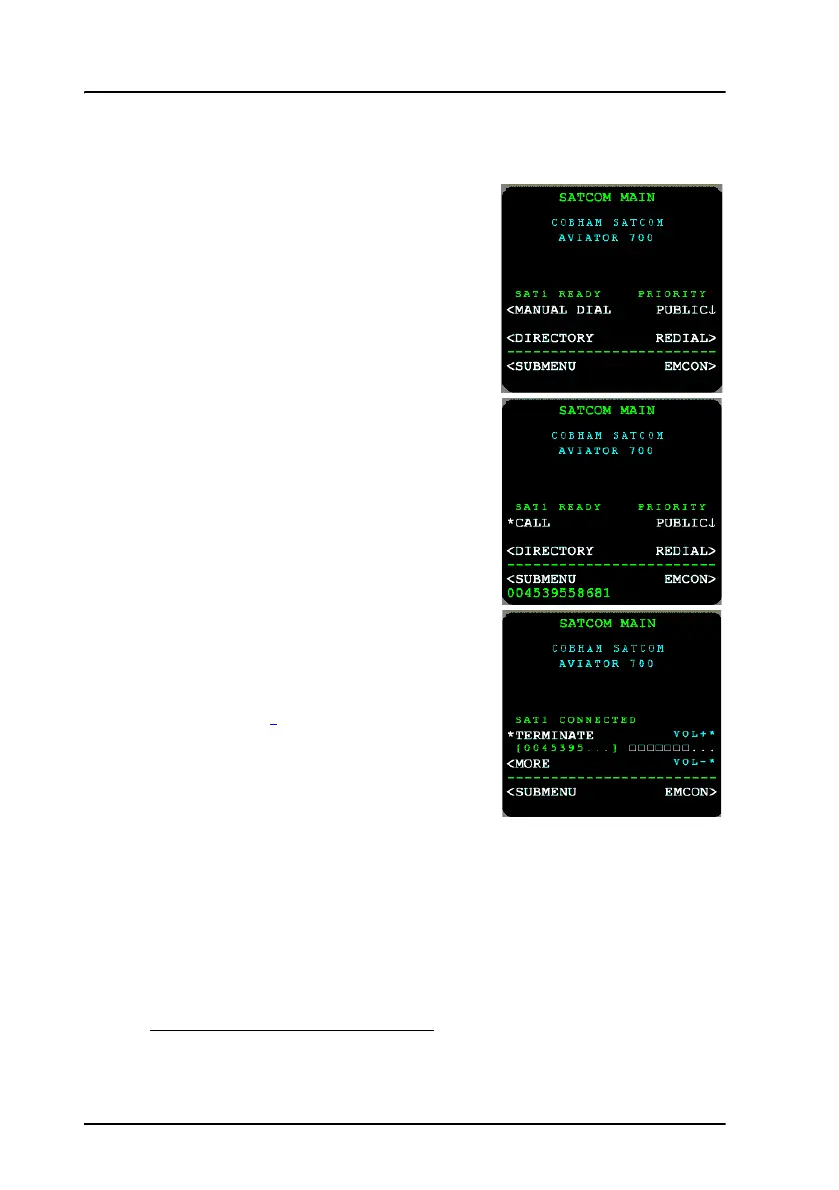
The main menu is shown here.
To make a call, do as follows:
1. Dial 00 <country code> <phone
number> using the numeric keys on the
MCDU and select CALL
1
.
Example: To call the phone number
39558681 in Denmark, Europe,
that has the country code 45
press 004539558681 and then
press CALL.
2. To terminate the call, select
TERMINATE
1
or use the latch key.
While having an active call, the volume can
be adjusted from main menu, or the
submenu MORE, you can put the call on
hold, transfer it or join a conference call. For
further information see To hold a call (MCDU) on page 92, To transfer a
call (MCDU) on page 92 and Conference call (MCDU) on page 93.
If the outgoing call type (see also Select a call type (SDU) on page 34) is
Standard Voice (H
+
), a Classic Aero Call Priority can be assigned to the call.
For more information on call priorities see AVIATOR 700 main menu on
page 150.
1. If in latched mode, activate the call by switching on the Mic Switch.



 To Next Page