UT-4500 Series C- and Ku-Band Up Converters MN/UT4500.IOM
Firmware Update Revision 3
5–7
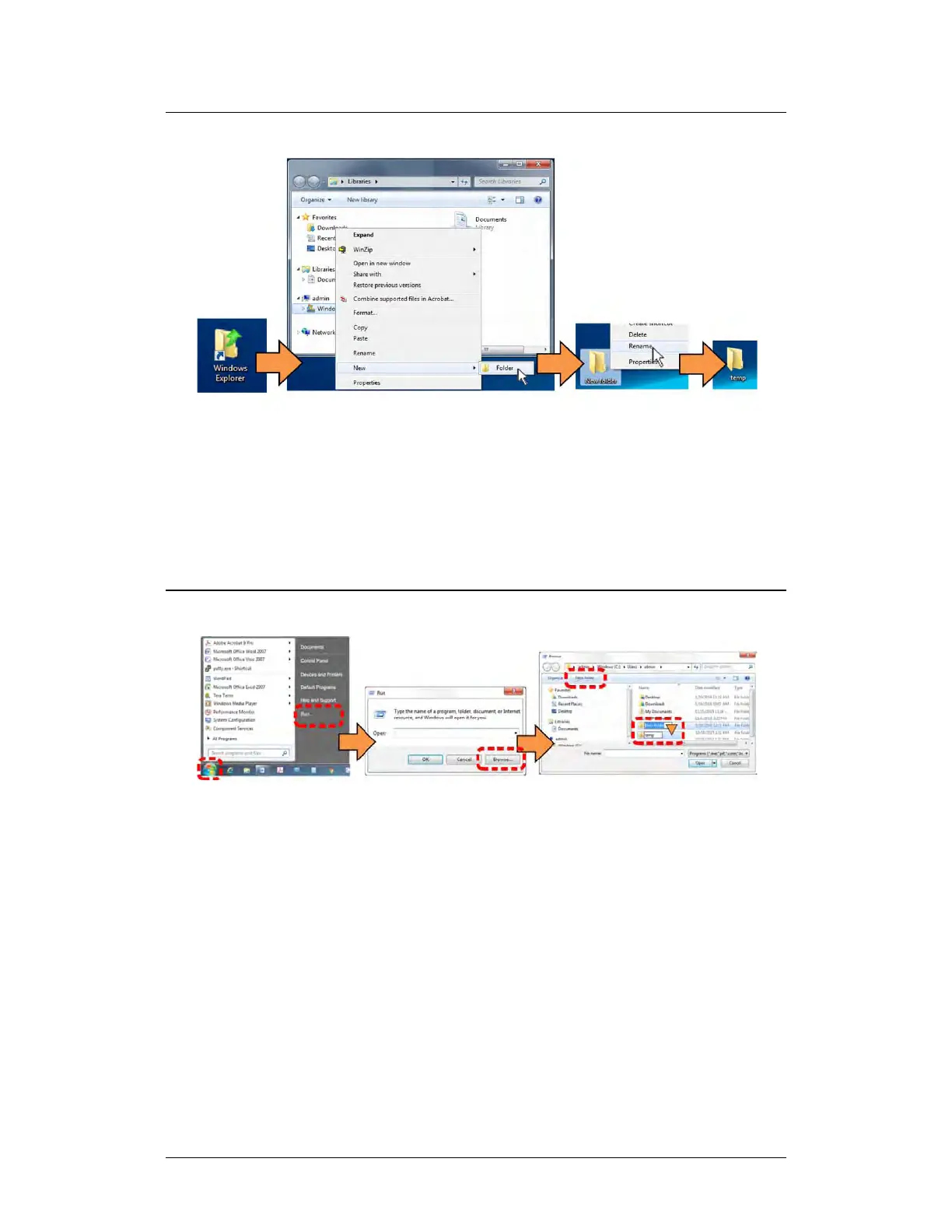
5.2.4.2 Use Windows Explorer to Make a Folder
Do these steps:
1. Left-double-click the Windows Explorer icon on the Windows Desktop.
2. Depending in your Windows OS version: select File > New > Folder, or
click your Folder Destination (e.g., Windows (C:) and then New Folder to
make the new, temporary folder in the active location.
3. Right-click the New Folder folder name, and then Rename this folder to
“temp” or some other convenient, unused name.
5.2.4.3 Use the Run and Browse Windows to Make a Folder
Select Start on the Windows taskbar and then do these steps:
1. Click Run… to open the Run window.
2. Click Browse… to open the Browse window.
3. Click New Folder. This can be an icon or a text label, depending on the
Windows OS version.
4. Right-click the New Folder folder name, and then Rename this folder to
“temp” or some other convenient, unused name.



 To Next Page