Chapter 6 Operation And Display
6.2 Main Menu
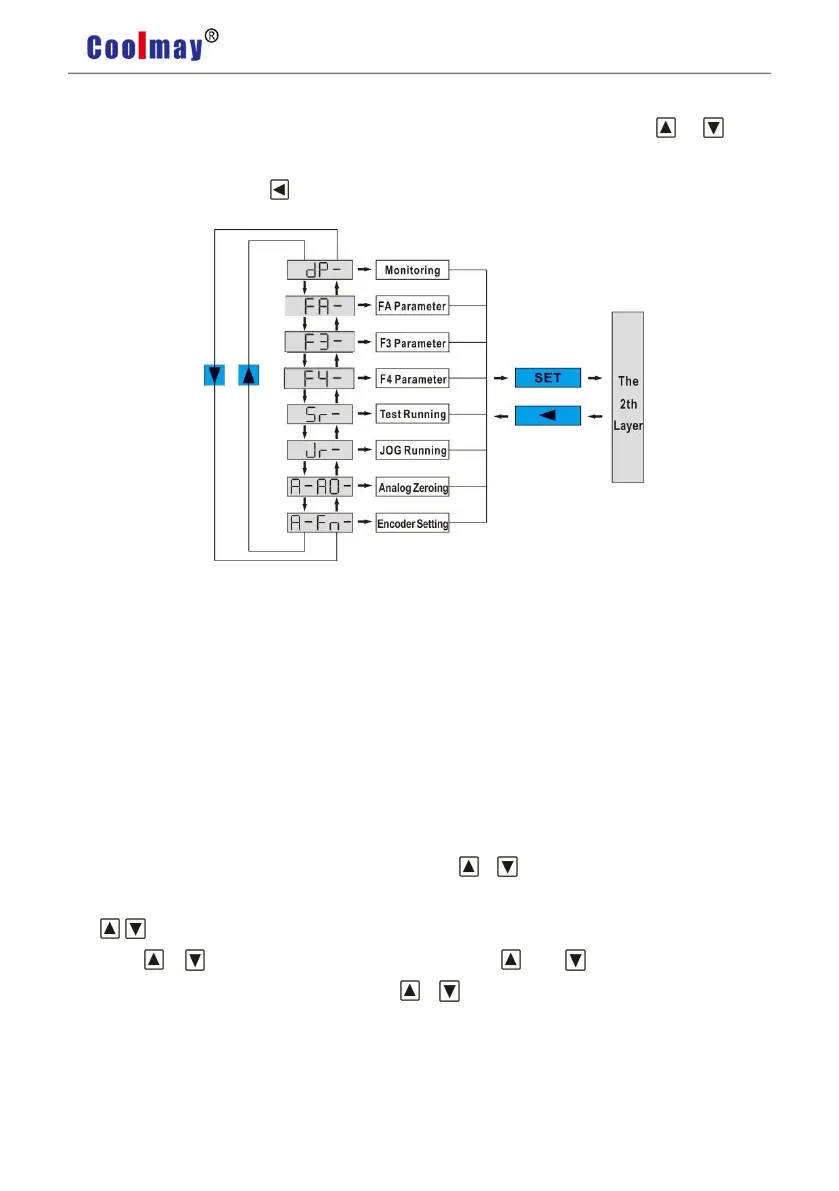
The first layer is the main menu and has 8 operating modes in total. Press or button
to change the operation mode. Then press SET button to enter into the second layer and executes
a concrete operation. Press button returns to the main menu from the second layer.
Pic6.2 Main Menu
6.3 Steps To Set Parameters
The parameter is represented by parameter segment + parameter number. The hundred digits
are the segment number, and the ten digits and the one digit are the parameter number. For
example, for parameter fa53, the segment number is "FA", the parameter number is "53", and the
display is "FA-53".
Select parameter setting "F -" under the main menu, and press SET to enter the parameter
setting mode. First, select the parameter section with , . After selection, press the SET to
enter the parameter number selection of this section. Secondly, select the parameter number
with , . After selection, press the SET to display the parameter value.
Use , to modify the parameter value. Press or key once, the parameter
increases or decreases by 1, press and hold or , the parameter can increase or decrease
continuously. When the parameter value is modified, press the SET key, the decimal point of the
LED digital tube on the far right lights up and flashes twice, that is, the modification is
completed, and the modified value will be reflected in the control immediately (some parameters
need to be saved and then powered on to take effect. ).


 To Next Page