2FD/2FF/2FG
1-6-16
(2) Detaching and refitting the scanner wires
Take the following procedure when the scanner wires are broken or to be replaced.
Caution:
After replacing the scanner wire, make a test copy and check the copy image. If the image is incorrect, perform the
adjustments (see pages 1-6-25 to 31).
(2-1) Detaching the scanner wires
Procedure
1. Remove the exposure lamp (see page 1-6-
19).
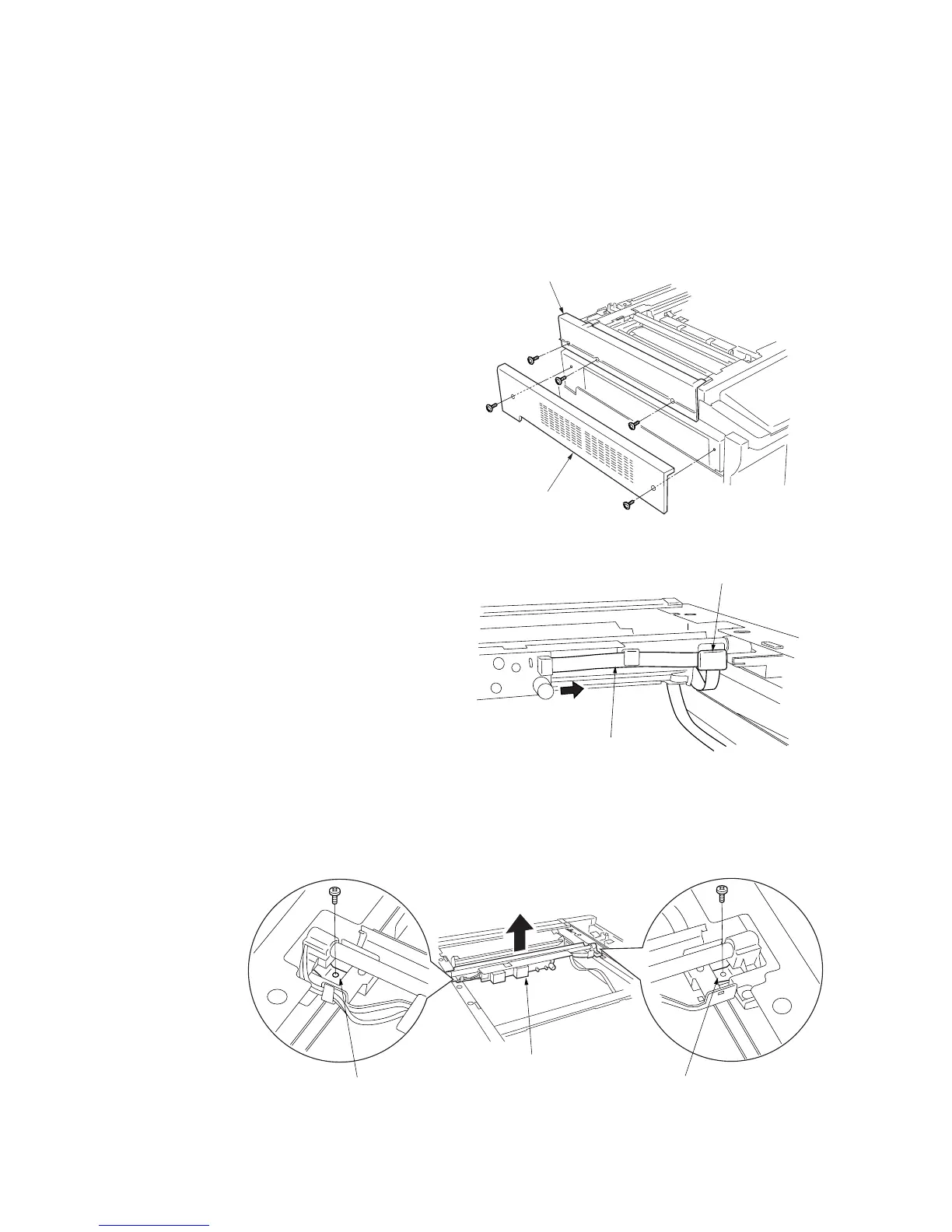
2. Remove the upper left cover and scanner left
cover.
Figure 1-6-29
3. Remove the inverter wire guide plate and
then the wire from the inverter PCB.
Figure 1-6-30
4. Remove the screw holding each of the front
and rear wire retainers and then remove the
mirror 1 frame from the scanner unit.
Figure 1-6-31
Upper left cover
Scanner left cover
Inverter wire
Inverter wire guide plate
Front wire retainer
Mirror 1 frame
Rear wire retainer



 To Next Page