3B5
1-4-2
Enter maintenance mode.
Make a test copy
in staple-sort mode.
Press the start key.
Press the start key.
Press the stop/clear key.
Exit maintenance mode.
Select the item to be adjusted .
Enter “246” using the numeric
keys.
Yes
Yes
No
No
Start
End
Change the setting using the
cursor up/down keys.
Is the paper registration
good?
Is the stapling
position correct?
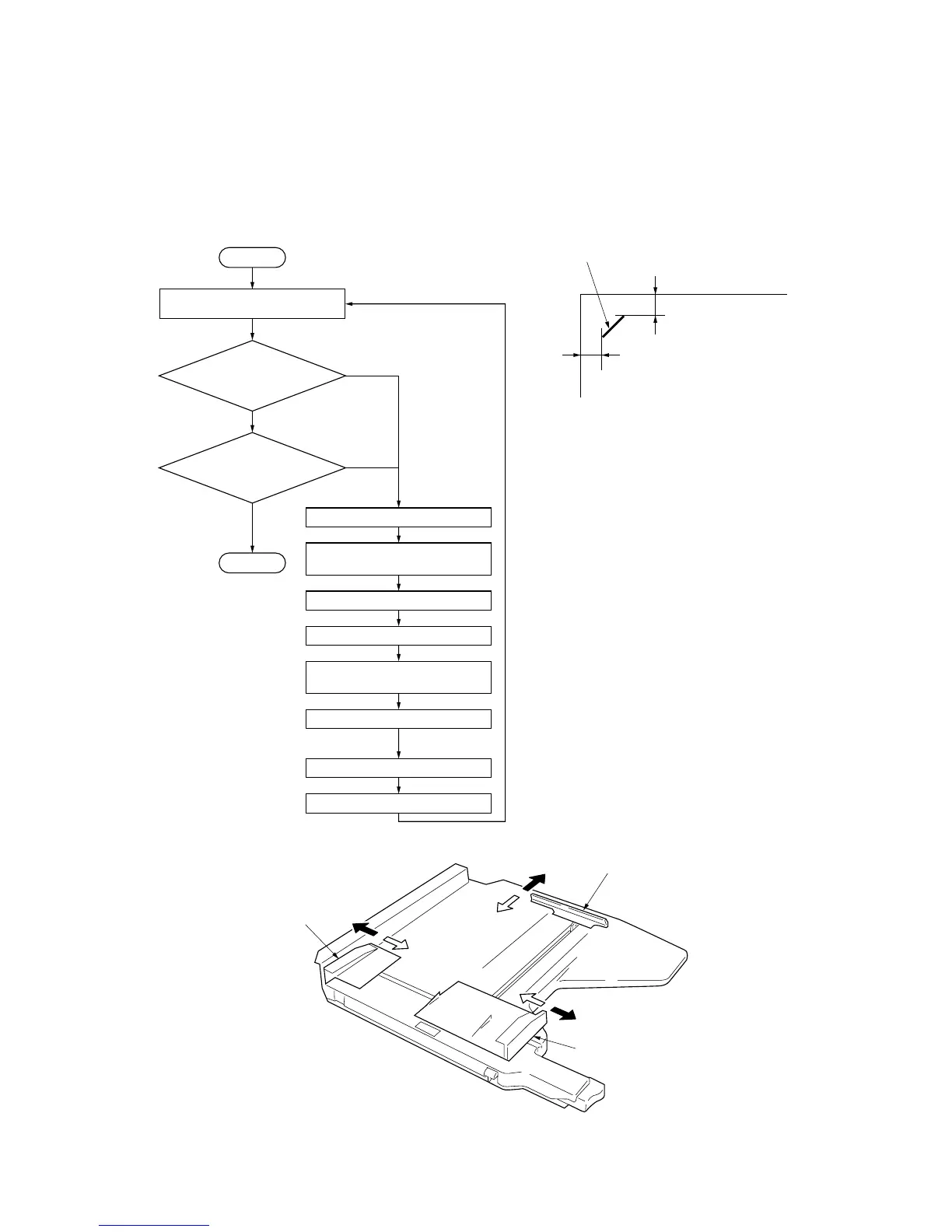
See Figure 1-4-1.
The new setting
is stored.
ADJUST FRONT JOGGER: Stop position of the
front side registration cursor
ADJUST REAR JOGGER: Stop position of the rear
side registration cursor
ADJUST END JOGGER: Stop position of the
trailing edge registration cursor
Setting range: 0 to 8
Reference: 4
Changing the value by 1 changes the position by
0.5 mm.
Increasing the value moves the front or rear side
registration cursor or trailing edge registration
cursor outward (a); decreasing the value moves
each cursor inward (e). See Figure 1-4-2.
(2) Adjusting the positions of the front side registration cursor, rear side registration cursor and trailing edge
registration cursor (reference)
Perform the following adjustment if paper registration is poor or stapling is made outside the specified area.
Procedure
Figure 1-4-1 Stapling position



 To Next Page