3CC
1-4-5
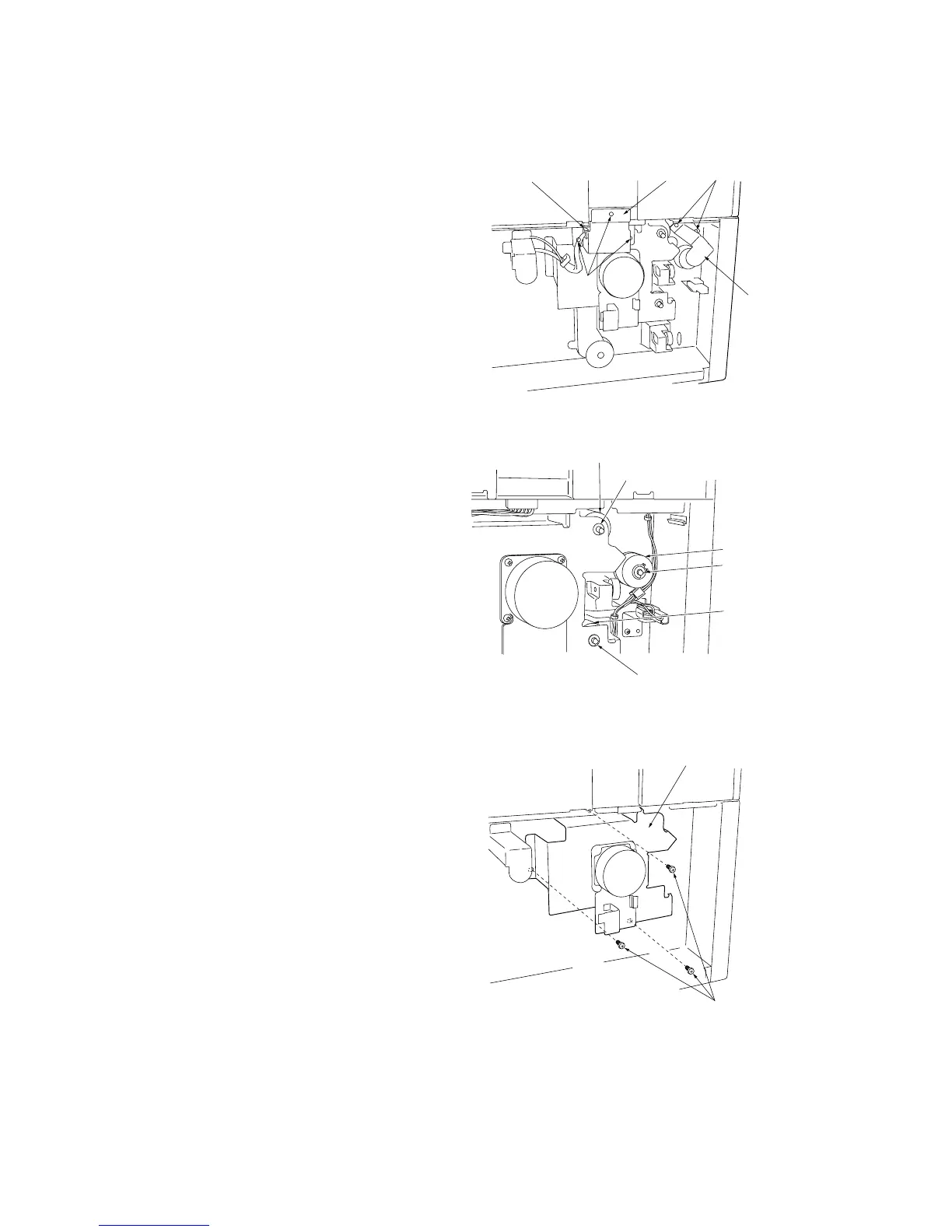
(3) Replacing the desk feed, upper and lower paper feed clutches
Replace the desk feed, upper and lower paper feed clutches as follows.
Procedure
1. Remove the three screws holding the desk
rear cover and then the cover.
2. Remove the cable from the retainer clamp.
3. Remove the three screws holding the retainer
and then the retainer.
4. Remove the two screws holding the rear
cover left retainer and then the retainer.
Figure 1-4-10
5. Remove the upper and lower stop rings and
bearings from the desk upper and lower
paper feed clutches.
6. Remove the stop ring from the desk feed
clutch.
Figure 1-4-11
7. Remove the three screws holding the desk
drive motor retainer and then the retainer.
Figure 1-4-12 Detaching the desk drive motor retainer
Clamp
Screws
Screws
Retainer
Rear cover
left retainer
Stop ring and bearing
Stop ring and bearing
Desk upper paper feed clutch
Desk lower paper
feed clutch
Stop ring
Desk feed clutch
Desk drive motor retainer
Screws



 To Next Page