3CC
1-4-2
1-4-2 Paper feed section
(1) Detaching and refitting the forwarding, paper feed and separation pulleys
Replace the forwarding, paper feed and separation pulleys as follows.
Procedure
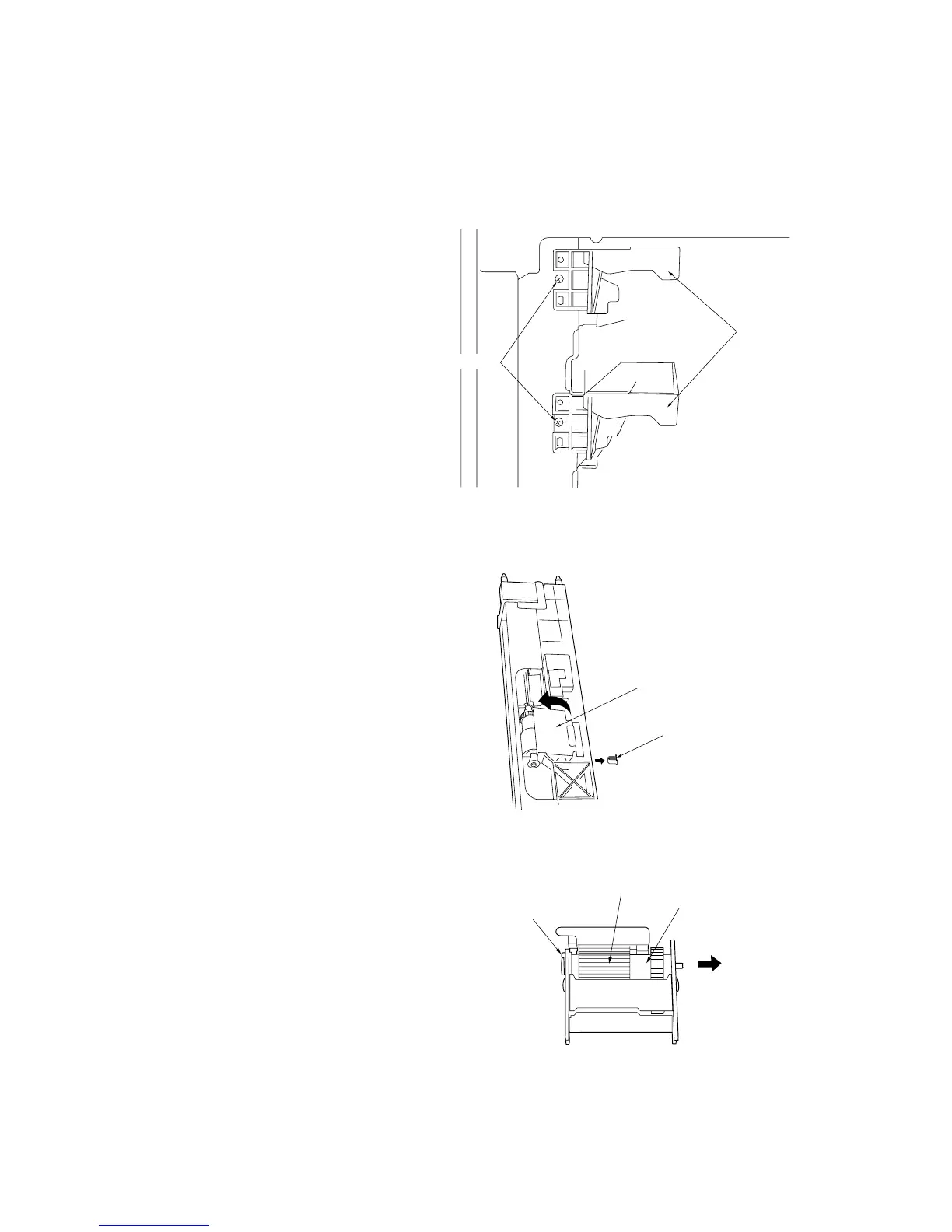
• Removing the primary paper feed units
1. Remove the upper and lower drawers.
2. Remove the two screws holding the lower
front cover and then the cover.
3. Remove the one screw from each of the
primary paper feed units and then the units.
Figure 1-4-1 Detaching the primary paper feed units
• Removing the forwarding pulley
4. Remove the stopper.
5. Raise the forwarding pulley retainer in the
direction of the arrow, and remove from the
primary paper feed unit.
Figure 1-4-2 Detaching the forwarding pulley retainer
6. Remove the stop ring, pull the forwarding
pulley shaft in the direction of the arrow, and
remove the forwarding pulley.
Figure 1-4-3 Detaching the forwarding pulley
Primary paper
feed units
Screws
Forwarding pulley retainer
Stopper
Stop ring
Forwarding pulley
Forwarding pulley shaft



 To Next Page