3CC
1-4-3
• Removing the paper feed pulley
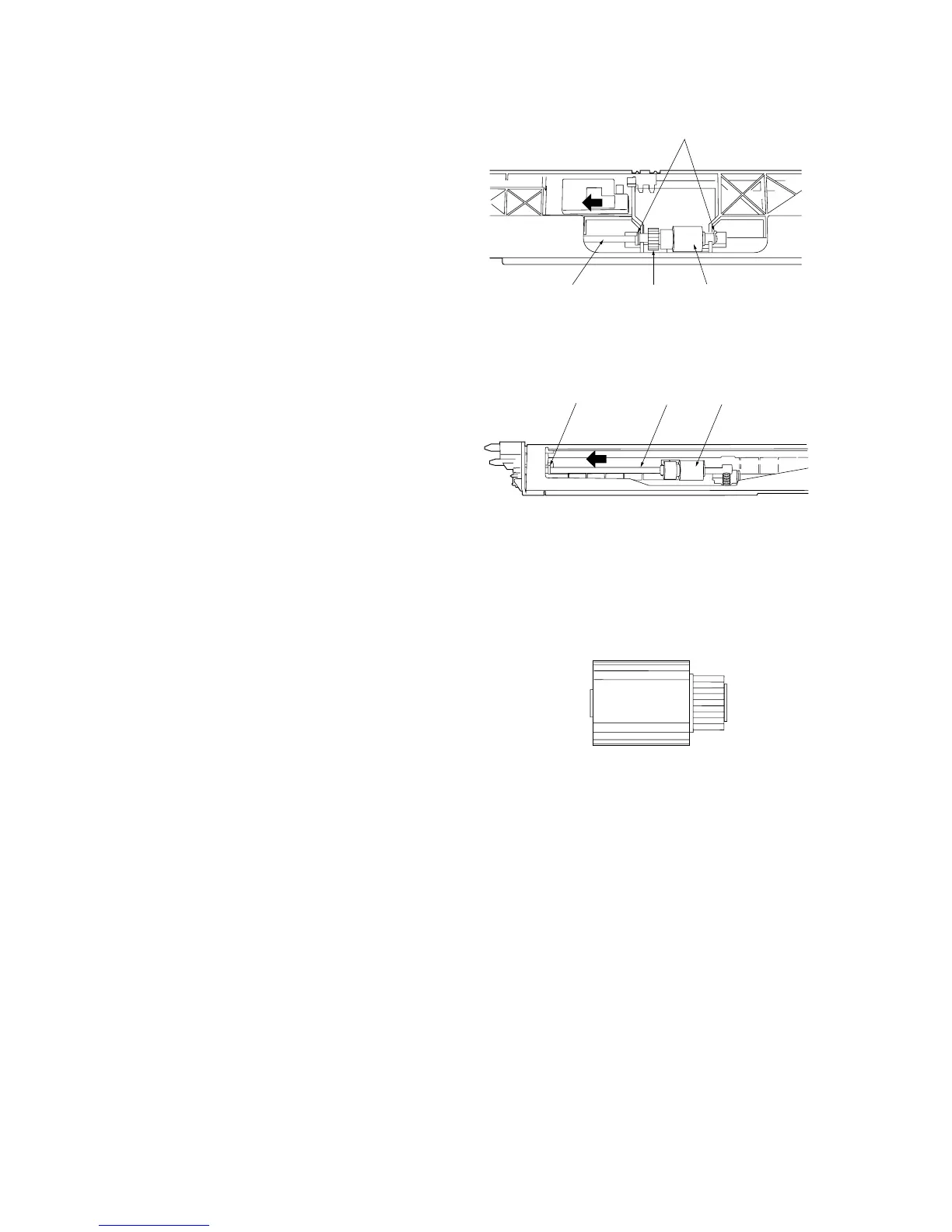
7. Remove the two stop rings.
8. Pull the paper feed shaft toward the rear of
the primary paper feed unit (in the direction of
the arrow) and remove the paper feed pulley
and gear.
Figure 1-4-4 Detaching the paper feed pulley
• Removing the separation pulley
9. Remove the stop ring from the rear of the
primary paper feed unit.
10. Pull the separation shaft toward the rear of
the machine (in the direction of the arrow)
and remove the separation pulley.
11. Replace the forwarding, paper feed and
separation pulleys.
12. Refit all removed parts.
Figure 1-4-5 Detaching the separation pulley
Cautions:
• When fitting the forwarding pulley, orient it
correctly as shown in Figure 1-4-6.
• When fitting the paper feed pulley and gear, keep
the blue end of the paper feed pulley and the
black end of the gear toward the machine rear.
Figure 1-4-6
Paper feed shaft Gear Paper feed pulley
Stop rings
Stop ring
Separation shaft
Separation pulley
Forwarding pulley
Machine front Machine rear



 To Next Page