Artiglio Master Code User Manual 73
UK
5.9. MENU
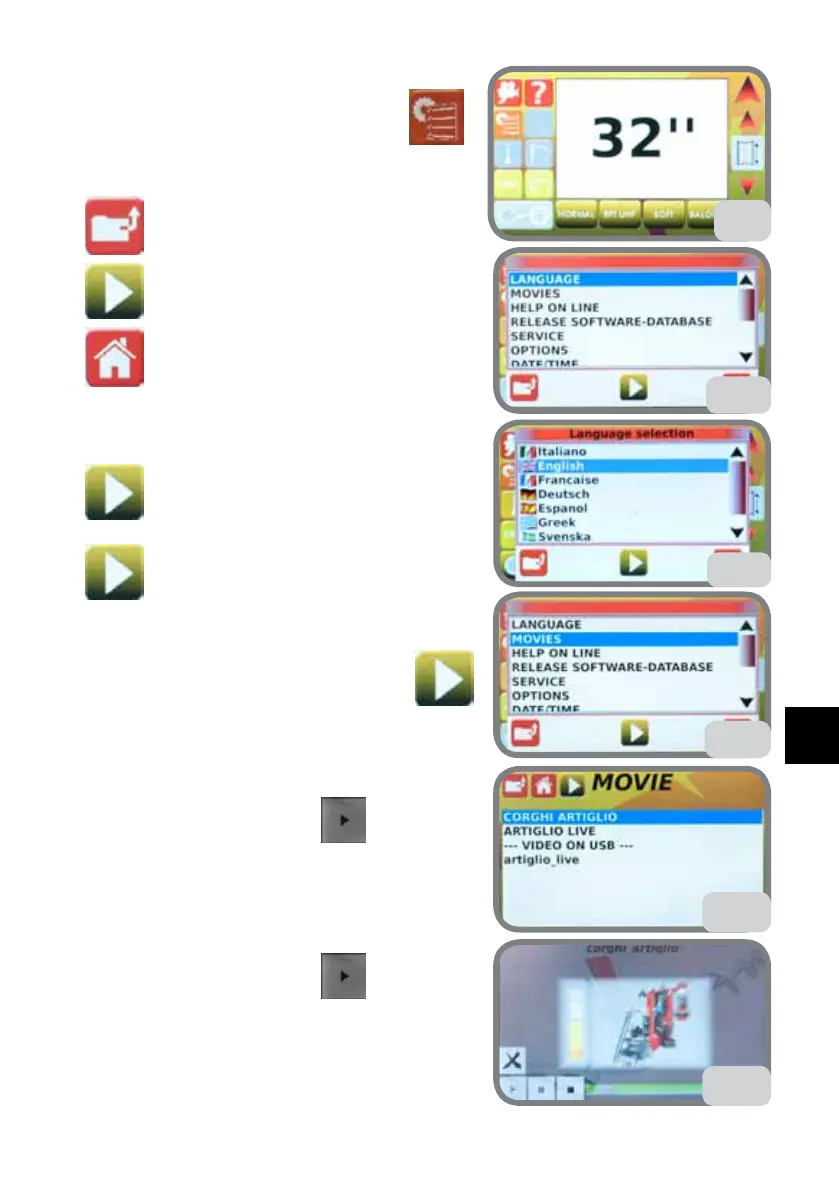
From the main screen (Fig. 52) press the key .
Description of universal buttons:
On one level
Confirm key
Exit
5.9.a. LANGUAGE
Select LANGUAGE then press the confirm key
(Fig. 53).
Select the language then press the confirm key
(Fig. 53a).
5.9.b. MOVIES
Select MOVIES then press the confirm key
(Fig. 54).
- Videos from SD-CARD:
1. Select the video from the list (Fig. 54a)
2. Highlight it and press PLAY
(Fig. 54a).
- Videos from USB pen:
1. Put the USB pen with the videos in the right port
2. At the end of the list --- “VIDEOs from USB” ---
will be displayed listing all videos in the USB pen
3. Highlight it and press PLAY (Fig. 54a).
Press the touch screen in any area while the video
is playing to display an operating menu for around
6 seconds (see Fig. 54b) with the following options:
“X” to Exit the video
53
54
54a
54b
52
53a



 To Next Page