Artiglio Master Code User Manual 75
UK
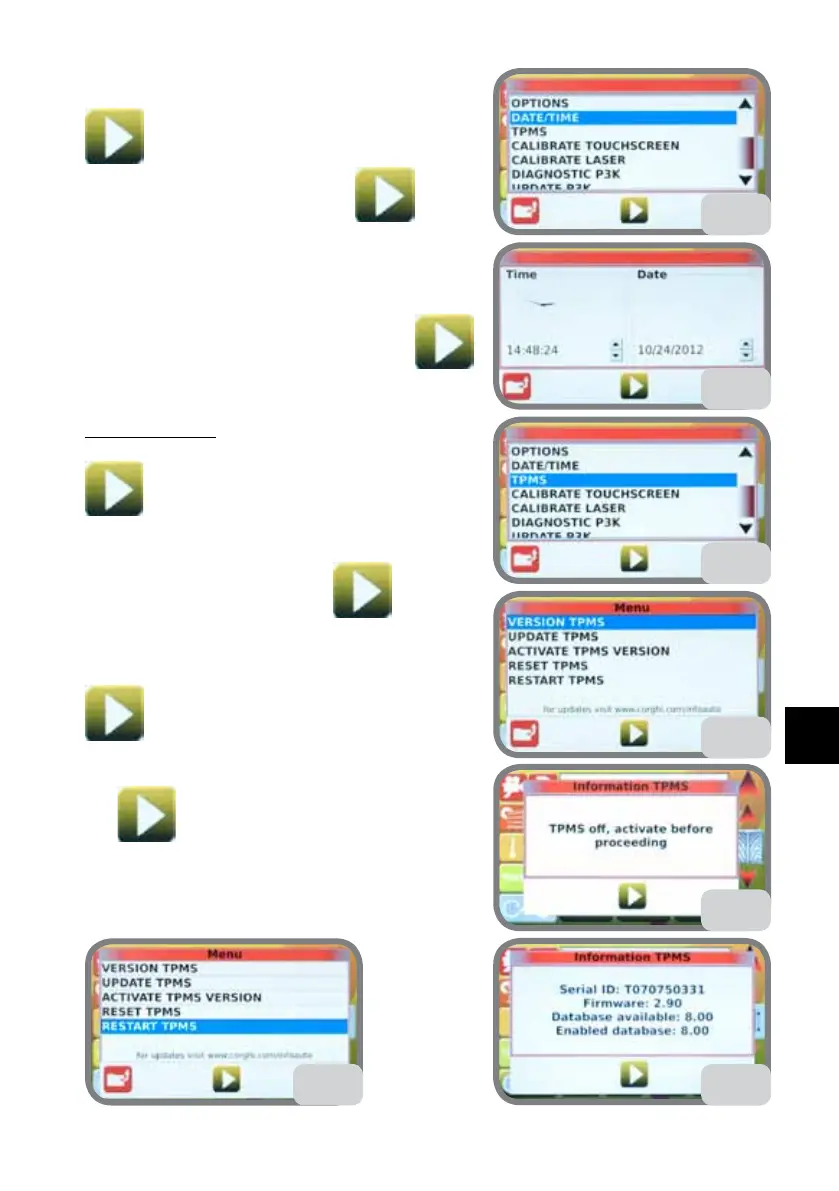
5.9.g. DATE/TIME
Select DATA/TIME then press the confirm key
(Fig. 59).
Set the date and time then press
to con-
firm (Fig. 59a).
5.9.h. TPMS
Select TPMS then press the confirm key
(Fig. 60).
VERSION TPMS
Select VERSION TPMS then press the confirm key
(Fig. 60a).
If the TPMS is off, an error message will be displayed
(Fig. 60b). Press the confirm key
to go back
to the previous screen.
Select RESTART TPMS then press the confirm key
(Fig. 60c).
Re-select VERSION TPMS then press the confirm
key
(Fig. 60a).
Note the SERIAL ID, FIRMWARE and DATA-
BASE AVAILABLE (Fig. 60d).
59
59a
60
60a
60c
60b
60d



 To Next Page