Artiglio Master Code User Manual 81
UK
5. Credit to top up the TPMS02 is added to the user profile.
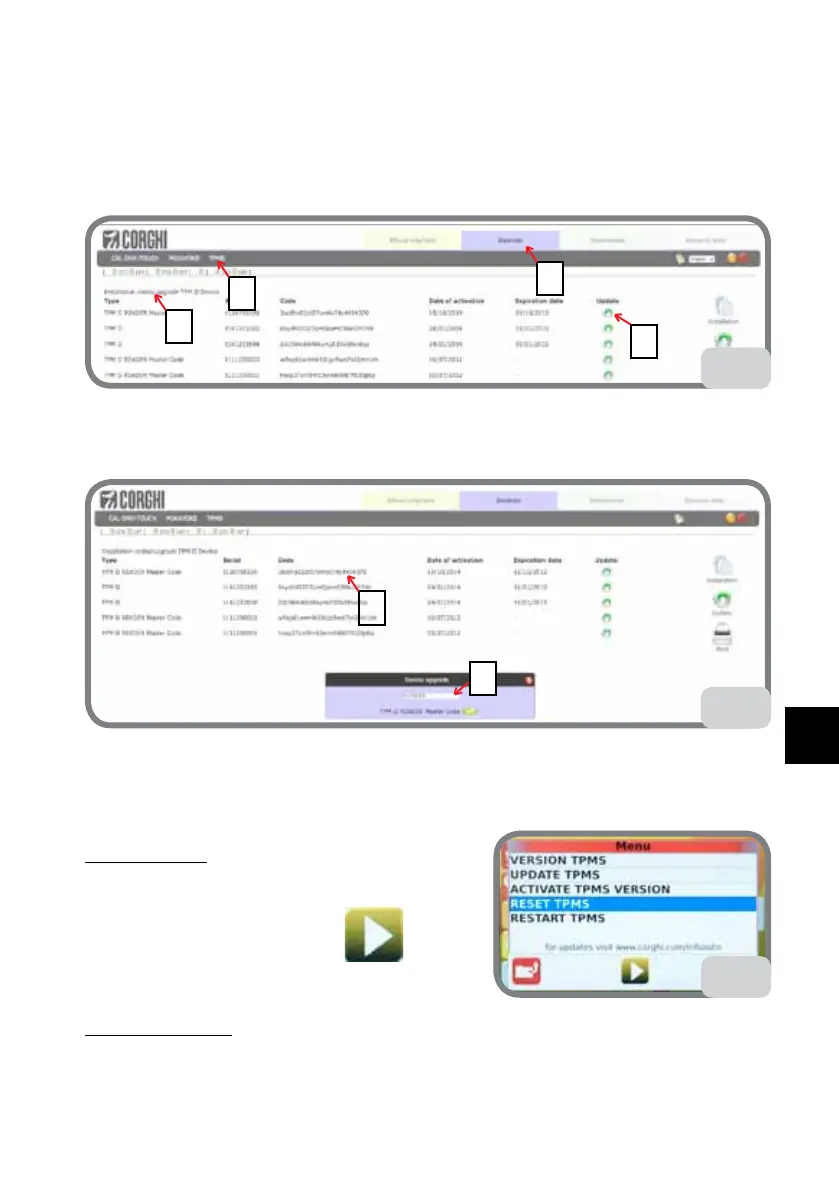
6. Select DEVICES (Fig. 64c - point a) and then TPMS (Fig. 64 - point b).
The number and type of credit available will be shown at the top (Fig. 64c - point c).
7. Select UPDATE (Fig. 64c - point d) of the device to update.
d
b
a
c
64c
8. Confirm (Fig. 64d - point a).
A new Password will be generated (Fig. 64d - point b).
64d
b
a
To activate the updated Database, proceed with ACTIVATE TPMS VERSION previously
described.
RESET TPMS
1. If you need to reset the TPMS, select RESET
TPMS then press the confirm key
(Fig. 65).
RESTART TPMS
1. If you need to restart the TPMS, select RESTART TPMS then press the confirm key
65



 To Next Page