Artiglio Master Code User Manual 97
UK
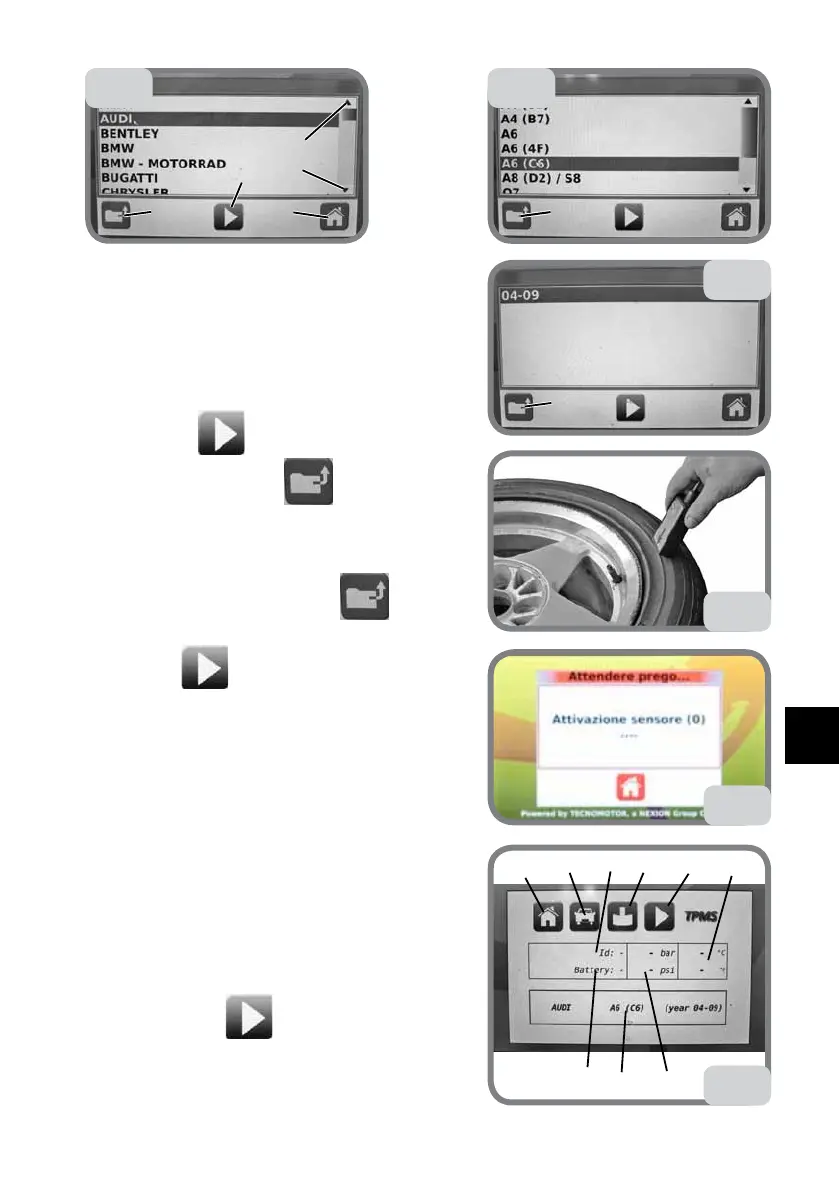
- The vehicle brand database will be displayed
(Fig. 77a).
- Use the arrows (1 and 2) on the right, or vertically
drag the cursors between the two arrows to search
for the brand.
- Select and click on the brand to highlight it (Fig.
77b).
- Select key 3
to confirm. If you select the
wrong brand, press key 4 to go back to the
previous page.
- Carry out the same operations to select the model
(Fig. 77b) and year of manufacture (Fig. 77c). If you
select the wrong year, press key 4 to go back
to the previous page.
- Select key
(Fig. 77c) to confirm.
- The display will show (Fig. 77f):
1 The key enabling the sensor
2 The key displaying sensor technical data
3 The vehicle database key (to make a new choice)
4 The key to exit TPMS
5 Data of the selected vehicle (brand, model, year
of manufacture)
6 The sensor battery level
7 The sensor code
8 The sensor pressure in bar and PSI
9 The temperature inside the tyre in °C and °F
- Position the sensor on the tyre side in the direc-
tion of the valve, at an angle of about 45° (Fig.
77d). Never position the sensor on the rim side.
- Press the button
(1, Fig. 77f)
to activate the
sensor reading
(Fig. 77e).
- After reading the mask offers screen of
Fig. 77f
with the sensor data.
1
2
3
4
5
77a
4
77b
77c
4
77d
1
4
6
7
8
2
3
5
77f
9
77e



 To Next Page