120 • 4-Series™ Control Systems Product Manual — Doc. 8559B
Control Subnet (AV4/CP4N/PRO4Only)
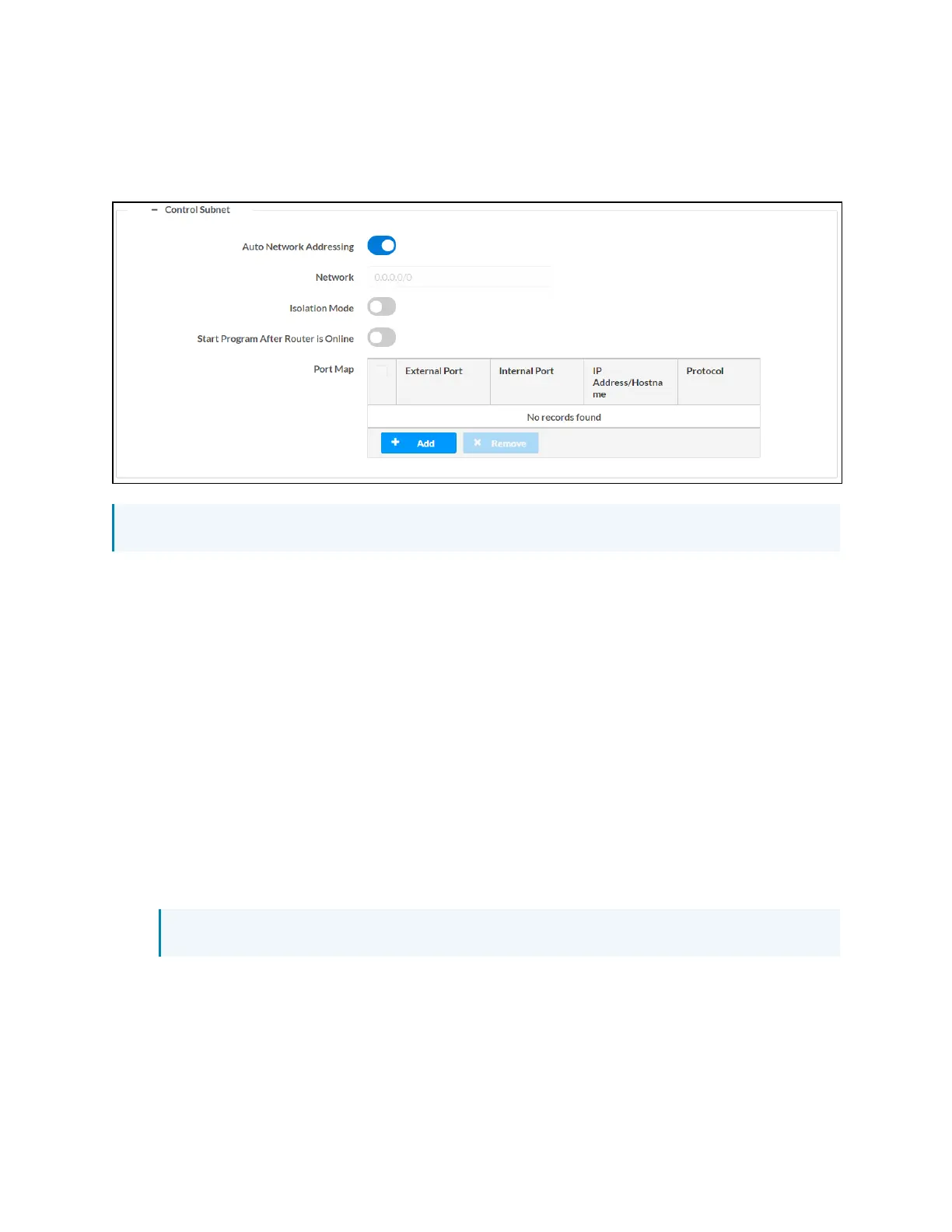
Select the + (plus)icon next to Control Subnet to display the following Control Subnet settings.
Settings Tab - System Setup (Control Subnet)
NOTE:For more information on the Control Subnet, refer to Control Subnet (on page185).
l
Turn on the Auto Network Addressing toggle to assign a network address for the Control
Subnet automatically. If this toggle is turned off, a static address must be entered in the
Network text field below.
l
If Auto Network Addressing is turned off, enter a static Control Subnet network address in
the Network text field. The network address must be in CIDR(Classless Inter-Domain
Routing)format that includes the bit mask count after the address (such as
"192.168.0.0/24").
l
Turn on the Isolation Mode toggle to run the Control Subnet in isolation mode. When in
isolation mode, the firewall is configured so that no communication can occur between the
LAN and devices on the Control Subnet. Using this mechanism, customers can protect
their corporate LAN from devices on the Control Subnet. For more information, refer to
Control Subnet (on page185).
l
Turn on the Start Program After Router is Online toggle to start control system programs
only after the internal Control Subnet router is reporting online.
l
Use the Port Map table to create port mapping rules to use with the Control Subnet.
NOTE:No port maps can be added if Isolation Mode is turned on.



 To Next Page