126 • 4-Series™ Control Systems Product Manual — Doc. 8559B
Edit a Program
To edit the IPtable for a control system program (if permitted by the program):
1.
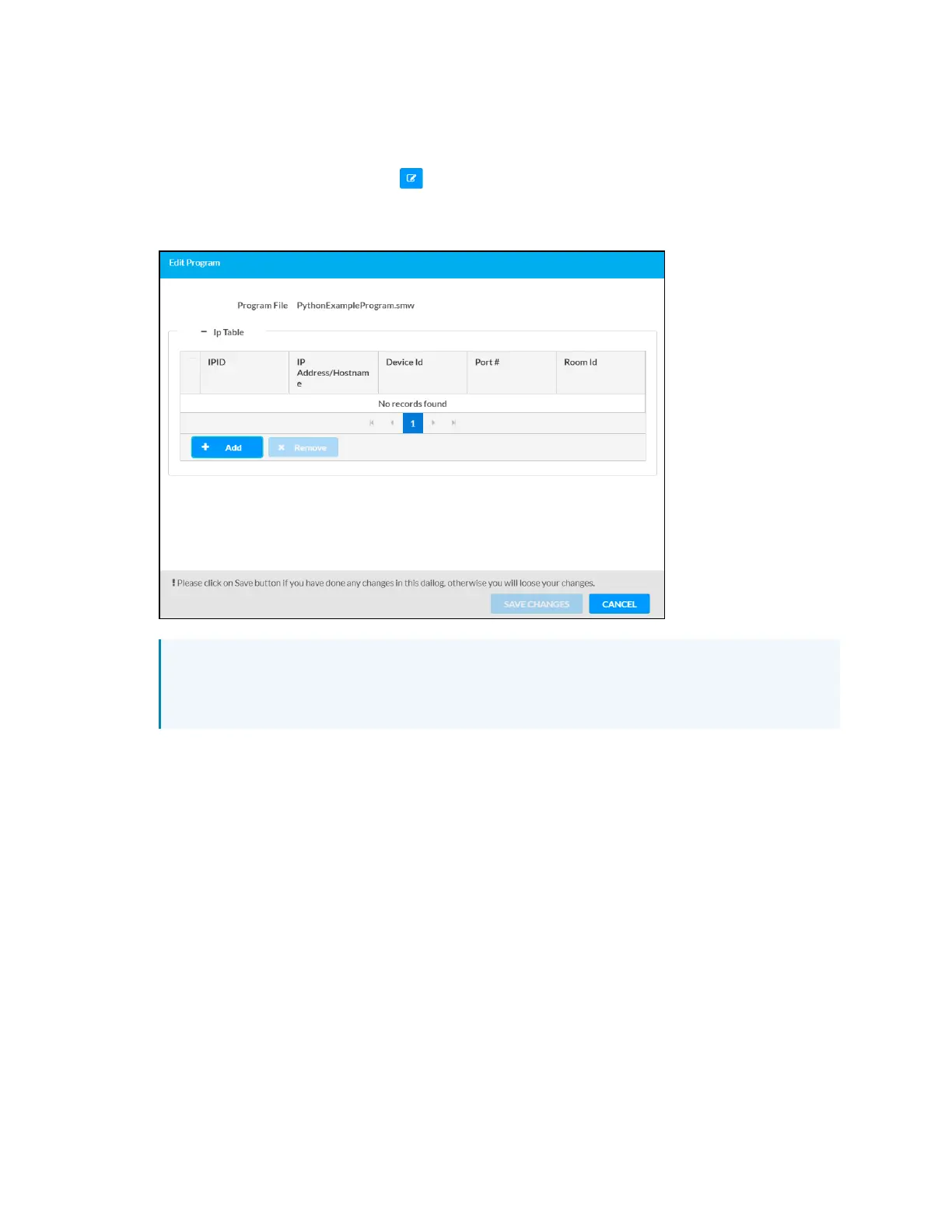
Select the Edit Program button in the desired program slot. The Edit Program dialog
box is displayed.
Edit Program Dialog Box
NOTE: If IPtable entries have already been defined in the program, these entries will
populate the table in the Edit Program dialog box unless the Do not copy IPTable
check box was filled when loading the program to the control system.
2. Select Add to add a new IP table entry for the program (if necessary).
3. Enter or update the following information in each column for the IPtable entry:
l
IPID:Enter an IPIDthat will be used for communication between a device and the
control system.
l
IPAddress/Hostname:Enter the IPaddress or host name for the device that will
connect to the control system over IP.
l
Device Id:Enter a unique ID for the connecting device. By default, this value is the
same as the provided IPID.
l
Port #:Enter the port used for communication between device and control system.
l
Room Id:Enter the Crestron Virtual Control (VC-4)room ID that is associated with
theIP table entry. This setting is applicable only for VC-4 connections.
4. Select Save Changes to save any changes to the IPtable.



 To Next Page