Hardware Configuration Options
4 AlterPath PM Installation, Administration, and User’s Guide
Hardware Configuration Options
The AlterPath PM can be used in one of three hardware configurations:
• Standalone – Managed independently of any other hardware device.
See “Standalone Configuration” on page 4.
• Daisy-chained – Multiple slave PMs connected to one another and
managed by one master PM.
See “Daisy-chained Configuration” on page 5.
• Integrated – Managed by a Cyclades TS, AlterPath ACS, AlterPath
OnSite, one of the AlterPath KVM products, or by any other console/
terminal management device.
See “Integrated Configuration” on page 6.
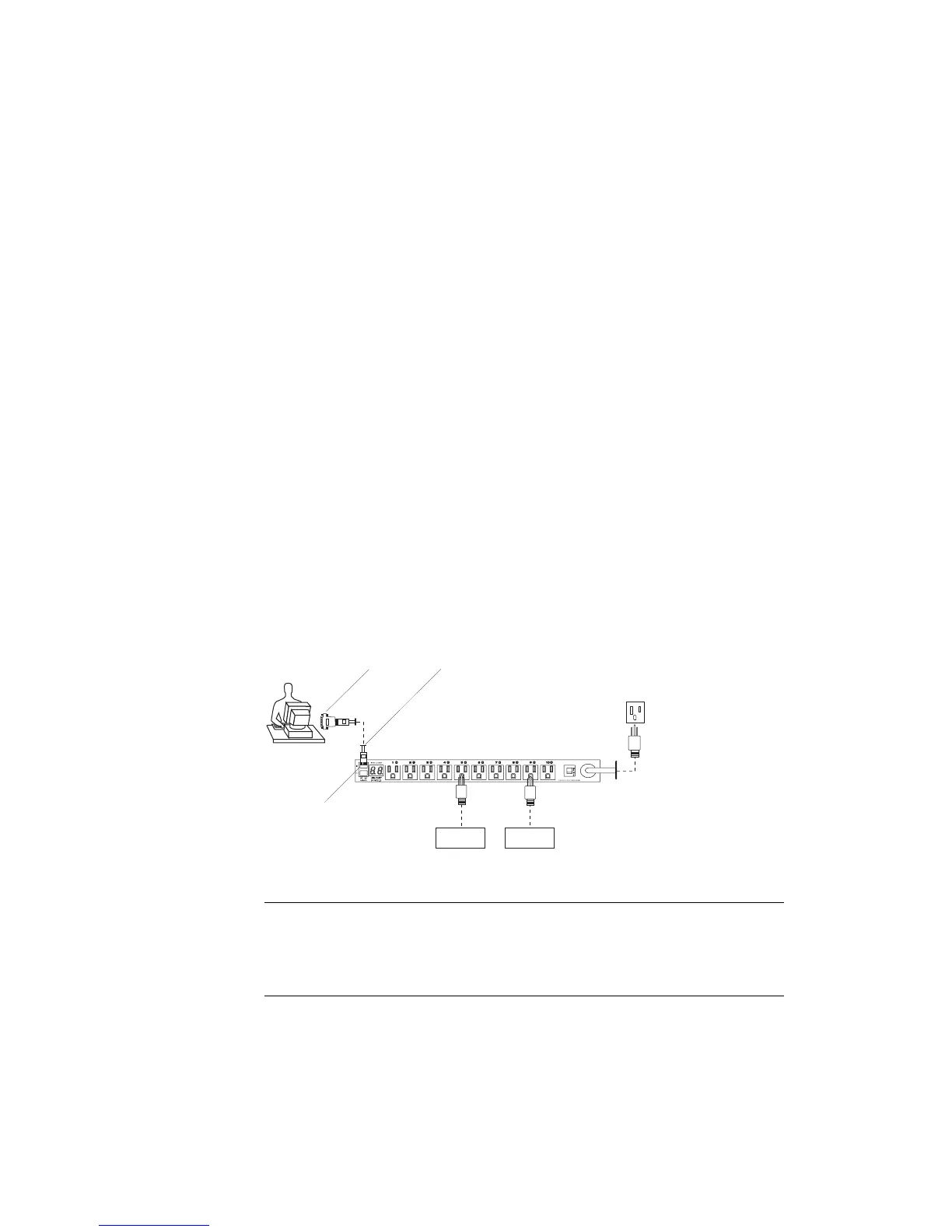
Standalone Configuration
In a standalone configuration, the AlterPath PM operates independently of
any other hardware such as the TS or ACS. The following graphic displays a
PM with the console port connected to a computer running HyperTerminal,
Kermit, or Minicom.
Figure 1-1: Standalone Configuration
Note: The previous graphic displays the PM being connected to the local work
station with the RJ-45 to DB-9F adapter that is shipped with the product. If
your work station does not have a DB-9M COM port, you may need to use a
USB serial adapter in order to connect to the computer’s USB port.
Power Source
User
Server Switch
IN port
RJ-45 cableRJ-45 to DB-9F adapter



 To Next Page