48D-Link DSL-2750B Wireless N300 ADSL2+ Modem Router User Manual
Section 3 - Conguration
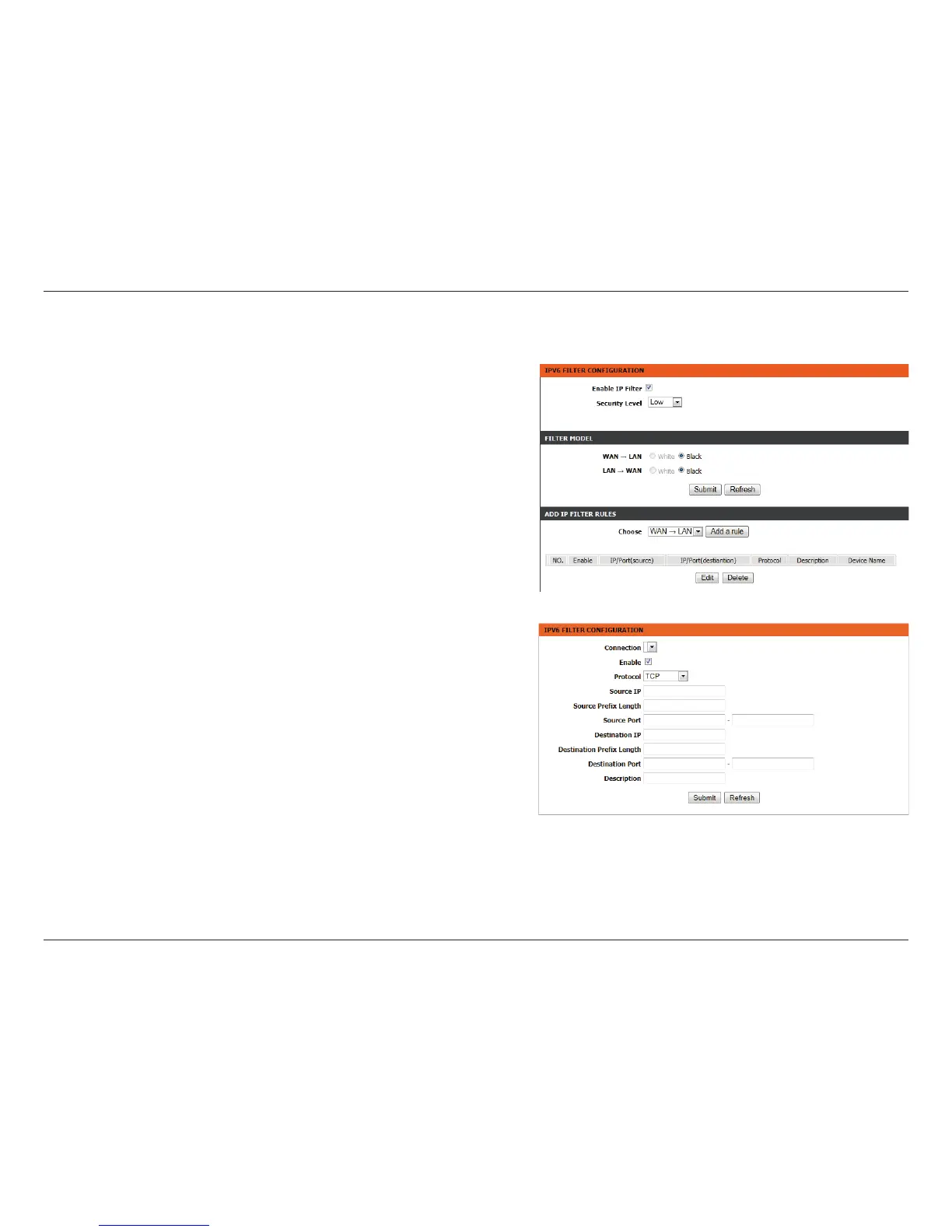
IPv6 Filtering
Enable IP
Filter:
Check to enable or disable the IPv6 Filter.
Security
Level:
Select the security level.
Low will set the lter to Black in both directions.
Middle will set the lter to White in the WAN -> LAN direction
and White in the LAN -> WAN direction.
High will set the lter to White in both directions.
Filter
Model:
Select the lter model to adjust and click Add a Rule to reveal
further options.
Enable: Check to enable or disable the IPv4 model.
Connection: Select the connection to be ltered.
Protocol: Select the appropriate protocol for the connection.
Source IP: Enter the sending IP address to be ltered.
Source
Mask:
Enter the sending mask to be ltered.
Source Port: Enter the sending port to be ltered.
Destination
IP:
Enter the destination IP address to be ltered.
Destination
Mask:
Enter the destination mask to be ltered.
Destination
Port:
Enter the destination port to be ltered.
Description: Enter a name for the lter rule.



 To Next Page