3-6
EXTERNAL PARTS
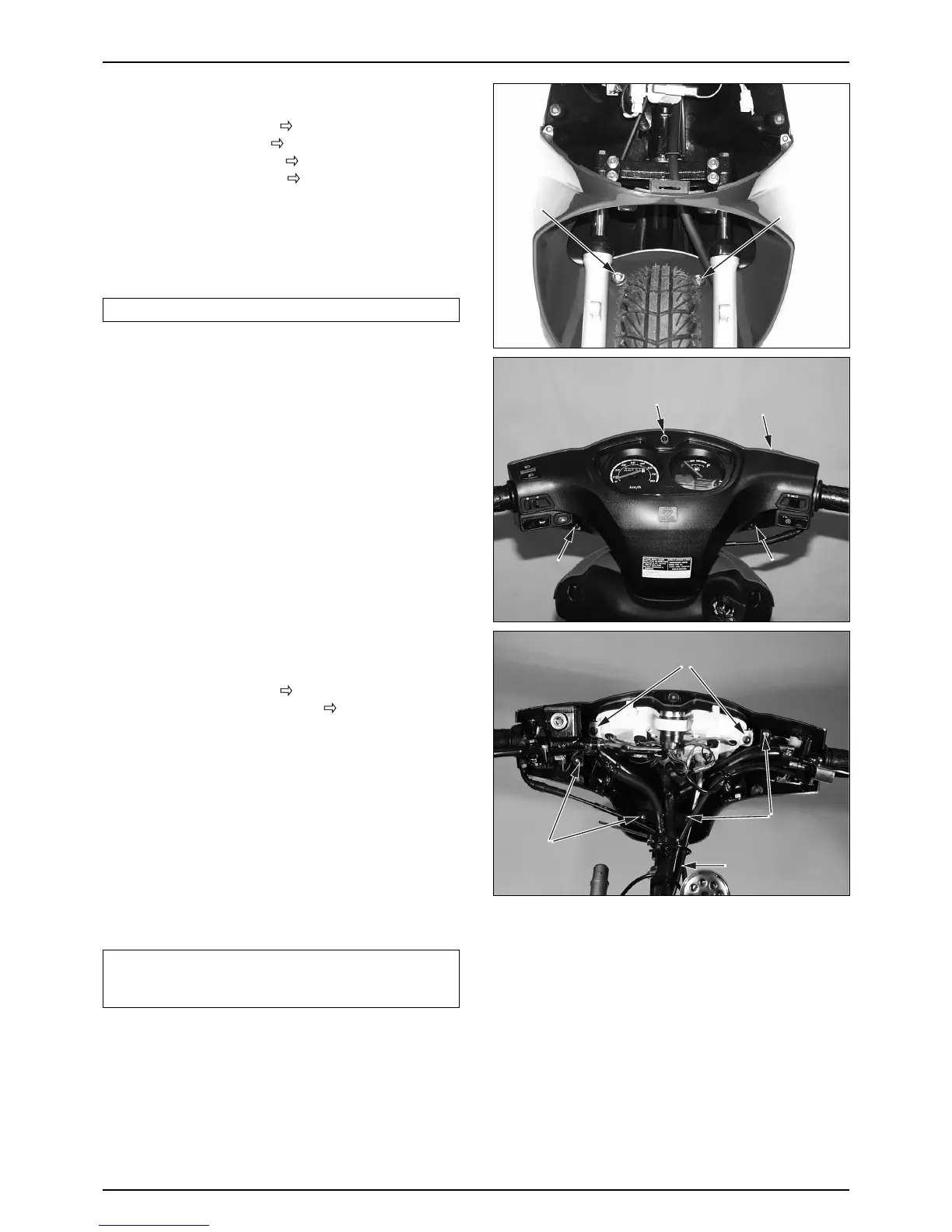
FRONT UNDER COVER
● Remove the front cover. ( 3-5)
● Remove the inner box. (
3-5)
● Remove the front fender. (
3-5)
● Remove the front wheel. (
10-5 )
● Loosen the flange bolts securing the lower end of the
inner box.
● Remove the front under cover.
● Install in the reverse order of removal.
NOTE
•Pay attention not to turn over the vehicle.
FRONT HANDLE COVER
● Remove the back mirror.
● Remove the master cylinder seal.
● Loosen the 3 tapping screws securing the rear handle
cover.
● Remove the front handle cover while pull the cover to
the front slightly.
● Install in the reverse order of removal.
REAR HANDLE COVER
● Remove the back mirror.
● Remove the front cover. (
3-5)
● Remove the front handle cover. (
3-6)
● Remove the speedometer cable from the meter.
● Loosen the 4 tapping screws securing the steering
handle comp.
● Disconnect the right and left switch wiring.
● Remove the speedometer and rear handle cover from
the steering handle.
● Disconnect the right and left switch.
● Loosen the 3 tapping screws securing the speedometer
and the rear handle cover.
● Remove the rear handle cover.
● Install in the reverse order of removal.
NOTE
•Check each switch for proper operation after
installation.
•Wires and cables must be connected properly.



 To Next Page