Manual Datafox Evo 4.3 Page 21 Date: 27.12.2017 V 04.03.09.XX
Menu bios:
firmware information
system information
communication
display and signals
date and Time
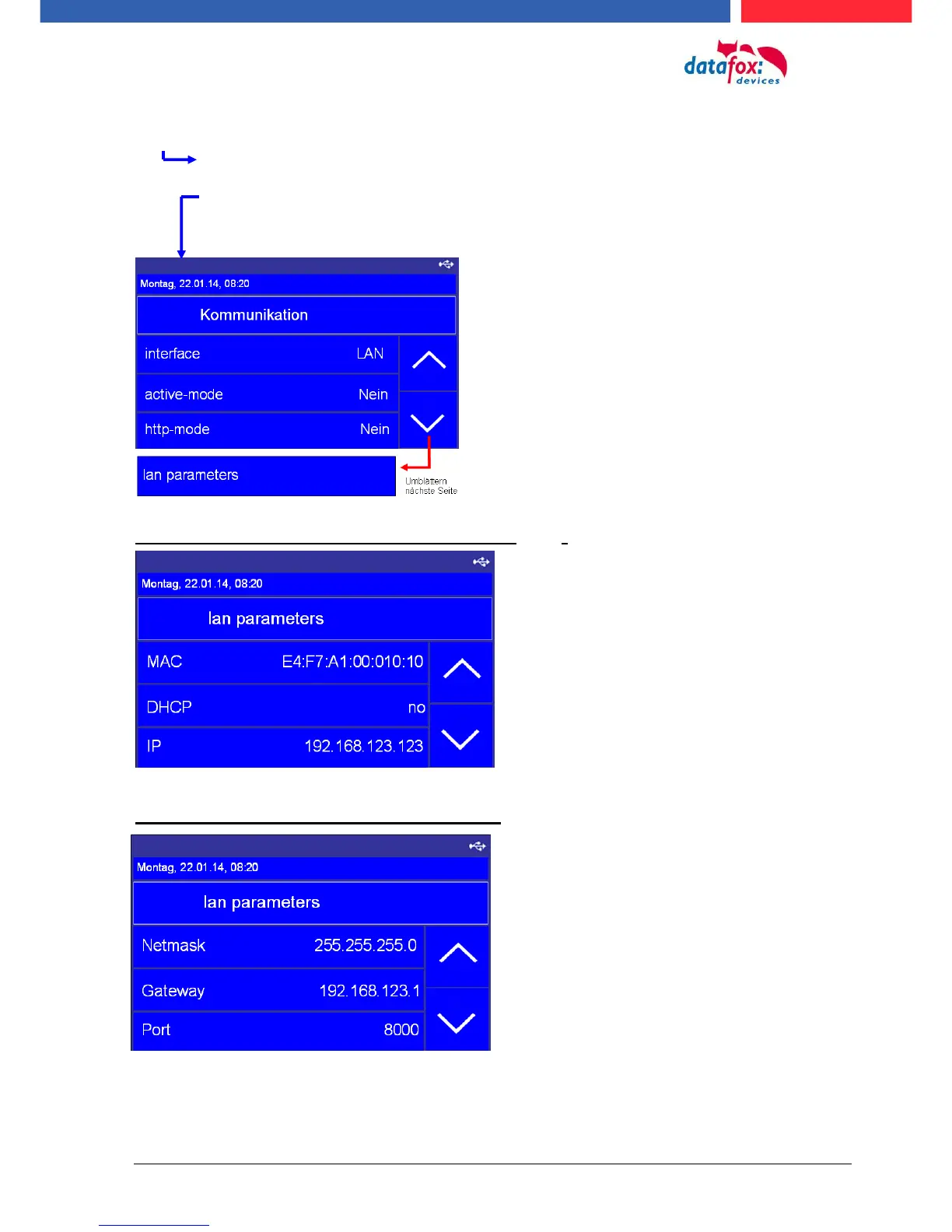
Setting the LAN parameters TCP/IP (page 1)_(DHCP)
Setting the LAN parameters TCP/IP (page 2)
(here see you the actuelly used communication)
(this is only to used by active connections. If this setting on “yes“,
the is the device not reachable.)
(With this setting use the the device the communication to an
webserver. If this setting on “yes“, the is the device not
reachable.)
(Here can you cange the TCP/IP parrameters.)
e.g. IP-adress, port and more.
MAC Adress, starts by the datafox devices ever with E4:F7.
activate DHCP, automatic IP address assignment
Actually ip-adress. When you use DHCP then can you not
set the IP adress manually.
Here you can set the netmask
Gateway – This settin are neccesarry if send the deveice
data in an other network.



 To Next Page